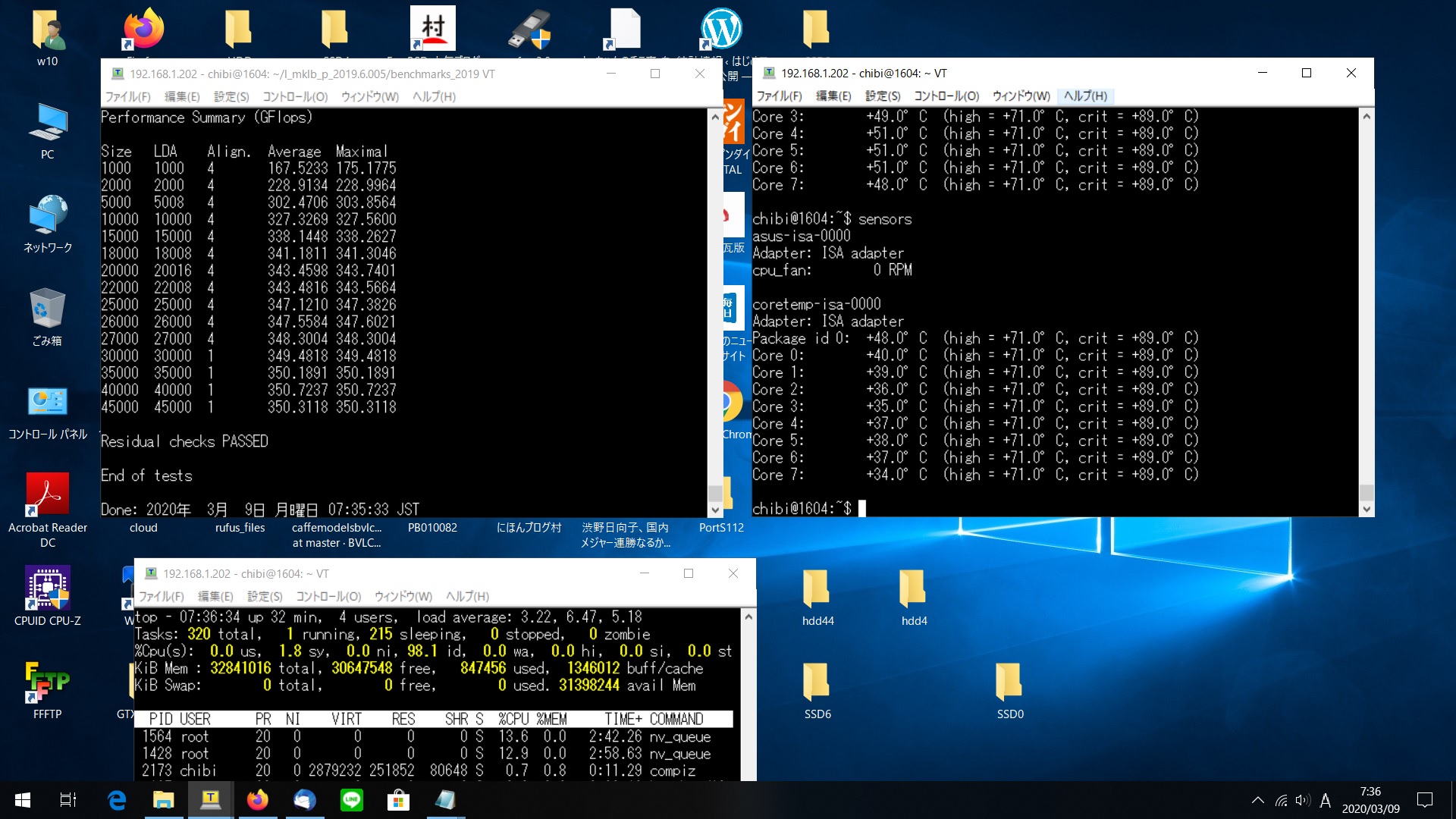
Ubuntu16.04.6 i7-5960X Linpack benchmark を動作させてみた 350.7237 GFlops

chibi@1604:~$ cat /etc/os-release
NAME=”Ubuntu”
VERSION=”16.04.6 LTS (Xenial Xerus)”
ID=ubuntu
ID_LIKE=debian
PRETTY_NAME=”Ubuntu 16.04.6 LTS”
VERSION_ID=”16.04″
HOME_URL=”http://www.ubuntu.com/”
SUPPORT_URL=”http://help.ubuntu.com/”
BUG_REPORT_URL=”http://bugs.launchpad.net/ubuntu/”
VERSION_CODENAME=xenial
UBUNTU_CODENAME=xenial
chibi@1604:~$ nvcc -V
nvcc: NVIDIA (R) Cuda compiler driver
Copyright (c) 2005-2019 NVIDIA Corporation
Built on Wed_Oct_23_19:24:38_PDT_2019
Cuda compilation tools, release 10.2, V10.2.89
chibi@1604:~$ cat /proc/cpuinfo
processor : 0
vendor_id : GenuineIntel
cpu family : 6
model : 63
model name : Intel(R) Core(TM) i7-5960X CPU @ 3.00GHz
stepping : 2
microcode : 0x43
cpu MHz : 1199.288
cache size : 20480 KB
physical id : 0
siblings : 16
core id : 0
cpu cores : 8
apicid : 0
initial apicid : 0
fpu : yes
fpu_exception : yes
cpuid level : 15
wp : yes
chibi@1604:~/l_mklb_p_2019.6.005/benchmarks_2019/linux/mkl/benchmarks/linpack$ ./runme_xeon64
This is a SAMPLE run script for running a shared-memory version of
Intel(R) Distribution for LINPACK* Benchmark. Change it to reflect
the correct number of CPUs/threads, problem input files, etc..
*Other names and brands may be claimed as the property of others.
./runme_xeon64: 28: [: -gt: unexpected operator
2020年 3月 9日 月曜日 07:20:19 JST
Sample data file lininput_xeon64.

Current date/time: Mon Mar 9 07:20:19 2020

CPU frequency: 3.497 GHz
Number of CPUs: 1
Number of cores: 8
Number of threads: 8

Parameters are set to:

Number of tests: 15
Number of equations to solve (problem size) : 1000 2000 5000 10000 15000 18000 20000 22000 25000 26000 27000 30000 35000 40000 45000
Leading dimension of array : 1000 2000 5008 10000 15000 18008 20016 22008 25000 26000 27000 30000 35000 40000 45000
Number of trials to run : 4 2 2 2 2 2 2 2 2 2 1 1 1 1 1
Data alignment value (in Kbytes) : 4 4 4 4 4 4 4 4 4 4 4 1 1 1 1

Maximum memory requested that can be used=16200901024, at the size=45000

=================== Timing linear equation system solver ===================

Size LDA Align. Time(s) GFlops Residual Residual(norm) Check
1000 1000 4 0.004 153.6510 1.029732e-12 3.511650e-02 pass
1000 1000 4 0.004 166.6325 1.029732e-12 3.511650e-02 pass
1000 1000 4 0.004 174.6321 1.029732e-12 3.511650e-02 pass
1000 1000 4 0.004 175.1775 1.029732e-12 3.511650e-02 pass
2000 2000 4 0.023 228.9964 4.717726e-12 4.103844e-02 pass
2000 2000 4 0.023 228.8303 4.717726e-12 4.103844e-02 pass
5000 5008 4 0.277 301.0849 2.209355e-11 3.080767e-02 pass
5000 5008 4 0.274 303.8564 2.209355e-11 3.080767e-02 pass
10000 10000 4 2.039 327.0938 9.699100e-11 3.420001e-02 pass
10000 10000 4 2.036 327.5600 9.699100e-11 3.420001e-02 pass
15000 15000 4 6.653 338.2627 2.200672e-10 3.466095e-02 pass
15000 15000 4 6.658 338.0269 2.200672e-10 3.466095e-02 pass
18000 18008 4 11.402 341.0577 2.976475e-10 3.259605e-02 pass
18000 18008 4 11.393 341.3046 2.976475e-10 3.259605e-02 pass
20000 20016 4 15.543 343.1794 4.458855e-10 3.947063e-02 pass
20000 20016 4 15.518 343.7401 4.458855e-10 3.947063e-02 pass
22000 22008 4 20.675 343.3968 4.317882e-10 3.162679e-02 pass
22000 22008 4 20.665 343.5664 4.317882e-10 3.162679e-02 pass
25000 25000 4 30.035 346.8594 6.053866e-10 3.442617e-02 pass
25000 25000 4 29.990 347.3826 6.053866e-10 3.442617e-02 pass
26000 26000 4 33.721 347.5148 6.583263e-10 3.461677e-02 pass
26000 26000 4 33.713 347.6021 6.583263e-10 3.461677e-02 pass
27000 27000 4 37.679 348.3004 6.465606e-10 3.152958e-02 pass
30000 30000 1 51.510 349.4818 8.296020e-10 3.270300e-02 pass
35000 35000 1 81.630 350.1891 1.206522e-09 3.502351e-02 pass
40000 40000 1 121.662 350.7237 1.501689e-09 3.339808e-02 pass
45000 45000 1 173.428 350.3118 1.609872e-09 2.832400e-02 pass

Performance Summary (GFlops)

Size LDA Align. Average Maximal
1000 1000 4 167.5233 175.1775
2000 2000 4 228.9134 228.9964
5000 5008 4 302.4706 303.8564
10000 10000 4 327.3269 327.5600
15000 15000 4 338.1448 338.2627
18000 18008 4 341.1811 341.3046
20000 20016 4 343.4598 343.7401
22000 22008 4 343.4816 343.5664
25000 25000 4 347.1210 347.3826
26000 26000 4 347.5584 347.6021
27000 27000 4 348.3004 348.3004
30000 30000 1 349.4818 349.4818
35000 35000 1 350.1891 350.1891
40000 40000 1 350.7237 350.7237
45000 45000 1 350.3118 350.3118

Residual checks PASSED

End of tests

Done: 2020年 3月 9日 月曜日 07:35:33 JST

データ詳細 Ubuntu16.04 i7-5960X Linpack benchmark 350.7237 GFlops

CPU温度推移 Ubuntu16.04 i7-5960X Linpack benchmark 350.7237 GFlops sensors

カテゴリー: nvidia, ubuntu | コメントする

Ubuntu 16.04.6 LTS TITAN V x2 i7 5960x namd 2.12-171025 NAMD STMV (virus) benchmark (1,066,628 atoms, periodic, PME) CUDA10.2 Driver440.33を動作させてみた 0.970106 days/ns

chibi@1604:~$ cat /etc/os-release
NAME=”Ubuntu”
VERSION=”16.04.6 LTS (Xenial Xerus)”
ID=ubuntu
ID_LIKE=debian
PRETTY_NAME=”Ubuntu 16.04.6 LTS”
VERSION_ID=”16.04″
HOME_URL=”http://www.ubuntu.com/”
SUPPORT_URL=”http://help.ubuntu.com/”
BUG_REPORT_URL=”http://bugs.launchpad.net/ubuntu/”
VERSION_CODENAME=xenial
UBUNTU_CODENAME=xenial
chibi@1604:~$ nvcc -V
nvcc: NVIDIA (R) Cuda compiler driver
Copyright (c) 2005-2019 NVIDIA Corporation
Built on Wed_Oct_23_19:24:38_PDT_2019
Cuda compilation tools, release 10.2, V10.2.89
chibi@1604:~$ sudo hddtemp /dev/sda
/dev/sda: WDC WD5000LPVX-22V0TT0: 17°C
chibi@1604:~$

chibi@1604:~$ sudo nvidia-docker run -it –rm nvcr.io/hpc/namd:2.12-171025 /opt/namd/namd-multicore-memopt +p40 +setcpuaffinity +idlepoll /workspace/examples/stmv/stmv_pmecuda.namd
Charm++: standalone mode (not using charmrun)
Charm++> Running in Multicore mode: 40 threads
Charm++> Using recursive bisection (scheme 3) for topology aware partitions
Converse/Charm++ Commit ID: v6.8.2
Warning> Randomization of virtual memory (ASLR) is turned on in the kernel, thread migration may not work! Run ‘echo 0 > /proc/sys/kernel/randomize_va_space’ as root to disable it, or try running with ‘+isomalloc_sync’.
CharmLB> Load balancer assumes all CPUs are same.
Charm++> cpu affinity enabled.
Charm++> Running on 1 unique compute nodes (16-way SMP).
Charm++> cpu topology info is gathered in 0.031 seconds.
Info: Built with CUDA version 9000
Did not find +devices i,j,k,… argument, using all
Pe 3 physical rank 3 will use CUDA device of pe 16
Pe 38 physical rank 38 will use CUDA device of pe 32
Pe 23 physical rank 23 will use CUDA device of pe 32
Pe 33 physical rank 33 will use CUDA device of pe 32
Pe 8 physical rank 8 will use CUDA device of pe 16
Pe 28 physical rank 28 will use CUDA device of pe 32
Pe 29 physical rank 29 will use CUDA device of pe 32
Pe 6 physical rank 6 will use CUDA device of pe 16
Pe 25 physical rank 25 will use CUDA device of pe 32
Pe 0 physical rank 0 will use CUDA device of pe 16
Pe 35 physical rank 35 will use CUDA device of pe 32
Pe 19 physical rank 19 will use CUDA device of pe 16
Pe 36 physical rank 36 will use CUDA device of pe 32
Pe 11 physical rank 11 will use CUDA device of pe 16
Pe 30 physical rank 30 will use CUDA device of pe 32
Pe 22 physical rank 22 will use CUDA device of pe 32
Pe 1 physical rank 1 will use CUDA device of pe 16
Pe 24 physical rank 24 will use CUDA device of pe 32
Pe 20 physical rank 20 will use CUDA device of pe 32
Pe 26 physical rank 26 will use CUDA device of pe 32
Pe 10 physical rank 10 will use CUDA device of pe 16
Pe 2 physical rank 2 will use CUDA device of pe 16
Pe 31 physical rank 31 will use CUDA device of pe 32
Pe 18 physical rank 18 will use CUDA device of pe 16
Pe 34 physical rank 34 will use CUDA device of pe 32
Pe 37 physical rank 37 will use CUDA device of pe 32
Pe 15 physical rank 15 will use CUDA device of pe 16
Pe 7 physical rank 7 will use CUDA device of pe 16
Pe 17 physical rank 17 will use CUDA device of pe 16
Pe 27 physical rank 27 will use CUDA device of pe 32
Pe 39 physical rank 39 will use CUDA device of pe 32
Pe 12 physical rank 12 will use CUDA device of pe 16
Pe 9 physical rank 9 will use CUDA device of pe 16
Pe 21 physical rank 21 will use CUDA device of pe 32
Pe 13 physical rank 13 will use CUDA device of pe 16
Pe 14 physical rank 14 will use CUDA device of pe 16
Pe 5 physical rank 5 will use CUDA device of pe 16
Pe 4 physical rank 4 will use CUDA device of pe 16
Pe 16 physical rank 16 binding to CUDA device 0 on e9153dd46a6d: ‘TITAN V’ Mem: 12065MB Rev: 7.0
Pe 32 physical rank 32 binding to CUDA device 1 on e9153dd46a6d: ‘TITAN V’ Mem: 12066MB

Info: Benchmark time: 40 CPUs 0.0838171 s/step 0.970106 days/ns 2474.9 MB memory

データ詳細 Ubuntu 16.04.6 LTS TITAN V x2 i7 5960x namd 2.12-171025 NAMD STMV (virus) benchmark (1,066,628 atoms, periodic, PME) CUDA10.2 Driver440.33 0.970106 days ns

GPU温度推移 Ubuntu 16.04.6 LTS TITAN V x2 i7 5960x namd 2.12-171025 NAMD STMV (virus) benchmark (1,066,628 atoms, periodic, PME) CUDA10.2 Driver440.33 0.970106 days ns nvidia-smi

参考サイト

カテゴリー: nvidia, ubuntu | コメントする

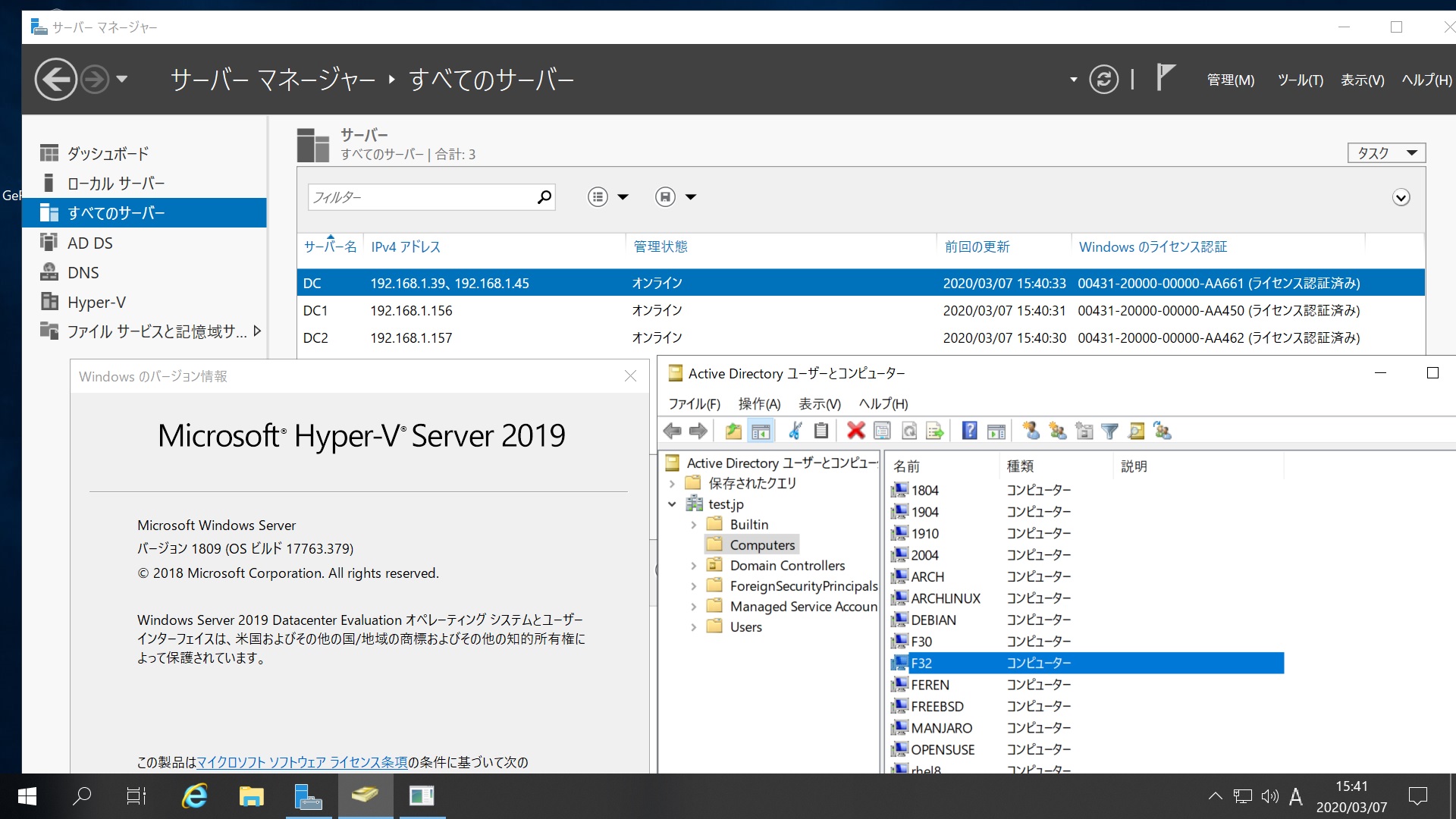
Fedora release 32 Samba4.12.0 Windows Server 2019 Datacenter Active Directory Domain のメンバーに参加してみた

[root@f32 ~]# kinit administrator
Password for administrator@TEST.JP:
[root@f32 ~]# net ads join -U administrator
Enter administrator’s password:
Using short domain name — TEST
Joined ‘F32’ to dns domain ‘test.jp’
No DNS domain configured for f32. Unable to perform DNS Update.
DNS update failed: NT_STATUS_INVALID_PARAMETER
[root@f32 ~]# systemctl restart winbind
[root@f32 ~]# wbinfo -u
administrator
guest
krbtgt
chibi
[root@f32 ~]# wbinfo -n chibi
S-1-5-21-1678940183-1404043644-1380363875-1103 SID_USER (1)
[root@f32 ~]# net ads info
LDAP server: 192.168.1.39
LDAP server name: dc.test.jp
Realm: TEST.JP
Bind Path: dc=TEST,dc=JP
LDAP port: 389
Server time: 土, 07 3月 2020 15:33:11 JST
KDC server: 192.168.1.39
Server time offset: -11
Last machine account password change: 土, 07 3月 2020 15:32:29 JST
[root@f32 ~]# host -4 dc
dc.test.jp has address 192.168.1.39
dc.test.jp has address 192.168.1.45
dc.test.jp has IPv6 address 2400:4052:46e0:b700:1911:c150:a1a4:ec24
dc.test.jp has IPv6 address 2400:4052:46e0:b700:f0b6:ef83:7301:d109
[root@f32 ~]# host -4 dc1
dc1.test.jp has address 192.168.1.156
dc1.test.jp has IPv6 address 2400:4052:46e0:b700:ad7c:4cdc:822b:97d1
[root@f32 ~]# host -4 dc2
dc2.test.jp has address 192.168.1.157
dc2.test.jp has IPv6 address 2400:4052:46e0:b700:98c3:a37e:341c:8589
[root@f32 ~]# host -t SRV _ldap._tcp.test.jp
_ldap._tcp.test.jp has SRV record 0 100 389 dc2.test.jp.
_ldap._tcp.test.jp has SRV record 0 100 389 dc.test.jp.
_ldap._tcp.test.jp has SRV record 0 100 389 dc1.test.jp.
[root@f32 ~]# host -t SRV _kerberos._udp.test.jp
_kerberos._udp.test.jp has SRV record 0 100 88 dc1.test.jp.
_kerberos._udp.test.jp has SRV record 0 100 88 dc2.test.jp.
_kerberos._udp.test.jp has SRV record 0 100 88 dc.test.jp.
[root@f32 ~]# host -t A test.jp
test.jp has address 192.168.1.45
test.jp has address 192.168.1.156
test.jp has address 192.168.1.157
test.jp has address 192.168.1.39
[root@f32 ~]# smbclient -L localhost -U%
do_connect: Connection to localhost failed (Error NT_STATUS_CONNECTION_REFUSED)
[root@f32 ~]# smbclient -L 192.168.1.39 -U%

Sharename Type Comment
——— —- ——-
SMB1 disabled — no workgroup available
[root@f32 ~]# smbclient //192.168.1.39/netlogon -Uadministrator

Fedora release 32 Samba4.12.0 Windows Server 2019 Datacenter Active Directory Domain のメンバーに参加してみた

カテゴリー: fedora, samba4, windows | コメントする

Oracle Linux Server 8.1 E5 2650V4 x2 linpack benchmarkを実行してみた 772.8329 GFlops

[chibi@oracle8 linpack]$ cat /etc/os-release
NAME=”Oracle Linux Server”
VERSION=”8.1″
ID=”ol”
ID_LIKE=”fedora”
VARIANT=”Server”
VARIANT_ID=”server”
VERSION_ID=”8.1″
PLATFORM_ID=”platform:el8″
PRETTY_NAME=”Oracle Linux Server 8.1″
ANSI_COLOR=”0;31″
CPE_NAME=”cpe:/o:oracle:linux:8:1:server”
HOME_URL=”https://linux.oracle.com/”
BUG_REPORT_URL=”https://bugzilla.oracle.com/”

ORACLE_BUGZILLA_PRODUCT=”Oracle Linux 8″
ORACLE_BUGZILLA_PRODUCT_VERSION=8.1
ORACLE_SUPPORT_PRODUCT=”Oracle Linux”
ORACLE_SUPPORT_PRODUCT_VERSION=8.1
[chibi@oracle8 linpack]$ nvcc -V
nvcc: NVIDIA (R) Cuda compiler driver
Copyright (c) 2005-2019 NVIDIA Corporation
Built on Wed_Oct_23_19:24:38_PDT_2019
Cuda compilation tools, release 10.2, V10.2.89
[chibi@oracle8 linpack]$ ./runme_xeon64

2020年 3月 7日 土曜日 05:38:21 JST
Sample data file lininput_xeon64.

Current date/time: Sat Mar 7 05:38:21 2020

CPU frequency: 2.885 GHz
Number of CPUs: 2
Number of cores: 24
Number of threads: 24

Performance Summary (GFlops)

Size LDA Align. Average Maximal
1000 1000 4 103.8318 127.7544
2000 2000 4 306.8922 316.7467
5000 5008 4 541.7247 541.7738
10000 10000 4 668.1086 670.5069
15000 15000 4 703.6579 704.0269
18000 18008 4 750.6129 758.8305
20000 20016 4 752.3802 757.5751
22000 22008 4 755.7371 756.7508
25000 25000 4 762.2980 772.8329
26000 26000 4 771.8861 772.2829
27000 27000 4 758.9284 758.9284
30000 30000 1 750.7770 750.7770
35000 35000 1 741.1281 741.1281
40000 40000 1 738.2829 738.2829
45000 45000 1 743.7081 743.7081

Residual checks PASSED

End of tests

Done: 2020年 3月 7日 土曜日 05:48:19 JST
[chibi@oracle8 linpack]$ sudo hddtemp /dev/sda
[sudo] chibi のパスワード:
/dev/sda: Samsung SSD 840 PRO Series: 17°C
[chibi@oracle8 linpack]$ nvidia-smi nvlink -c
GPU 0: GeForce RTX 2080 Ti (UUID: GPU-1ac935c2-557f-282e-14e5-3f749ffd63ac)
GPU 1: GeForce RTX 2080 Ti (UUID: GPU-13277ce5-e1e9-0cb1-8cee-6c9e6618e774)
[chibi@oracle8 linpack]$

データ詳細 Oracle Linux Server 8.1 E5 2650V4 x2 linpack benchmarkを実施してみた 772.8329 GFlops

CPU温度推移 Oracle Linux Server 8.1 E5 2650V4 x2 linpack benchmarkを実施してみた 772.8329 GFlops sensors

参考サイト

カテゴリー: oracle8 | コメントする

Oracle Linux Server 8.1 TITAN RTX x2 RTX2080Tix2 CUDA10..2 E5 2650 V4x2 namd 2.12-171025 STMV (virus) benchmark を動作させてみた(1,066,628 atoms, periodic, PME) 0.349202 days/ns

参考サイト1サイト2

[chibi@oracle8 ~]$ cat /etc/os-release
NAME=”Oracle Linux Server”
VERSION=”8.1″
ID=”ol”
ID_LIKE=”fedora”
VARIANT=”Server”
VARIANT_ID=”server”
VERSION_ID=”8.1″
PLATFORM_ID=”platform:el8″
PRETTY_NAME=”Oracle Linux Server 8.1″
ANSI_COLOR=”0;31″
CPE_NAME=”cpe:/o:oracle:linux:8:1:server”
HOME_URL=”https://linux.oracle.com/”
BUG_REPORT_URL=”https://bugzilla.oracle.com/”

ORACLE_BUGZILLA_PRODUCT=”Oracle Linux 8″
ORACLE_BUGZILLA_PRODUCT_VERSION=8.1
ORACLE_SUPPORT_PRODUCT=”Oracle Linux”
ORACLE_SUPPORT_PRODUCT_VERSION=8.1
[chibi@oracle8 ~]$ cat /etc/redhat-release
Red Hat Enterprise Linux release 8.1 (Ootpa)
[chibi@oracle8 ~]$ nvcc -V
nvcc: NVIDIA (R) Cuda compiler driver
Copyright (c) 2005-2019 NVIDIA Corporation
Built on Wed_Oct_23_19:24:38_PDT_2019
Cuda compilation tools, release 10.2, V10.2.89
[chibi@oracle8 ~]$ sudo nvidia-docker run -it –rm nvcr.io/hpc/namd:2.12-171025 /opt/namd/namd-multicore-memopt +p40 +setcpuaffinity +idlepoll /workspace/examples/stmv/stmv_pmecuda.namd
[sudo] chibi のパスワード:
Unable to find image ‘nvcr.io/hpc/namd:2.12-171025’ locally
2.12-171025: Pulling from hpc/namd
f6fa9a861b90: Pull complete
2d93875543ec: Pull complete
407421ef3e7e: Pull complete
ea9ffec33008: Pull complete
c695ce24f66e: Pull complete
cb6e6f26f62f: Pull complete
4ca5cacd5888: Pull complete
127359e380ae: Pull complete
09f52fb90f32: Pull complete
c8b4fccff7c3: Pull complete
a898f5b12168: Pull complete
0c9fa151e12b: Pull complete
e9f9e8f970e4: Pull complete
6cb19c6e7375: Pull complete
76db9e80d16b: Pull complete
Digest: sha256:c9184f9b071f2197f20a0064ed47f9dc8deac9f007e03d384ecbaad28a754124
Status: Downloaded newer image for nvcr.io/hpc/namd:2.12-171025
Charm++: standalone mode (not using charmrun)
Charm++> Running in Multicore mode: 40 threads
Charm++> Using recursive bisection (scheme 3) for topology aware partitions
Converse/Charm++ Commit ID: v6.8.2
Warning> Randomization of virtual memory (ASLR) is turned on in the kernel, thread migration may not work! Run ‘echo 0 > /proc/sys/kernel/randomize_va_space’ as root to disable it, or try running with ‘+isomalloc_sync’.
CharmLB> Load balancer assumes all CPUs are same.
Charm++> cpu affinity enabled.
Charm++> Running on 1 unique compute nodes (48-way SMP).
Charm++> cpu topology info is gathered in 0.019 seconds.
Info: Built with CUDA version 9000
Did not find +devices i,j,k,… argument, using all
Pe 0 physical rank 0 will use CUDA device of pe 8
Pe 36 physical rank 36 will use CUDA device of pe 32
Pe 33 physical rank 33 will use CUDA device of pe 32
Pe 9 physical rank 9 will use CUDA device of pe 8
Pe 18 physical rank 18 will use CUDA device of pe 16
Pe 39 physical rank 39 will use CUDA device of pe 32
Pe 22 physical rank 22 will use CUDA device of pe 24
Pe 15 physical rank 15 will use CUDA device of pe 16
Pe 20 physical rank 20 will use CUDA device of pe 24
Pe 25 physical rank 25 will use CUDA device of pe 24
Pe 7 physical rank 7 will use CUDA device of pe 8
Pe 3 physical rank 3 will use CUDA device of pe 8
Pe 11 physical rank 11 will use CUDA device of pe 16
Pe 27 physical rank 27 will use CUDA device of pe 24
Pe 12 physical rank 12 will use CUDA device of pe 16
Pe 30 physical rank 30 will use CUDA device of pe 32
Pe 6 physical rank 6 will use CUDA device of pe 8
Pe 17 physical rank 17 will use CUDA device of pe 16
Pe 13 physical rank 13 will use CUDA device of pe 16
Pe 31 physical rank 31 will use CUDA device of pe 32
Pe 37 physical rank 37 will use CUDA device of pe 32
Pe 1 physical rank 1 will use CUDA device of pe 8
Pe 35 physical rank 35 will use CUDA device of pe 32
Pe 4 physical rank 4 will use CUDA device of pe 8
Pe 28 physical rank 28 will use CUDA device of pe 24
Pe 38 physical rank 38 will use CUDA device of pe 32
Pe 21 physical rank 21 will use CUDA device of pe 24
Pe 14 physical rank 14 will use CUDA device of pe 16
Pe 5 physical rank 5 will use CUDA device of pe 8
Pe 19 physical rank 19 will use CUDA device of pe 16
Pe 26 physical rank 26 will use CUDA device of pe 24
Pe 2 physical rank 2 will use CUDA device of pe 8
Pe 34 physical rank 34 will use CUDA device of pe 32
Pe 23 physical rank 23 will use CUDA device of pe 24
Pe 10 physical rank 10 will use CUDA device of pe 16
Pe 29 physical rank 29 will use CUDA device of pe 24
Pe 32 physical rank 32 binding to CUDA device 3 on fef16d337343: ‘GeForce RTX 2080 Ti’ Mem: 11019MB Rev: 7.5
Pe 24 physical rank 24 binding to CUDA device 2 on fef16d337343: ‘GeForce RTX 2080 Ti’ Mem: 11019MB Rev: 7.5
Pe 16 physical rank 16 binding to CUDA device 1 on fef16d337343: ‘TITAN RTX’ Mem: 24220MB Rev: 7.5
Pe 8 physical rank 8 binding to CUDA device 0 on fef16d337343: ‘TITAN RTX’ Mem: 24220MB Rev: 7.5
Info: NAMD 2.12 for Linux-x86_64-multicore-CUDA-memopt
Warning:
Warning: *** EXPERIMENTAL MEMORY OPTIMIZED VERSION ***
Warning:
Info:
Info: Please visit http://www.ks.uiuc.edu/Research/namd/
Info: for updates, documentation, and support information.
Info:
Info: Please cite Phillips et al., J. Comp. Chem. 26:1781-1802 (2005)
Info: in all publications reporting results obtained with NAMD.
Info:
Info: Based on Charm++/Converse 60800 for multicore-linux64-gcc
Info: Built Tue Nov 21 02:03:10 UTC 2017 by on a02d2dbfe66b
Info: 1 NAMD 2.12 Linux-x86_64-multicore-CUDA-memopt 40 fef16d337343 root
Info: Running on 40 processors, 1 nodes, 1 physical nodes.
Info: CPU topology information available.
Info: Charm++/Converse parallel runtime startup completed at 1.28777 s
CkLoopLib is used in SMP with a simple dynamic scheduling (converse-level notification) but not using node-level queue
Info: 38.5625 MB of memory in use based on /proc/self/stat
Info: Configuration file is /workspace/examples/stmv/stmv_pmecuda.namd
Info: Changed directory to /workspace/examples/stmv
TCL: Suspending until startup complete.
Info: SIMULATION PARAMETERS:
Info: TIMESTEP 1
Info: NUMBER OF STEPS 800
Info: STEPS PER CYCLE 20
Info: PERIODIC CELL BASIS 1 216.832 0 0
Info: PERIODIC CELL BASIS 2 0 216.832 0
Info: PERIODIC CELL BASIS 3 0 0 216.832
Info: PERIODIC CELL CENTER 0 0 0
Info: LOAD BALANCER Hybrid
Info: LOAD BALANCING STRATEGY New Load Balancers — DEFAULT
Info: LDB PERIOD 4000 steps
Info: FIRST LDB TIMESTEP 100
Info: HYBRIDLB GROUP SIZE 512
Info: LAST LDB TIMESTEP -1
Info: LDB BACKGROUND SCALING 1
Info: HOM BACKGROUND SCALING 1
Info: PME BACKGROUND SCALING 1
Info: MAX SELF PARTITIONS 1
Info: MAX PAIR PARTITIONS 1
Info: SELF PARTITION ATOMS 154
Info: SELF2 PARTITION ATOMS 154
Info: PAIR PARTITION ATOMS 318
Info: PAIR2 PARTITION ATOMS 637
Info: MIN ATOMS PER PATCH 40
Info: INITIAL TEMPERATURE 298
Info: CENTER OF MASS MOVING INITIALLY? NO
Info: DIELECTRIC 1
Info: EXCLUDE SCALED ONE-FOUR
Info: 1-4 ELECTROSTATICS SCALED BY 1
Info: MODIFIED 1-4 VDW PARAMETERS WILL BE USED
Info: NO DCD TRAJECTORY OUTPUT
Info: NO EXTENDED SYSTEM TRAJECTORY OUTPUT
Info: NO VELOCITY DCD OUTPUT
Info: NO FORCE DCD OUTPUT
Info: OUTPUT FILENAME /workspace/examples/stmv/stmv-output
Info: BINARY OUTPUT FILES WILL BE USED
Info: NO RESTART FILE
Info: SWITCHING ACTIVE
Info: SWITCHING ON 10
Info: SWITCHING OFF 12
Info: PAIRLIST DISTANCE 13.5
Info: PAIRLIST SHRINK RATE 0.01
Info: PAIRLIST GROW RATE 0.01
Info: PAIRLIST TRIGGER 0.3
Info: PAIRLISTS PER CYCLE 2
Info: PAIRLISTS ENABLED
Info: MARGIN 0.48
Info: HYDROGEN GROUP CUTOFF 2.5
Info: PATCH DIMENSION 16.48
Info: ENERGY OUTPUT STEPS 200
Info: CROSSTERM ENERGY INCLUDED IN DIHEDRAL
Info: TIMING OUTPUT STEPS 1
Info: LANGEVIN DYNAMICS ACTIVE
Info: LANGEVIN TEMPERATURE 298
Info: LANGEVIN USING BBK INTEGRATOR
Info: LANGEVIN DAMPING COEFFICIENT IS 5 INVERSE PS
Info: LANGEVIN DYNAMICS NOT APPLIED TO HYDROGENS
Info: LANGEVIN PISTON PRESSURE CONTROL ACTIVE
Info: TARGET PRESSURE IS 1.01325 BAR
Info: OSCILLATION PERIOD IS 200 FS
Info: DECAY TIME IS 100 FS
Info: PISTON TEMPERATURE IS 298 K
Info: PRESSURE CONTROL IS GROUP-BASED
Info: INITIAL STRAIN RATE IS 0 0 0
Info: CELL FLUCTUATION IS ISOTROPIC
Info: PARTICLE MESH EWALD (PME) ACTIVE
Info: PME TOLERANCE 1e-06
Info: PME EWALD COEFFICIENT 0.257952
Info: PME INTERPOLATION ORDER 8
Info: PME GRID DIMENSIONS 108 108 108
Info: PME MAXIMUM GRID SPACING 2.1
Info: FULL ELECTROSTATIC EVALUATION FREQUENCY 4
Info: USING VERLET I (r-RESPA) MTS SCHEME.
Info: C1 SPLITTING OF LONG RANGE ELECTROSTATICS
Info: PLACING ATOMS IN PATCHES BY HYDROGEN GROUPS
Info: RIGID BONDS TO HYDROGEN : ALL
Info: ERROR TOLERANCE : 1e-08
Info: MAX ITERATIONS : 100
Info: RIGID WATER USING SETTLE ALGORITHM
Info: NONBONDED FORCES EVALUATED EVERY 2 STEPS
Info: RANDOM NUMBER SEED 3141
Info: USE HYDROGEN BONDS? NO
Info: STRUCTURE FILE stmv.psf.inter
Info: PARAMETER file: CHARMM format!
Info: PARAMETERS par_all27_prot_na.inp
Info: USING ARITHMETIC MEAN TO COMBINE L-J SIGMA PARAMETERS
Info: BINARY COORDINATES stmv.coor
Info: SUMMARY OF PARAMETERS:
Info: 250 BONDS
Info: 622 ANGLES
Info: 1049 DIHEDRAL
Info: 73 IMPROPER
Info: 0 CROSSTERM
Info: 130 VDW
Info: 0 VDW_PAIRS
Info: 0 NBTHOLE_PAIRS
Info: TIME FOR READING PSF FILE: 0.00924206
Info:
Info: Entering startup at 1.33416 s, 85.5117 MB of memory in use
Info: Startup phase 0 took 0.000120878 s, 85.5117 MB of memory in use
Warning: an empty exclusion signature with index 709!
Info: Startup phase 1 took 0.000654936 s, 85.5117 MB of memory in use
Info: NONBONDED TABLE R-SQUARED SPACING: 0.0625
Info: NONBONDED TABLE SIZE: 769 POINTS
Info: INCONSISTENCY IN FAST TABLE ENERGY VS FORCE: 0.000325096 AT 11.9556
Info: INCONSISTENCY IN SCOR TABLE ENERGY VS FORCE: 0.000324844 AT 11.9556
Info: INCONSISTENCY IN VDWA TABLE ENERGY VS FORCE: 0.0040507 AT 0.251946
Info: INCONSISTENCY IN VDWB TABLE ENERGY VS FORCE: 0.00150189 AT 0.251946
Info: Running with 2 input processors.
Info: Running with 1 output processors (1 of them will output simultaneously).
Info: INPUT PROC LOCATIONS: 8 16
Info: OUTPUT PROC LOCATIONS: 32
Info: Startup phase 2 took 0.0251701 s, 241.312 MB of memory in use
Info: Startup phase 3 took 0.107203 s, 244.648 MB of memory in use
Info: PATCH GRID IS 13 (PERIODIC) BY 13 (PERIODIC) BY 13 (PERIODIC)
Info: PATCH GRID IS 1-AWAY BY 1-AWAY BY 1-AWAY
Info: LOADED 1810196 TOTAL EXCLUSIONS
Info: REMOVING COM VELOCITY -0.00436736 -0.0116608 0.0017952
Info: Startup phase 4 took 0.0433049 s, 560.387 MB of memory in use
Info: ****************************
Info: STRUCTURE SUMMARY:
Info: 1066628 ATOMS
Info: 769956 BONDS
Info: 605872 ANGLES
Info: 450875 DIHEDRALS
Info: 24578 IMPROPERS
Info: 0 CROSSTERMS
Info: 0 EXCLUSIONS
Info: 977416 RIGID BONDS
Info: 2222468 DEGREES OF FREEDOM
Info: 389067 HYDROGEN GROUPS
Info: 4 ATOMS IN LARGEST HYDROGEN GROUP
Info: 389067 MIGRATION GROUPS
Info: 4 ATOMS IN LARGEST MIGRATION GROUP
Info: TOTAL MASS = 6.69877e+06 amu
Info: TOTAL CHARGE = 0.000168104 e
Info: MASS DENSITY = 1.09115 g/cm^3
Info: ATOM DENSITY = 0.104627 atoms/A^3
Info: *****************************
Info: LARGEST PATCH (1044) HAS 541 ATOMS
Info: Startup phase 5 took 0.099992 s, 566.574 MB of memory in use
Info: TORUS A SIZE 1 USING 0
Info: TORUS B SIZE 1 USING 0
Info: TORUS C SIZE 1 USING 0
Info: TORUS MINIMAL MESH SIZE IS 1 BY 1 BY 1
Info: Placed 100% of base nodes on same physical node as patch
Info: Startup phase 6 took 0.0113301 s, 575.332 MB of memory in use
Info: PME using 1 x 1 x 1 pencil grid for FFT and reciprocal sum.
Info: Updated CUDA force table with 4096 elements.
Info: Updated CUDA LJ table with 130 x 130 elements.
Info: Updated CUDA force table with 4096 elements.
Info: Updated CUDA LJ table with 130 x 130 elements.
Info: Updated CUDA force table with 4096 elements.
Info: Updated CUDA LJ table with 130 x 130 elements.
Info: Updated CUDA force table with 4096 elements.
Info: Updated CUDA LJ table with 130 x 130 elements.
Info: Startup phase 7 took 9.69612 s, 1646.11 MB of memory in use
Info: Startup phase 8 took 0.0201719 s, 1649.35 MB of memory in use
LDB: Hybrid LB being created…
HybridBaseLB: ThreeLevelTree is created.
Info: Startup phase 9 took 0.0160291 s, 1649.5 MB of memory in use
Info: CREATING 46457 COMPUTE OBJECTS
Info: Found 333 unique exclusion lists needing 1076 bytes
Info: useSync: 0 useProxySync: 0
Info: Startup phase 10 took 0.111414 s, 1686.05 MB of memory in use
Info: Startup phase 11 took 0.000168085 s, 1686.05 MB of memory in use
Info: Startup phase 12 took 0.000447035 s, 1686.06 MB of memory in use
Info: Finished startup at 11.4663 s, 1686.06 MB of memory in use

Benchmark time: 40 CPUs 0.0301711 s/step 0.349202 days/ns 2878.68 MB memory

データ詳細 Oracle Linux Server 8.1 TITAN RTX x2 RTX2080Tix2 CUDA10..2 E5 2650 V4x2 namd 2.12-171025 STMV (virus) benchmark (1,066,628 atoms, periodic, PME) 0.349202 days ns

GPU温度推移 Oracle Linux Server 8.1 TITAN RTX x2 RTX2080Tix2 CUDA10..2 E5 2650 V4x2 namd 2.12-171025 STMV (virus) benchmark (1,066,628 atoms, periodic, PME) 0.349202 days ns nvidia-smi

カテゴリー: nvidia, oracle8 | コメントする