Manjaro Linux Kernel5.8.8-2-MANJARO Update

Manjaro Linux Kernelが5.8.8-2-MANJAROにUpdateされました。

[manjaro ~]# uname -r
5.8.8-2-MANJARO
[manjaro ~]# php -v
PHP 7.4.10 (cli) (built: Sep 2 2020 05:15:33) ( NTS )
Copyright (c) The PHP Group
Zend Engine v3.4.0, Copyright (c) Zend Technologies
[manjaro ~]# curl -V
curl 7.72.0 (x86_64-pc-linux-gnu) libcurl/7.72.0 OpenSSL/1.1.1g zlib/1.2.11 zstd/1.4.5 libidn2/2.3.0 libpsl/0.21.1 (+libidn2/2.3.0) libssh2/1.9.0 nghttp2/1.41.0
Release-Date: 2020-08-19
Protocols: dict file ftp ftps gopher http https imap imaps pop3 pop3s rtsp scp sftp smb smbs smtp smtps telnet tftp
Features: AsynchDNS GSS-API HTTP2 HTTPS-proxy IDN IPv6 Kerberos Largefile libz NTLM NTLM_WB PSL SPNEGO SSL TLS-SRP UnixSockets zstd
[manjaro ~]# samba -V
Version 4.12.3
[manjaro ~]# cat /etc/os-release
NAME=”Manjaro Linux”
ID=manjaro
ID_LIKE=arch
BUILD_ID=rolling
PRETTY_NAME=”Manjaro Linux”
ANSI_COLOR=”32;2;24;144;200″
HOME_URL=”https://manjaro.org/”
DOCUMENTATION_URL=”https://wiki.manjaro.org/”
SUPPORT_URL=”https://manjaro.org/”
BUG_REPORT_URL=”https://bugs.manjaro.org/”
LOGO=manjarolinux
[manjaro ~]#

カテゴリー: manjaro | コメントする

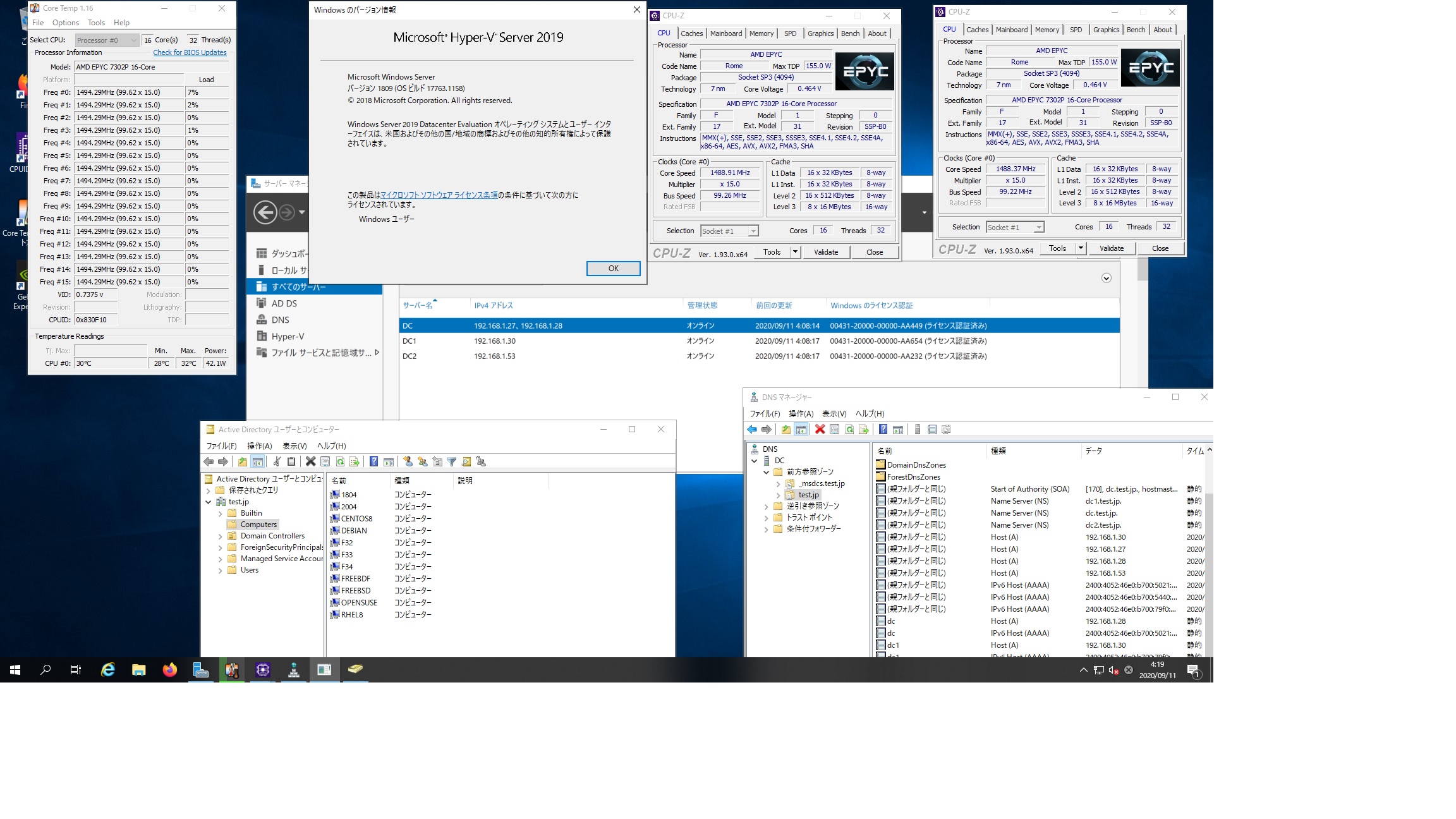
FreeBSD12.2 Samba4.11.11 AMD EPYC 7302Pで構築したWindows Server 2019 Datacenter Active Directory Domainのメンバーに参加してみた


root@FreeBDF:~ # kinit administrator
administrator@TEST.JP’s Password:
root@FreeBDF:~ # date
Fri Sep 11 13:06:21 JST 2020
root@FreeBDF:~ # ntpdate ntp.nict.jp
11 Sep 04:06:56 ntpdate[1905]: step time server 133.243.238.244 offset -32401.374956 sec
root@FreeBDF:~ # kinit administrator
administrator@TEST.JP’s Password:
kinit: krb5_get_init_creds: Clock skew too great
root@FreeBDF:~ # net ads join -U administrator
Enter administrator’s password:
Using short domain name — TEST
Joined ‘FREEBDF’ to dns domain ‘test.jp’
No DNS domain configured for freebdf. Unable to perform DNS Update.
DNS update failed: NT_STATUS_INVALID_PARAMETER
root@FreeBDF:~ # service samba_server start
Performing sanity check on Samba configuration: OK
Starting nmbd.
Starting smbd.
Starting winbindd.
root@FreeBDF:~ # wbinfo -u
TEST\guest
TEST\administrator
TEST\krbtgt
TEST\chibi
root@FreeBDF:~ # wbinfo -n chibi
S-1-5-21-4252828235-1945649609-3318306072-1103 SID_USER (1)
root@FreeBDF:~ # net ads info
LDAP server: 192.168.1.30
LDAP server name: dc1.test.jp
Realm: TEST.JP
Bind Path: dc=TEST,dc=JP
LDAP port: 389
Server time: Fri, 11 Sep 2020 04:11:10 JST
KDC server: 192.168.1.30
Server time offset: -5
Last machine account password change: Fri, 11 Sep 2020 04:07:44 JST
root@FreeBDF:~ # host -4 dc
dc.test.jp has address 192.168.1.28
dc.test.jp has IPv6 address 2400:4052:46e0:b700:5021:a5ac:5882:f185
root@FreeBDF:~ # host -4 dc1
dc1.test.jp has address 192.168.1.30
dc1.test.jp has IPv6 address 2400:4052:46e0:b700:79f0:d44d:dc7a:b245
root@FreeBDF:~ # host -4 dc2
dc2.test.jp has address 192.168.1.53
dc2.test.jp has IPv6 address 2400:4052:46e0:b700:d9fb:4f0:1b8c:d399
root@FreeBDF:~ # uname -a
FreeBSD FreeBDF 12.2-PRERELEASE FreeBSD 12.2-PRERELEASE r365545 GENERIC amd64
root@FreeBDF:~ # samba -V
Version 4.11.11
root@FreeBDF:~ # net ads lookup
FreeBSD12.2 Samba4.11.11 AMD EPYC 7302Pで構築したWindows Server 2019 Datacenter Active Directory Domainのメンバーに参加してみた

カテゴリー: freebsd, samba4, windows | コメントする

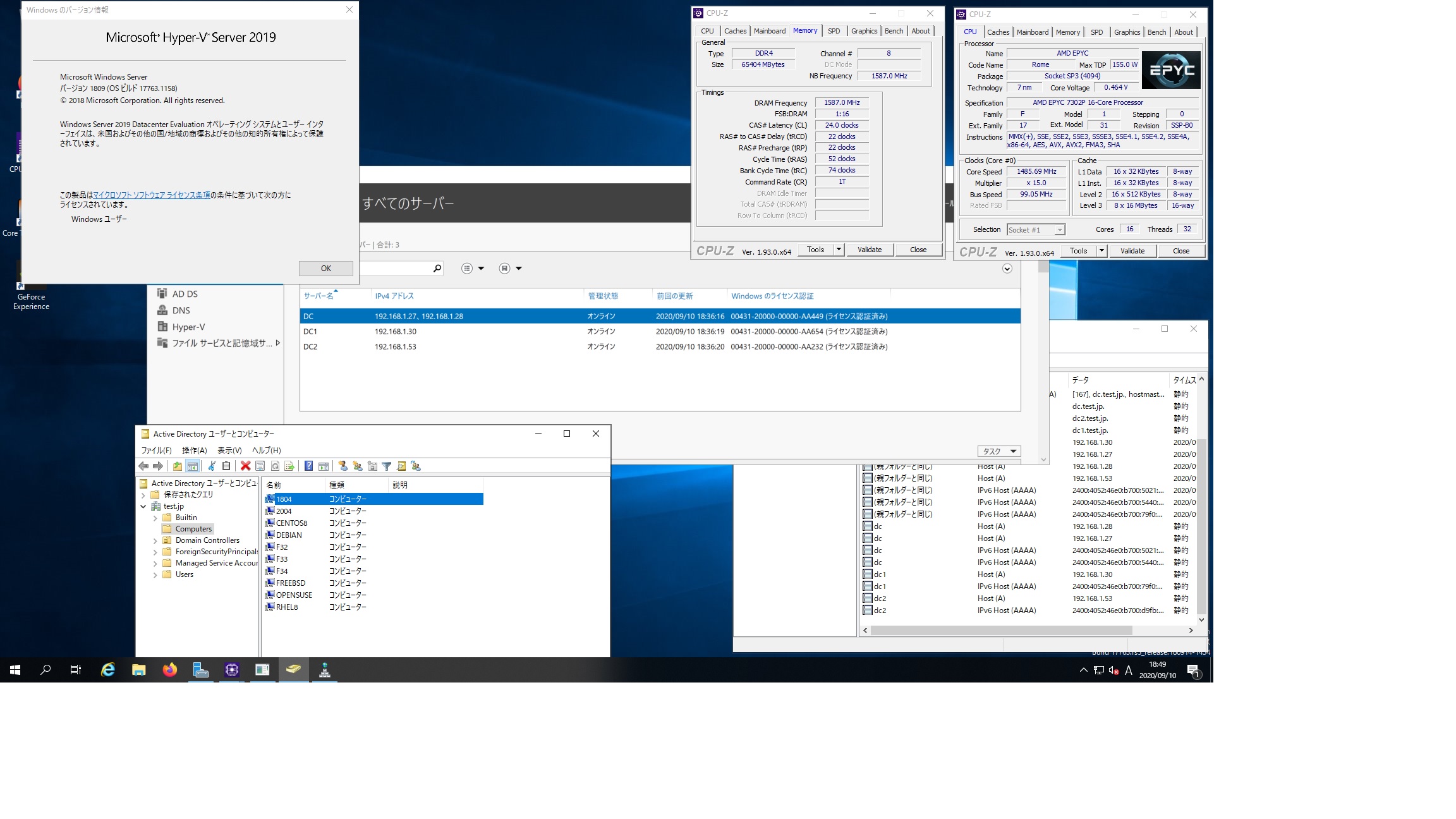
Ubuntu 18.04.5 LTS Samba4.7.6 AMD EPYCに構築したWindows Server 2019 Datacenter Active Directory Domain のメンバーに参加してみた


root@1804:~# kinit administrator
Password for administrator@TEST.JP:
root@1804:~# net ads join -U administrator
Enter administrator’s password:
Using short domain name — TEST
Joined ‘1804’ to dns domain ‘test.jp’
No DNS domain configured for 1804. Unable to perform DNS Update.
DNS update failed: NT_STATUS_INVALID_PARAMETER
root@1804:~# systemctl restart winbind
root@1804:~# wbinfo -u
TEST\administrator
TEST\guest
TEST\krbtgt
TEST\chibi
root@1804:~# wbinfo -n chibi
S-1-5-21-4252828235-1945649609-3318306072-1103 SID_USER (1)
root@1804:~# net ads info
LDAP server: 192.168.1.28
LDAP server name: dc.test.jp
Realm: TEST.JP
Bind Path: dc=TEST,dc=JP
LDAP port: 389
Server time: 木, 10 9月 2020 18:47:51 JST
KDC server: 192.168.1.28
Server time offset: -3
Last machine account password change: 木, 10 9月 2020 18:47:03 JST
root@1804:~# host -4 dc
dc.test.jp has address 192.168.1.27
dc.test.jp has address 192.168.1.28
dc.test.jp has IPv6 address 2400:4052:46e0:b700:5440:7997:1f70:6066
dc.test.jp has IPv6 address 2400:4052:46e0:b700:5021:a5ac:5882:f185
root@1804:~# host -4 dc1
dc1.test.jp has address 192.168.1.30
dc1.test.jp has IPv6 address 2400:4052:46e0:b700:79f0:d44d:dc7a:b245
root@1804:~# host -4 dc2
dc2.test.jp has address 192.168.1.53
dc2.test.jp has IPv6 address 2400:4052:46e0:b700:d9fb:4f0:1b8c:d399
root@1804:~# host -t A test.jp
test.jp has address 192.168.1.27
test.jp has address 192.168.1.30
test.jp has address 192.168.1.28
test.jp has address 192.168.1.53
root@1804:~# cat /etc/os-release
NAME=”Ubuntu”
VERSION=”18.04.5 LTS (Bionic Beaver)”
ID=ubuntu
ID_LIKE=debian
PRETTY_NAME=”Ubuntu 18.04.5 LTS”
VERSION_ID=”18.04″
HOME_URL=”https://www.ubuntu.com/”
SUPPORT_URL=”https://help.ubuntu.com/”
BUG_REPORT_URL=”https://bugs.launchpad.net/ubuntu/”
PRIVACY_POLICY_URL=”https://www.ubuntu.com/legal/terms-and-policies/privacy-policy”
VERSION_CODENAME=bionic
UBUNTU_CODENAME=bionic
root@1804:~# samba -V
Version 4.7.6-Ubuntu
root@1804:~# net ads lookup
Information for Domain Controller: 192.168.1.28

Response Type: LOGON_SAM_LOGON_RESPONSE_EX
GUID: afb28d02-8fbc-40b1-9f73-c6d23cce32bb
Flags:
Is a PDC: yes
Is a GC of the forest: yes
Is an LDAP server: yes
Supports DS: yes
Is running a KDC: yes
Is running time services: yes
Is the closest DC: yes
Is writable: yes
Has a hardware clock: yes
Is a non-domain NC serviced by LDAP server: no
Is NT6 DC that has some secrets: no
Is NT6 DC that has all secrets: yes
Runs Active Directory Web Services: yes
Runs on Windows 2012 or later: yes
Forest: test.jp
Domain: test.jp
Domain Controller: dc.test.jp
Pre-Win2k Domain: TEST
Pre-Win2k Hostname: DC
Server Site Name : Default-First-Site-Name
Client Site Name : Default-First-Site-Name
NT Version: 5
LMNT Token: ffff
LM20 Token: ffff
root@1804:~# dig test.jp

; <<>> DiG 9.11.3-1ubuntu1.13-Ubuntu <<>> test.jp
;; global options: +cmd
;; Got answer:
;; ->>HEADER<<- opcode: QUERY, status: NOERROR, id: 13787 ;; flags: qr aa rd ra; QUERY: 1, ANSWER: 4, AUTHORITY: 0, ADDITIONAL: 1 ;; OPT PSEUDOSECTION: ; EDNS: version: 0, flags:; udp: 4000 ;; QUESTION SECTION: ;test.jp. IN A ;; ANSWER SECTION: test.jp. 600 IN A 192.168.1.30 test.jp. 600 IN A 192.168.1.27 test.jp. 600 IN A 192.168.1.28 test.jp. 600 IN A 192.168.1.53 ;; Query time: 2 msec ;; SERVER: 192.168.1.27#53(192.168.1.27) ;; WHEN: Thu Sep 10 18:52:18 JST 2020 ;; MSG SIZE rcvd: 100 root@1804:~# klist Ticket cache: FILE:/tmp/krb5cc_0 Default principal: administrator@TEST.JP Valid starting Expires Service principal 2020-09-10T18:43:27 2020-09-11T04:43:27 krbtgt/TEST.JP@TEST.JP renew until 2020-09-11T18:43:22 root@1804:~# wbinfo -t checking the trust secret for domain TEST via RPC calls succeeded Ubuntu 18.04.5 LTS Samba4.7.6 Windows Server 2019 Datacenter Active Directory Domain のメンバーに参加してみた

カテゴリー: samba4, ubuntu, windows | コメントする

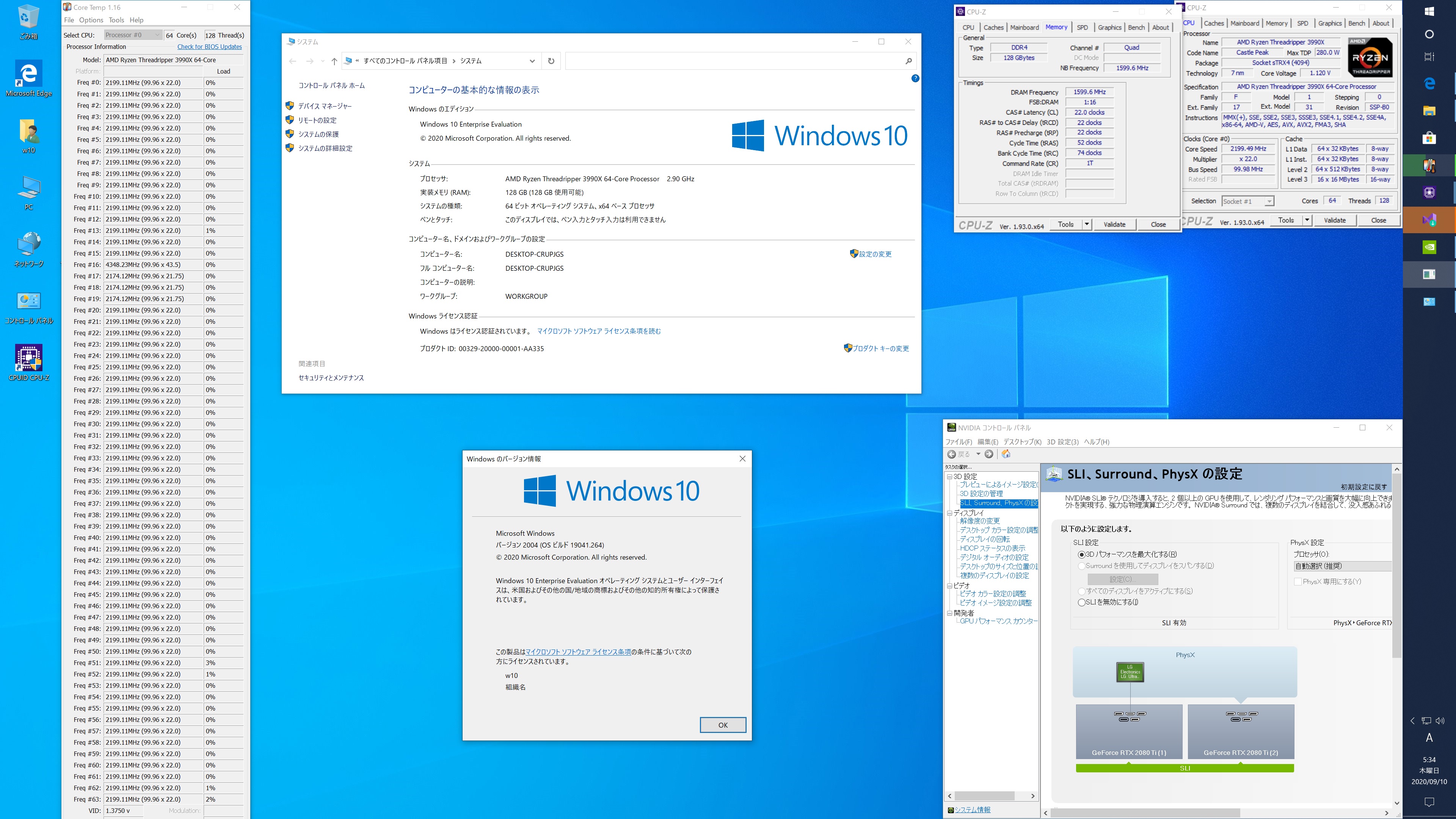
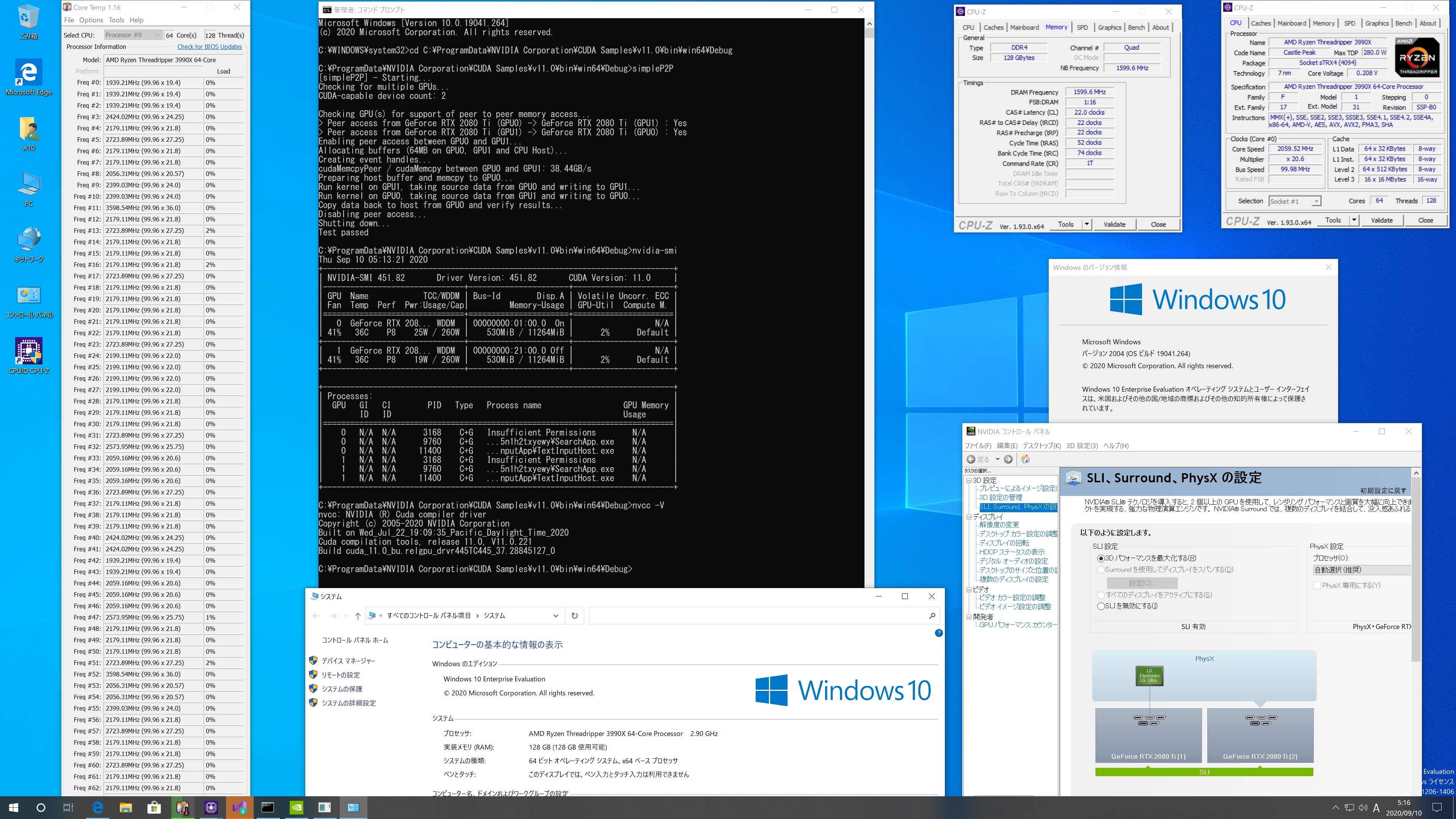
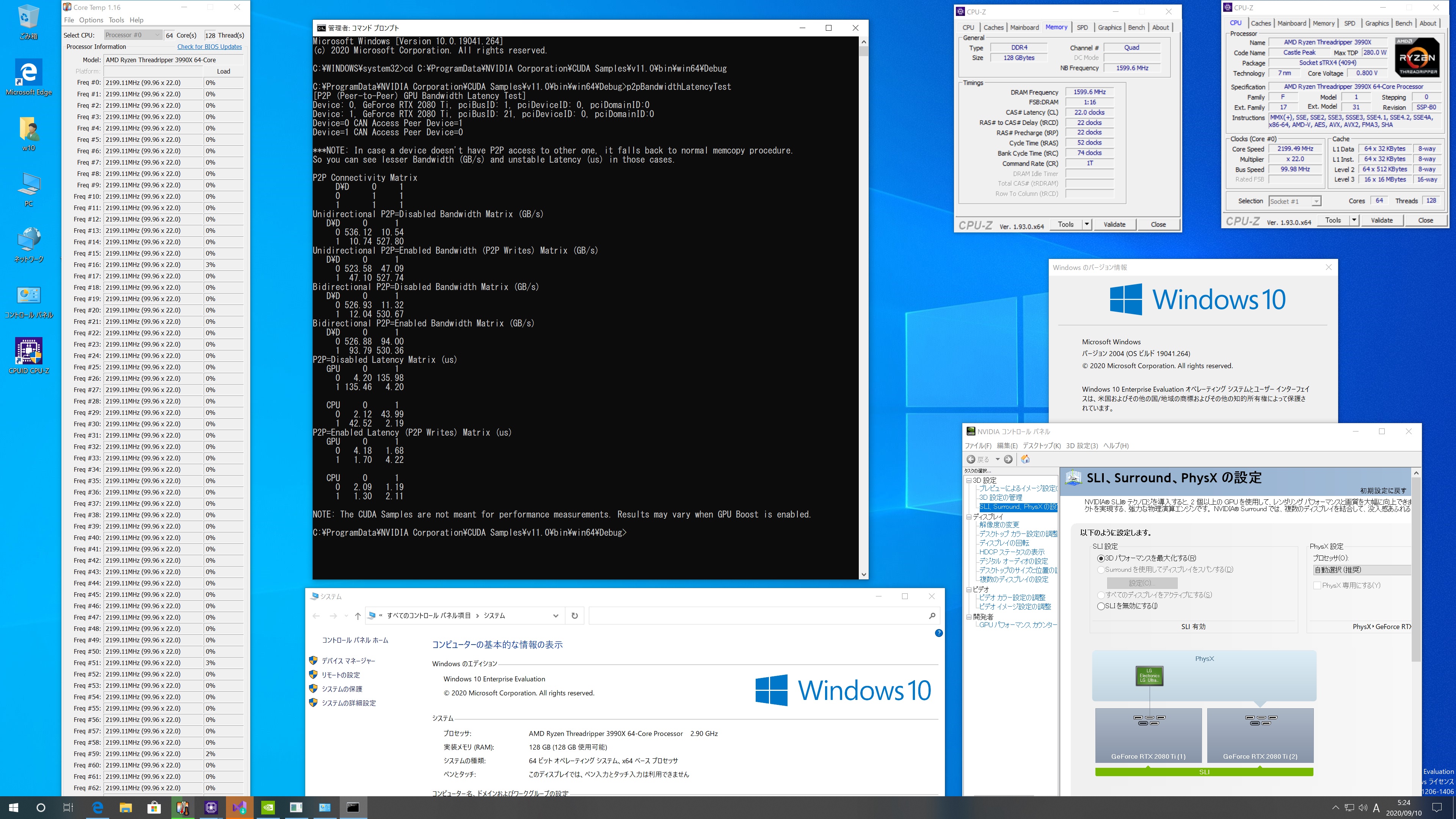
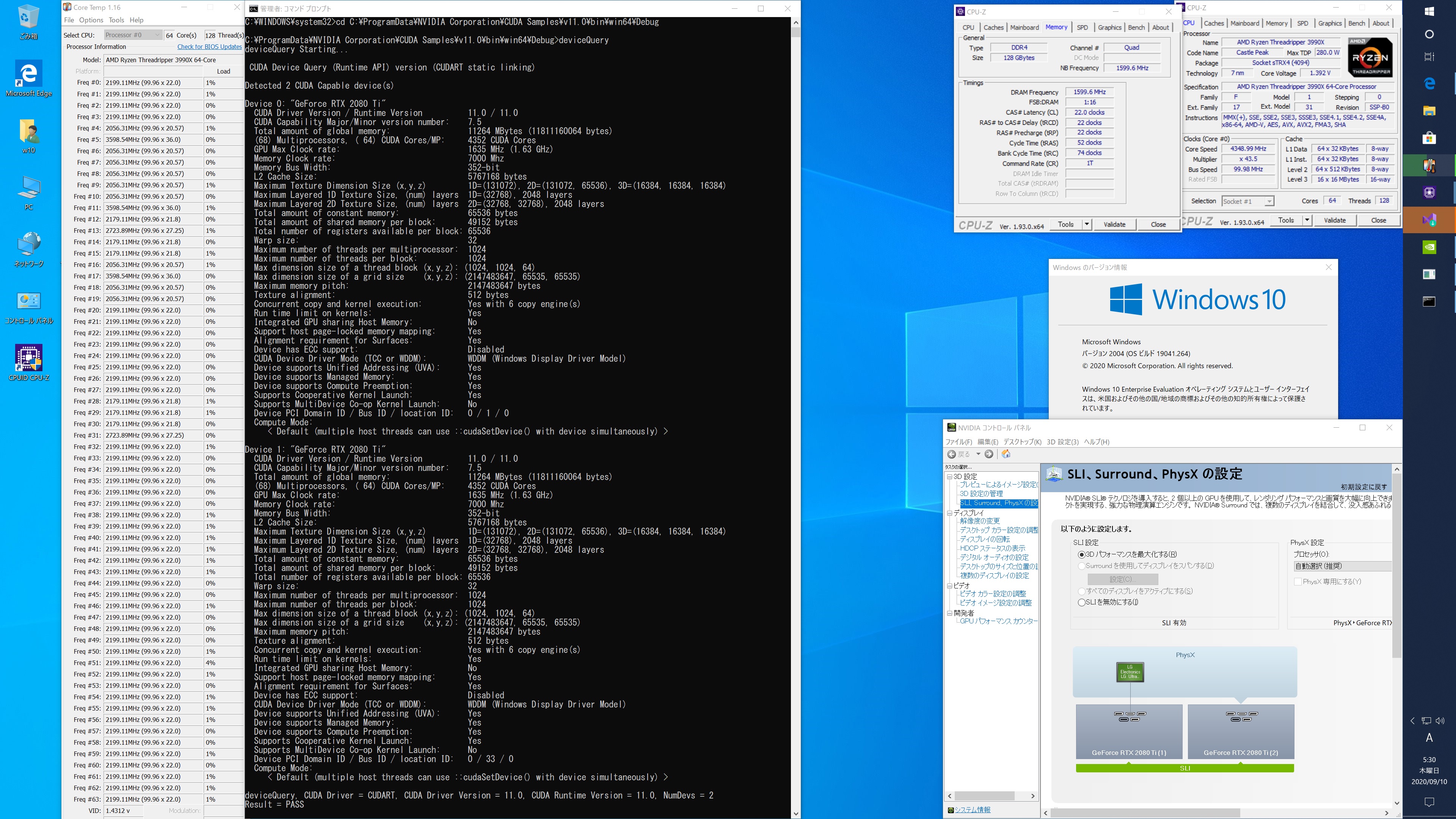
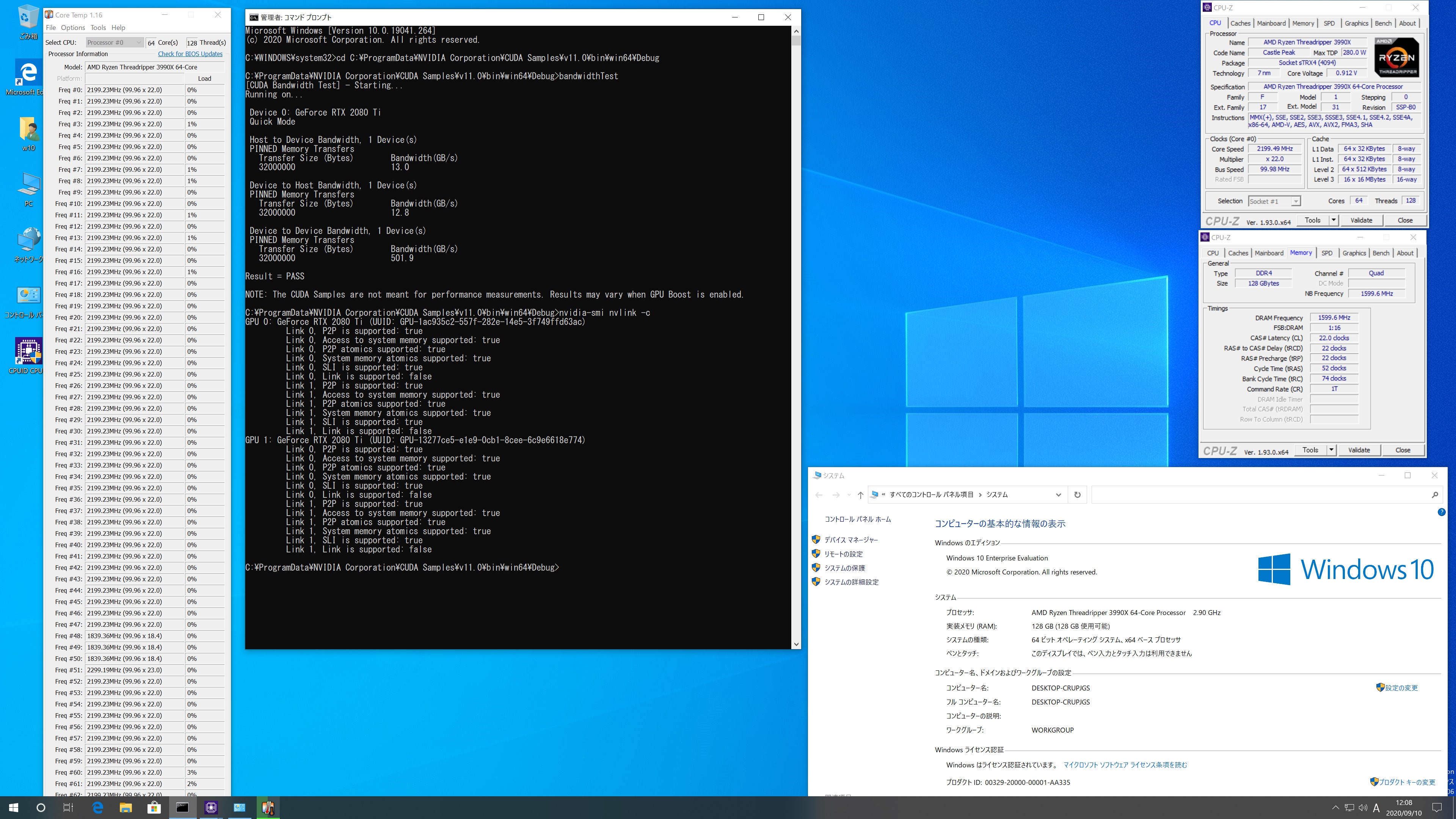
Windows10 Pro AMD Ryzen 3990X 64 Core Processer RTX2080Ti x2 Cuda_11.0.3_451.82 Smaples simpleP2P p2pBandwidthLatencyTest deviceQueryを動作させてみた

カテゴリー: nvidia, windows | コメントする

OpenSUSE Tumbleweed PHP 7.4.10 Update

OpenSUSE Tumbleweed PHPが7.4.10にUpdateされました。

opensuse:~ # uname -r
5.8.4-1-default
opensuse:~ # php -v
PHP 7.4.10 (cli) ( NTS )
Copyright (c) The PHP Group
Zend Engine v3.4.0, Copyright (c) Zend Technologies
opensuse:~ # curl -V
curl 7.72.0 (x86_64-suse-linux-gnu) libcurl/7.72.0 OpenSSL/1.1.1g-fips zlib/1.2.11 libidn2/2.3.0 libpsl/0.21.1 (+libidn2/2.3.0) libssh/0.9.3/openssl/zlib nghttp2/1.41.0
Release-Date: 2020-08-19
Protocols: dict file ftp ftps gopher http https imap imaps ldap ldaps pop3 pop3s rtsp scp sftp smb smbs smtp smtps telnet tftp
Features: AsynchDNS GSS-API HTTP2 HTTPS-proxy IDN IPv6 Kerberos Largefile libz Metalink NTLM NTLM_WB PSL SPNEGO SSL TLS-SRP UnixSockets
opensuse:~ # samba -V
Version 4.12.5-git.168.88cc07e6cbfSUSE-oS15.5-x86_64
opensuse:~ # cat /etc/os-release
NAME=”openSUSE Tumbleweed”
# VERSION=”20200908″
ID=”opensuse-tumbleweed”
ID_LIKE=”opensuse suse”
VERSION_ID=”20200908″
PRETTY_NAME=”openSUSE Tumbleweed”
ANSI_COLOR=”0;32″
CPE_NAME=”cpe:/o:opensuse:tumbleweed:20200908″
BUG_REPORT_URL=”https://bugs.opensuse.org”
HOME_URL=”https://www.opensuse.org/”
LOGO=”distributor-logo”
opensuse:~ #

カテゴリー: opensuse | コメントする