Oracle Linux Server release 8.3 Upgrade


Oracle Linux Server release 8.3にUpgradeされました。Kernelが4.18.0-240.1.1.el8_3.x86_64にUpdateされました。

[root@oracle8 ~]# uname -r
4.18.0-240.1.1.el8_3.x86_64
[root@oracle8 ~]# php -v
PHP 7.4.12 (cli) (built: Oct 27 2020 15:01:52) ( NTS )
Copyright (c) The PHP Group
Zend Engine v3.4.0, Copyright (c) Zend Technologies
with Zend OPcache v7.4.12, Copyright (c), by Zend Technologies
[root@oracle8 ~]# curl -V
curl 7.61.1 (x86_64-redhat-linux-gnu) libcurl/7.61.1 OpenSSL/1.1.1g zlib/1.2.11 brotli/1.0.6 libidn2/2.2.0 libpsl/0.20.2 (+libidn2/2.2.0) libssh/0.9.4/openssl/zlib nghttp2/1.33.0
Release-Date: 2018-09-05
Protocols: dict file ftp ftps gopher http https imap imaps ldap ldaps pop3 pop3s rtsp scp sftp smb smbs smtp smtps telnet tftp
Features: AsynchDNS IDN IPv6 Largefile GSS-API Kerberos SPNEGO NTLM NTLM_WB SSL libz brotli TLS-SRP HTTP2 UnixSockets HTTPS-proxy PSL Metalink
[root@oracle8 ~]# smbd -V
Version 4.12.3
[root@oracle8 ~]# cat /etc/redhat-release
Red Hat Enterprise Linux release 8.3 (Ootpa)
[root@oracle8 ~]# cat /etc/oracle-release
Oracle Linux Server release 8.3
[root@oracle8 ~]#

カテゴリー: oracle8 | コメントする

第2世代 AMD EPYC 7742 64-Core Processor Red Hat Enterprise Linux release 8.3 TITAN RTX x2 RTX2080Ti x2 CUDA 11.0 NGC namd 2.12-171025 STMV (virus) benchmark を動作させてみた(1,066,628 atoms, periodic, PME) 0.210162 days/ns


days/nsは数値が小さいほど高性能
中略
TIMING: 765 CPU: 14.2739, 0.01191/step Wall: 14.5102, 0.0121181/step, 0.000117815 hours remaining, 2850.527344 MB of memory in use.
TIMING: 766 CPU: 14.2868, 0.012846/step Wall: 14.5233, 0.0131948/step, 0.000124618 hours remaining, 2850.527344 MB of memory in use.
TIMING: 767 CPU: 14.2991, 0.012291/step Wall: 14.5348, 0.011445/step, 0.000104913 hours remaining, 2850.527344 MB of memory in use.
TIMING: 768 CPU: 14.3295, 0.030378/step Wall: 14.5662, 0.031388/step, 0.000279005 hours remaining, 2850.527344 MB of memory in use.
TIMING: 769 CPU: 14.3423, 0.012877/step Wall: 14.5784, 0.012217/step, 0.000105202 hours remaining, 2850.527344 MB of memory in use.
TIMING: 770 CPU: 14.3542, 0.011835/step Wall: 14.5912, 0.0127809/step, 0.000106508 hours remaining, 2850.527344 MB of memory in use.
TIMING: 771 CPU: 14.3666, 0.012459/step Wall: 14.603, 0.0118101/step, 9.51366e-05 hours remaining, 2850.527344 MB of memory in use.
TIMING: 772 CPU: 14.3958, 0.029177/step Wall: 14.6325, 0.0294769/step, 0.000229265 hours remaining, 2850.527344 MB of memory in use.
TIMING: 773 CPU: 14.4067, 0.010925/step Wall: 14.6435, 0.0110672/step, 8.30036e-05 hours remaining, 2850.527344 MB of memory in use.
TIMING: 774 CPU: 14.4206, 0.013858/step Wall: 14.6578, 0.0142629/step, 0.00010301 hours remaining, 2850.527344 MB of memory in use.
TIMING: 775 CPU: 14.4321, 0.011522/step Wall: 14.669, 0.01125/step, 7.81251e-05 hours remaining, 2850.527344 MB of memory in use.
TIMING: 776 CPU: 14.4622, 0.030134/step Wall: 14.7002, 0.0311041/step, 0.000207361 hours remaining, 2850.527344 MB of memory in use.
TIMING: 777 CPU: 14.4751, 0.012847/step Wall: 14.7124, 0.012269/step, 7.83854e-05 hours remaining, 2850.527344 MB of memory in use.
TIMING: 778 CPU: 14.4869, 0.011821/step Wall: 14.725, 0.0125899/step, 7.69385e-05 hours remaining, 2850.527344 MB of memory in use.
TIMING: 779 CPU: 14.4978, 0.01091/step Wall: 14.7359, 0.010916/step, 6.36766e-05 hours remaining, 2850.527344 MB of memory in use.
TIMING: 780 CPU: 14.5574, 0.059621/step Wall: 14.7956, 0.059655/step, 0.000331416 hours remaining, 2850.527344 MB of memory in use.
TIMING: 781 CPU: 14.5684, 0.010925/step Wall: 14.807, 0.0113721/step, 6.00194e-05 hours remaining, 2850.527344 MB of memory in use.
TIMING: 782 CPU: 14.5812, 0.012845/step Wall: 14.8197, 0.0127709/step, 6.38545e-05 hours remaining, 2850.527344 MB of memory in use.
TIMING: 783 CPU: 14.5931, 0.011857/step Wall: 14.832, 0.012275/step, 5.79652e-05 hours remaining, 2850.527344 MB of memory in use.
TIMING: 784 CPU: 14.6228, 0.029785/step Wall: 14.8621, 0.0300601/step, 0.0001336 hours remaining, 2850.527344 MB of memory in use.
TIMING: 785 CPU: 14.6347, 0.011895/step Wall: 14.8737, 0.011662/step, 4.85917e-05 hours remaining, 2850.527344 MB of memory in use.
TIMING: 786 CPU: 14.6486, 0.013856/step Wall: 14.8875, 0.0137961/step, 5.36515e-05 hours remaining, 2850.527344 MB of memory in use.
TIMING: 787 CPU: 14.6595, 0.01091/step Wall: 14.8985, 0.010972/step, 3.96212e-05 hours remaining, 2850.527344 MB of memory in use.
TIMING: 788 CPU: 14.6923, 0.03277/step Wall: 14.932, 0.0335069/step, 0.00011169 hours remaining, 2850.527344 MB of memory in use.
TIMING: 789 CPU: 14.7042, 0.011881/step Wall: 14.944, 0.011966/step, 3.65627e-05 hours remaining, 2850.527344 MB of memory in use.
TIMING: 790 CPU: 14.717, 0.012877/step Wall: 14.9566, 0.012651/step, 3.51416e-05 hours remaining, 2850.527344 MB of memory in use.
TIMING: 791 CPU: 14.7289, 0.011893/step Wall: 14.9686, 0.01196/step, 2.99001e-05 hours remaining, 2850.527344 MB of memory in use.
TIMING: 792 CPU: 14.7587, 0.02979/step Wall: 14.9991, 0.030575/step, 6.79445e-05 hours remaining, 2850.527344 MB of memory in use.
TIMING: 793 CPU: 14.7706, 0.011887/step Wall: 15.0109, 0.0117731/step, 2.28922e-05 hours remaining, 2850.527344 MB of memory in use.
TIMING: 794 CPU: 14.7835, 0.012893/step Wall: 15.0242, 0.0133028/step, 2.21713e-05 hours remaining, 2850.527344 MB of memory in use.
TIMING: 795 CPU: 14.7954, 0.011857/step Wall: 15.0354, 0.0112052/step, 1.55628e-05 hours remaining, 2850.527344 MB of memory in use.
TIMING: 796 CPU: 14.8252, 0.029804/step Wall: 15.0659, 0.0304658/step, 3.38509e-05 hours remaining, 2850.527344 MB of memory in use.
TIMING: 797 CPU: 14.837, 0.011883/step Wall: 15.0777, 0.011853/step, 9.87748e-06 hours remaining, 2850.527344 MB of memory in use.
TIMING: 798 CPU: 14.8499, 0.01287/step Wall: 15.0908, 0.013021/step, 7.23388e-06 hours remaining, 2850.527344 MB of memory in use.
TIMING: 799 CPU: 14.8608, 0.010873/step Wall: 15.1014, 0.010628/step, 2.95222e-06 hours remaining, 2850.527344 MB of memory in use.
Info: Benchmark time: 40 CPUs 0.018158 s/step 0.210162 days/ns
AMD EPYC 7742 64-Core Processor データ詳細
AMD EPYC 7742 64-Core Processor Red Hat Enterprise Linux release 8.3 TITAN RTX x2 RTX2080Ti x2 CUDA 11.0 namd 2.12-171025 STMV (virus) benchmark (1,066,628 atoms, periodic, PME) 0.210162 days ns
GPU温度推移
AMD EPYC 7742 64-Core Processor Red Hat Enterprise Linux release 8.3 TITAN RTX x2 RTX2080Ti x2 CUDA 11.0 namd 2.12-171025 STMV (virus) benchmark (1,066,628 atoms, periodic, PME) 0.210162 days ns nvidia-smi
関連サイト その2 3


カテゴリー: nvidia, rhel8 | コメントする

Manjaro Linux Kernel5.9.8-1-MANJARO Update

Manjaro Linux Kernelが5.9.8-1-MANJAROにUpdateされました。

[manjaro ~]# uname -r
5.9.8-1-MANJARO
[manjaro ~]# php -v
PHP 7.4.12 (cli) (built: Oct 29 2020 18:50:11) ( NTS )
Copyright (c) The PHP Group
Zend Engine v3.4.0, Copyright (c) Zend Technologies
[manjaro ~]# curl -V
curl 7.73.0 (x86_64-pc-linux-gnu) libcurl/7.73.0 OpenSSL/1.1.1h zlib/1.2.11 zstd/1.4.5 libidn2/2.3.0 libpsl/0.21.1 (+libidn2/2.3.0) libssh2/1.9.0 nghttp2/1.41.0
Release-Date: 2020-10-14
Protocols: dict file ftp ftps gopher http https imap imaps mqtt pop3 pop3s rtsp scp sftp smb smbs smtp smtps telnet tftp
Features: AsynchDNS GSS-API HTTP2 HTTPS-proxy IDN IPv6 Kerberos Largefile libz NTLM NTLM_WB PSL SPNEGO SSL TLS-SRP UnixSockets zstd
[manjaro ~]# samba -V
Version 4.13.2
[manjaro ~]# cat /etc/os-release
NAME=”Manjaro Linux”
ID=manjaro
ID_LIKE=arch
BUILD_ID=rolling
PRETTY_NAME=”Manjaro Linux”
ANSI_COLOR=”32;1;24;144;200″
HOME_URL=”https://manjaro.org/”
DOCUMENTATION_URL=”https://wiki.manjaro.org/”
SUPPORT_URL=”https://manjaro.org/”
BUG_REPORT_URL=”https://bugs.manjaro.org/”
LOGO=manjarolinux
[manjaro ~]#

カテゴリー: manjaro | コメントする

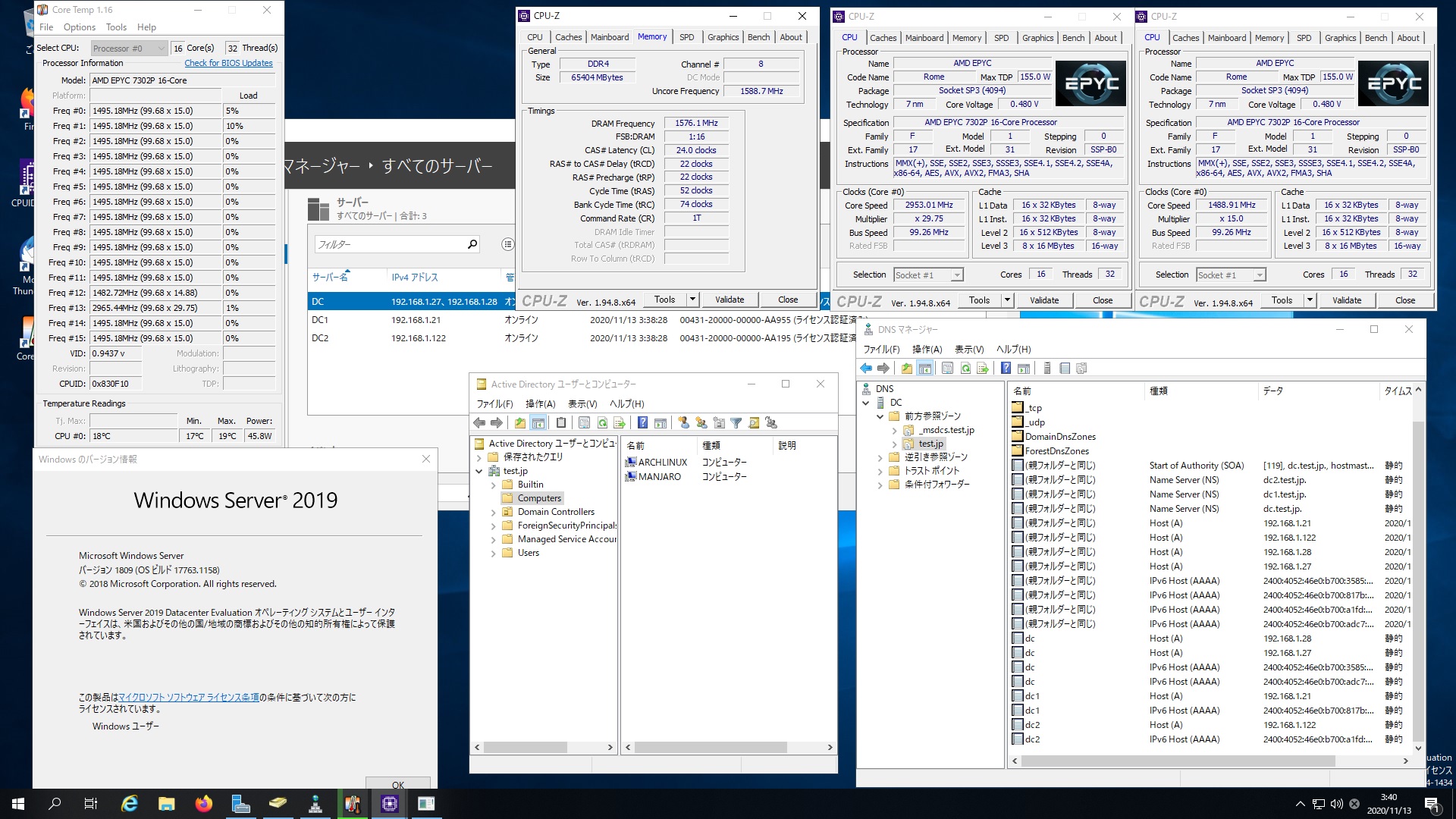
Manjaro Linux Samba4.13.2 AMD EPYC 7302Pで構築したWindows Server 2019 Datacenter Active Directory Domainのメンバーに参加してみた


[manjaro ~]# kinit administrator
Password for administrator@TEST.JP:
[manjaro ~]# net ads join -U administrator
Enter administrator’s password:
Using short domain name — TEST
Joined ‘MANJARO’ to dns domain ‘test.jp’
No DNS domain configured for manjaro. Unable to perform DNS Update.
DNS update failed: NT_STATUS_INVALID_PARAMETER
[manjaro ~]# systemctl restart winbind
[manjaro ~]# wbinfo -u
TEST\guest
TEST\administrator
TEST\krbtgt
TEST\chibi
[manjaro ~]# wbinfo -n chibi
S-1-5-21-3890957261-1382386746-4181787469-1103 SID_USER (1)
[manjaro ~]# net ads info
LDAP server: 192.168.1.122
LDAP server name: dc2.test.jp
Realm: TEST.JP
Bind Path: dc=TEST,dc=JP
LDAP port: 389
Server time: 金, 13 11月 2020 03:30:23 JST
KDC server: 192.168.1.122
Server time offset: -1
Last machine account password change: 金, 13 11月 2020 03:29:43 JST
[manjaro ~]# cat /etc/os-release
NAME=”Manjaro Linux”
ID=manjaro
ID_LIKE=arch
BUILD_ID=rolling
PRETTY_NAME=”Manjaro Linux”
ANSI_COLOR=”32;1;24;144;200″
HOME_URL=”https://manjaro.org/”
DOCUMENTATION_URL=”https://wiki.manjaro.org/”
SUPPORT_URL=”https://manjaro.org/”
BUG_REPORT_URL=”https://bugs.manjaro.org/”
LOGO=manjarolinux
[manjaro ~]# samba -V
Version 4.13.2
[manjaro ~]# host -4 dc
dc.test.jp has address 192.168.1.27
dc.test.jp has address 192.168.1.28
dc.test.jp has IPv6 address 2400:4052:46e0:b700:adc7:30fc:439d:5e51
dc.test.jp has IPv6 address 2400:4052:46e0:b700:3585:4794:6591:3fcd
[manjaro ~]# host -4 dc1
dc1.test.jp has address 192.168.1.21
dc1.test.jp has IPv6 address 2400:4052:46e0:b700:817b:e476:4dc3:67ec
[manjaro ~]# host -4 dc2
dc2.test.jp has address 192.168.1.122
dc2.test.jp has IPv6 address 2400:4052:46e0:b700:a1fd:88ce:43ba:b37c
[manjaro ~]# host -t SRV _ldap._tcp.test.jp
_ldap._tcp.test.jp has SRV record 0 100 389 dc2.test.jp.
_ldap._tcp.test.jp has SRV record 0 100 389 dc.test.jp.
_ldap._tcp.test.jp has SRV record 0 100 389 dc1.test.jp.
[manjaro ~]# host -t SRV _kerberos._udp.test.jp
_kerberos._udp.test.jp has SRV record 0 100 88 dc.test.jp.
_kerberos._udp.test.jp has SRV record 0 100 88 dc2.test.jp.
_kerberos._udp.test.jp has SRV record 0 100 88 dc1.test.jp.
[manjaro ~]# host -t A test.jp
test.jp has address 13.113.45.174
[manjaro ~]# host -t A dc.test.jp
dc.test.jp has address 192.168.1.27
dc.test.jp has address 192.168.1.28
[manjaro ~]# host -t A dc1.test.jp
dc1.test.jp has address 192.168.1.21
[manjaro ~]# host -t A dc2.test.jp
dc2.test.jp has address 192.168.1.122
[manjaro ~]# smbclient -L 192.168.1.27 -U%
Manjaro Linux Samba4.13.2 AMD EPYC 7302Pで構築したWindows Server 2019 Datacenter Active Directory Domainのメンバーに参加してみた

カテゴリー: manjaro, samba4, windows | コメントする

Samba 4.14.0rc1 Available for Download

Samba 4.14.0rc1 が公開されました。ReleaseNoteはこちらです。

カテゴリー: samba4 | コメントする