Fedora release 34 PHP 7.4.14 Update

Fedora release 34 PHPが7.4.14にUpdateされました。

[root@f34 ~]# cat /etc/redhat-release
Fedora release 34 (Rawhide)
[root@f34 ~]# php -v
PHP 7.4.14 (cli) (built: Jan 5 2021 10:45:06) ( NTS )
Copyright (c) The PHP Group
Zend Engine v3.4.0, Copyright (c) Zend Technologies
with Zend OPcache v7.4.14, Copyright (c), by Zend Technologies
[root@f34 ~]# curl -V
curl 7.74.0 (x86_64-redhat-linux-gnu) libcurl/7.74.0 OpenSSL/1.1.1i-fips zlib/1.2.11 brotli/1.0.9 libidn2/2.3.0 libpsl/0.21.1 (+libidn2/2.3.0) libssh/0.9.5/openssl/zlib nghttp2/1.42.0
Release-Date: 2020-12-09
Protocols: dict file ftp ftps gopher http https imap imaps ldap ldaps mqtt pop3 pop3s rtsp scp sftp smb smbs smtp smtps telnet tftp
Features: alt-svc AsynchDNS brotli GSS-API HTTP2 HTTPS-proxy IDN IPv6 Kerberos Largefile libz Metalink NTLM NTLM_WB PSL SPNEGO SSL TLS-SRP UnixSockets
[root@f34 ~]# samba -V
Version 4.13.3
[root@f34 ~]# uname -r
5.11.0-0.rc3.122.fc34.x86_64
[root@f34 ~]#

カテゴリー: fedora | コメントする

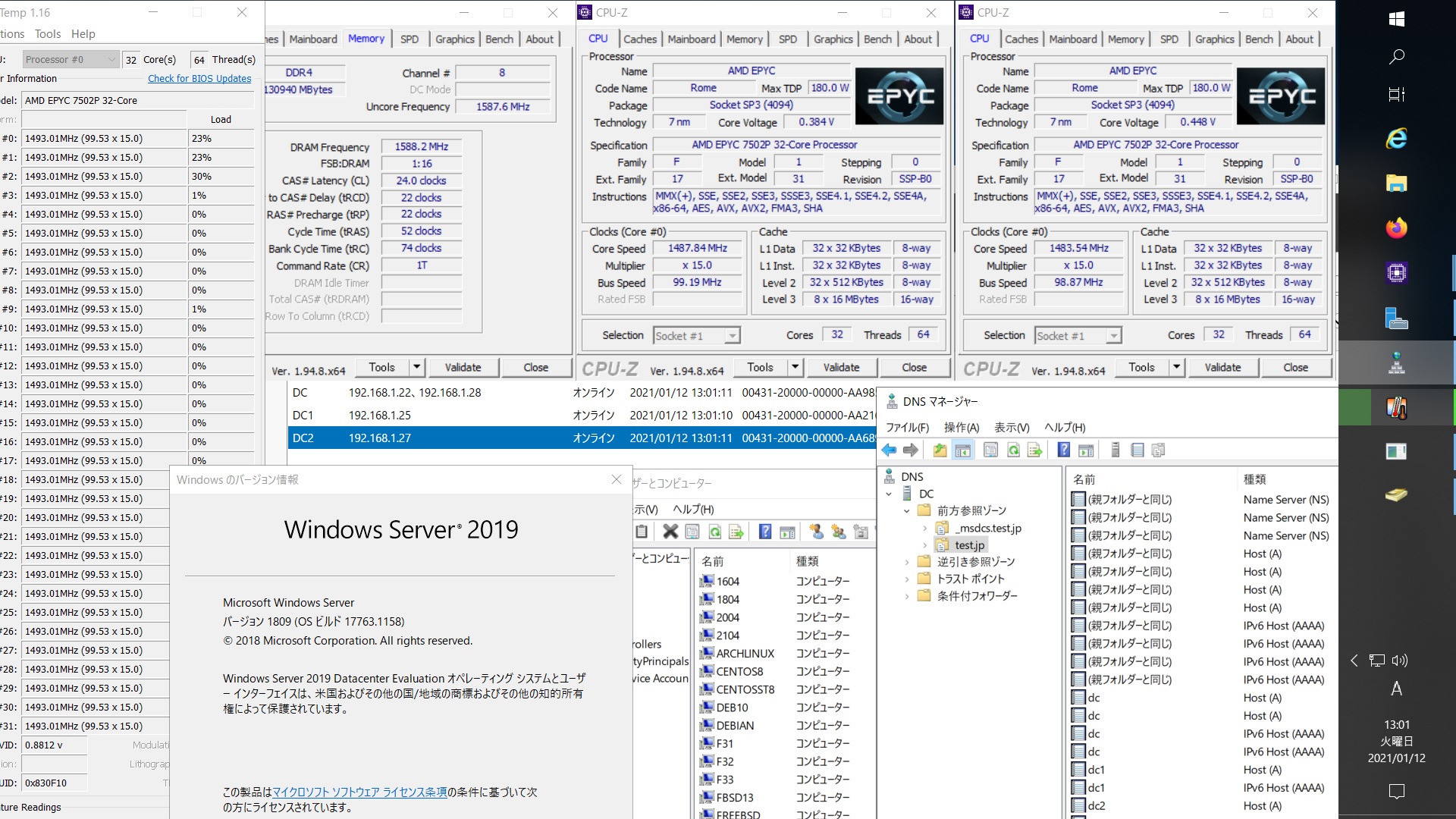
Fedora release 32 Samba4.12.10 AMD EPYC 7502P 32-core Processorで構築した Windows Server 2019 Datacenter Active Directory Domain のメンバーに参加してみた


[root@f32 ~]# kinit administrator
Password for administrator@TEST.JP:
[root@f32 ~]# net ads join -U administrator
Enter administrator’s password:
Using short domain name — TEST
Joined ‘F32’ to dns domain ‘test.jp’
No DNS domain configured for f32. Unable to perform DNS Update.
DNS update failed: NT_STATUS_INVALID_PARAMETER
[root@f32 ~]# systemctl restart winbind
[root@f32 ~]# wbinfo -u
TEST\administrator
TEST\guest
TEST\krbtgt
TEST\chibi
[root@f32 ~]# wbinfo -n chibi
S-1-5-21-995094434-2370853644-3769685270-1103 SID_USER (1)
[root@f32 ~]# net ads info
LDAP server: 192.168.1.28
LDAP server name: dc.test.jp
Realm: TEST.JP
Bind Path: dc=TEST,dc=JP
LDAP port: 389
Server time: 火, 12 1月 2021 13:02:52 JST
KDC server: 192.168.1.28
Server time offset: -11
Last machine account password change: 火, 12 1月 2021 12:59:49 JST
[root@f32 ~]# host -4 dc
dc.test.jp has address 192.168.1.22
dc.test.jp has address 192.168.1.28
dc.test.jp has IPv6 address 2400:4052:46e0:b700:b462:ad0e:dd8c:96f4
dc.test.jp has IPv6 address 2400:4052:46e0:b700:15dc:bd6:5817:24fc
[root@f32 ~]# host -4 dc1
dc1.test.jp has address 192.168.1.25
dc1.test.jp has IPv6 address 2400:4052:46e0:b700:c0ac:f44c:e63:2b0
[root@f32 ~]# host -4 dc2
dc2.test.jp has address 192.168.1.27
dc2.test.jp has IPv6 address 2400:4052:46e0:b700:250f:3df1:1c43:8fcd
[root@f32 ~]# host -t SRV _ldap._tcp.test.jp
_ldap._tcp.test.jp has SRV record 0 100 389 dc2.test.jp.
_ldap._tcp.test.jp has SRV record 0 100 389 dc.test.jp.
_ldap._tcp.test.jp has SRV record 0 100 389 dc1.test.jp.
[root@f32 ~]# host -t SRV _kerberos._udp.test.jp
_kerberos._udp.test.jp has SRV record 0 100 88 dc.test.jp.
_kerberos._udp.test.jp has SRV record 0 100 88 dc1.test.jp.
_kerberos._udp.test.jp has SRV record 0 100 88 dc2.test.jp.
[root@f32 ~]# host -t A test.jp
test.jp has address 192.168.1.27
test.jp has address 192.168.1.25
test.jp has address 192.168.1.28
test.jp has address 192.168.1.22
[root@f32 ~]# cat /etc/redhat-release
Fedora release 32 (Thirty Two)
[root@f32 ~]# samba -V
Version 4.12.10
[root@f32 ~]# smbclient //192.168.1.22/netlogon -U administrator
Fedora release 32 Samba4.12.10 AMD EPYC 7502P 32-core Processorで構築した Windows Server 2019 Datacenter Active Directory Domain のメンバーに参加してみた

カテゴリー: fedora, samba4, windows | コメントする

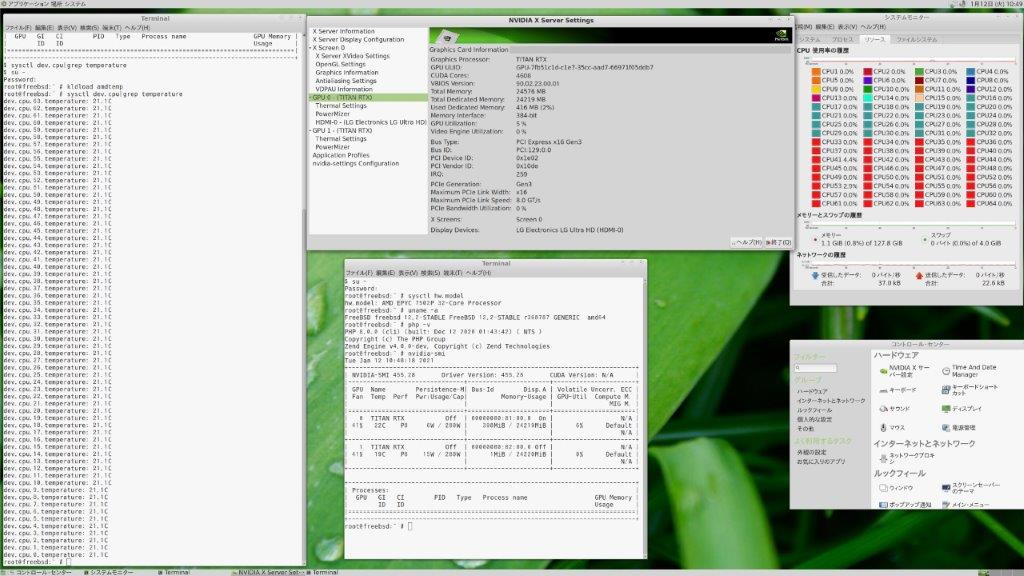
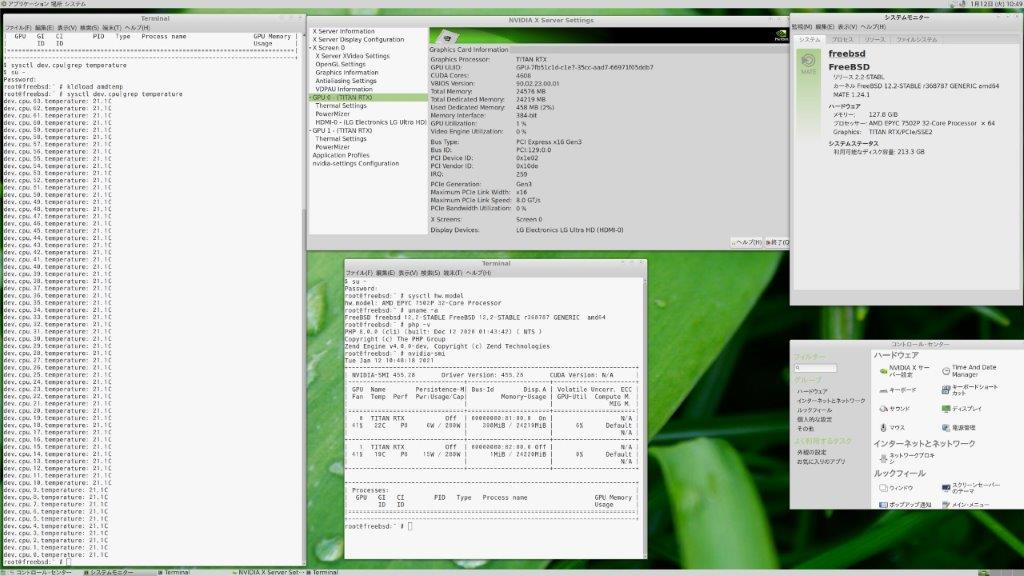
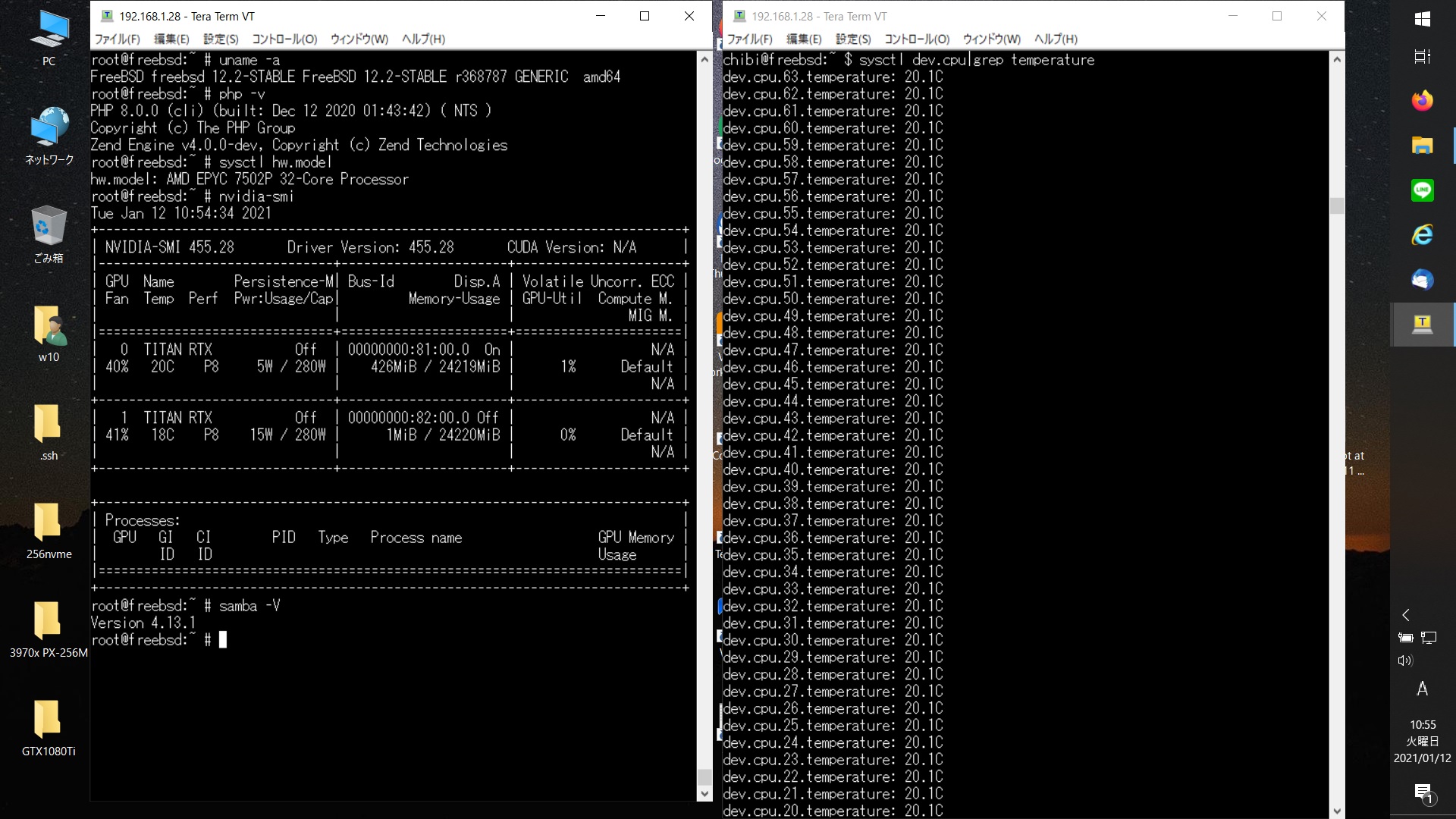
AMD EPYC 7502P 32-Core Processor FreeBSD 12.2-STABLE r368787 GENERIC TITAN RTX x2 AMDTEMP nvidia-smiを設定してみた


root@freebsd:~ # uname -a
FreeBSD freebsd 12.2-STABLE FreeBSD 12.2-STABLE r368787 GENERIC amd64
root@freebsd:~ # php -v
PHP 8.0.0 (cli) (built: Dec 12 2020 01:43:42) ( NTS )
Copyright (c) The PHP Group
Zend Engine v4.0.0-dev, Copyright (c) Zend Technologies
root@freebsd:~ # sysctl hw.model
hw.model: AMD EPYC 7502P 32-Core Processor
root@freebsd:~ # nvidia-smi

AMD EPYC 7502P 32-Core Processor FreeBSD 12.2-STABLE r368787 GENERIC TITAN RTX x2 AMDTEMP nvidia-smi

カテゴリー: freebsd, nvidia | コメントする

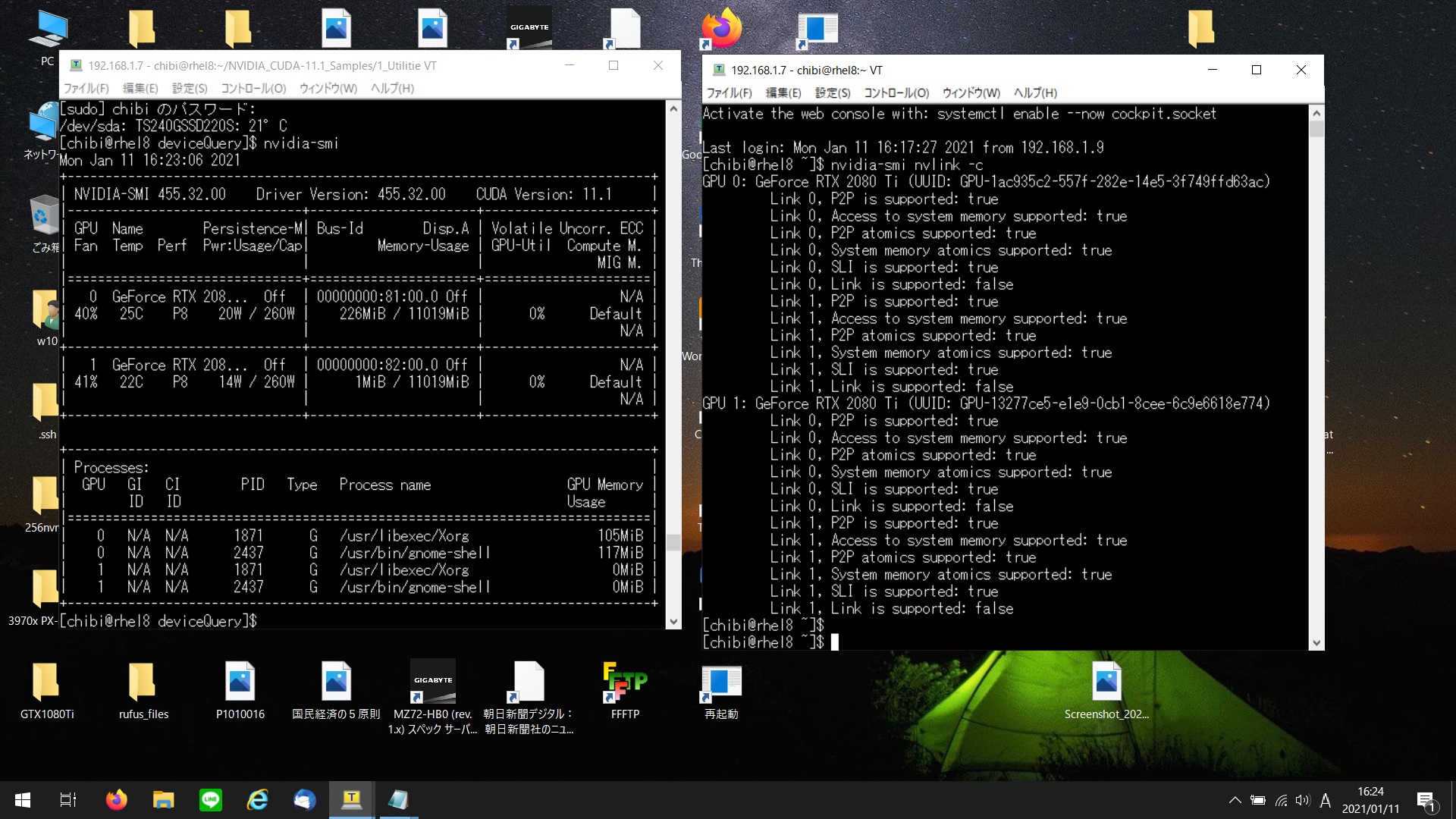
AMD EPYC 7302P 16-Core Processor Red Hat Enterprise Linux release 8.3 RTX2080Ti x2 CUDA 11.1 simpleP2P p2pBandwidthLatencyTest bandwidthTest deviceQueryを動作させてみた

[chibi@rhel8 simpleP2P]$ ./simpleP2P
[./simpleP2P] – Starting…
Checking for multiple GPUs…
CUDA-capable device count: 2

Checking GPU(s) for support of peer to peer memory access…
> Peer access from GeForce RTX 2080 Ti (GPU0) -> GeForce RTX 2080 Ti (GPU1) : Yes
> Peer access from GeForce RTX 2080 Ti (GPU1) -> GeForce RTX 2080 Ti (GPU0) : Yes
Enabling peer access between GPU0 and GPU1…
Allocating buffers (64MB on GPU0, GPU1 and CPU Host)…
Creating event handles…
cudaMemcpyPeer / cudaMemcpy between GPU0 and GPU1: 43.54GB/s
Preparing host buffer and memcpy to GPU0…
Run kernel on GPU1, taking source data from GPU0 and writing to GPU1…
Run kernel on GPU0, taking source data from GPU1 and writing to GPU0…
Copy data back to host from GPU0 and verify results…
Disabling peer access…
Shutting down…
Test passed
[chibi@rhel8 simpleP2P]$
[chibi@rhel8 deviceQuery]$ ./deviceQuery
./deviceQuery Starting…

CUDA Device Query (Runtime API) version (CUDART static linking)

Detected 2 CUDA Capable device(s)

Device 0: “GeForce RTX 2080 Ti”
CUDA Driver Version / Runtime Version 11.1 / 11.1
CUDA Capability Major/Minor version number: 7.5
Total amount of global memory: 11019 MBytes (11554324480 bytes)
(68) Multiprocessors, ( 64) CUDA Cores/MP: 4352 CUDA Cores
GPU Max Clock rate: 1635 MHz (1.63 GHz)
Memory Clock rate: 7000 Mhz
Memory Bus Width: 352-bit
L2 Cache Size: 5767168 bytes
Maximum Texture Dimension Size (x,y,z) 1D=(131072), 2D=(131072, 65536), 3D=(16384, 16384, 16384)
Maximum Layered 1D Texture Size, (num) layers 1D=(32768), 2048 layers
Maximum Layered 2D Texture Size, (num) layers 2D=(32768, 32768), 2048 layers
Total amount of constant memory: 65536 bytes
Total amount of shared memory per block: 49152 bytes
Total shared memory per multiprocessor: 65536 bytes
Total number of registers available per block: 65536
Warp size: 32
Maximum number of threads per multiprocessor: 1024
Maximum number of threads per block: 1024
Max dimension size of a thread block (x,y,z): (1024, 1024, 64)
Max dimension size of a grid size (x,y,z): (2147483647, 65535, 65535)
Maximum memory pitch: 2147483647 bytes
Texture alignment: 512 bytes
Concurrent copy and kernel execution: Yes with 3 copy engine(s)
Run time limit on kernels: Yes
Integrated GPU sharing Host Memory: No
Support host page-locked memory mapping: Yes
Alignment requirement for Surfaces: Yes
Device has ECC support: Disabled
Device supports Unified Addressing (UVA): Yes
Device supports Managed Memory: Yes
Device supports Compute Preemption: Yes
Supports Cooperative Kernel Launch: Yes
Supports MultiDevice Co-op Kernel Launch: Yes
Device PCI Domain ID / Bus ID / location ID: 0 / 129 / 0
Compute Mode:
< Default (multiple host threads can use ::cudaSetDevice() with device simultaneously) >

Device 1: “GeForce RTX 2080 Ti”
CUDA Driver Version / Runtime Version 11.1 / 11.1
CUDA Capability Major/Minor version number: 7.5
Total amount of global memory: 11019 MBytes (11554717696 bytes)
(68) Multiprocessors, ( 64) CUDA Cores/MP: 4352 CUDA Cores
GPU Max Clock rate: 1635 MHz (1.63 GHz)
Memory Clock rate: 7000 Mhz
Memory Bus Width: 352-bit
L2 Cache Size: 5767168 bytes
Maximum Texture Dimension Size (x,y,z) 1D=(131072), 2D=(131072, 65536), 3D=(16384, 16384, 16384)
Maximum Layered 1D Texture Size, (num) layers 1D=(32768), 2048 layers
Maximum Layered 2D Texture Size, (num) layers 2D=(32768, 32768), 2048 layers
Total amount of constant memory: 65536 bytes
Total amount of shared memory per block: 49152 bytes
Total shared memory per multiprocessor: 65536 bytes
Total number of registers available per block: 65536
Warp size: 32
Maximum number of threads per multiprocessor: 1024
Maximum number of threads per block: 1024
Max dimension size of a thread block (x,y,z): (1024, 1024, 64)
Max dimension size of a grid size (x,y,z): (2147483647, 65535, 65535)
Maximum memory pitch: 2147483647 bytes
Texture alignment: 512 bytes
Concurrent copy and kernel execution: Yes with 3 copy engine(s)
Run time limit on kernels: No
Integrated GPU sharing Host Memory: No
Support host page-locked memory mapping: Yes
Alignment requirement for Surfaces: Yes
Device has ECC support: Disabled
Device supports Unified Addressing (UVA): Yes
Device supports Managed Memory: Yes
Device supports Compute Preemption: Yes
Supports Cooperative Kernel Launch: Yes
Supports MultiDevice Co-op Kernel Launch: Yes
Device PCI Domain ID / Bus ID / location ID: 0 / 130 / 0
Compute Mode:
< Default (multiple host threads can use ::cudaSetDevice() with device simultaneously) >
> Peer access from GeForce RTX 2080 Ti (GPU0) -> GeForce RTX 2080 Ti (GPU1) : Yes
> Peer access from GeForce RTX 2080 Ti (GPU1) -> GeForce RTX 2080 Ti (GPU0) : Yes

deviceQuery, CUDA Driver = CUDART, CUDA Driver Version = 11.1, CUDA Runtime Version = 11.1, NumDevs = 2
Result = PASS
[chibi@rhel8 deviceQuery]$
AMD EPYC 7302P 16-Core Processor Red Hat Enterprise Linux release 8.3 RTX2080Ti x2 CUDA 11.1 simpleP2P p2pBandwidthLatencyTest bandwidthTest deviceQuery

カテゴリー: nvidia, rhel8 | コメントする

OpenSUSE Tumbleweed PHP 7.4.14 Update

OpenSUSE Tumbleweed PHPが7.4.14にUpdateされました。

opensuse:~ # uname -r
5.10.4-1-default
opensuse:~ # php -v
PHP 7.4.14 (cli) (built: Jan 7 2021 00:00:00) ( NTS )
Copyright (c) The PHP Group
Zend Engine v3.4.0, Copyright (c) Zend Technologies
opensuse:~ # curl -V
curl 7.74.0 (x86_64-suse-linux-gnu) libcurl/7.74.0 OpenSSL/1.1.1h-fips zlib/1.2.11 brotli/1.0.9 zstd/1.4.8 libidn2/2.3.0 libpsl/0.21.1 (+libidn2/2.3.0) libssh/0.9.5/openssl/zlib nghttp2/1.42.0
Release-Date: 2020-12-09
Protocols: dict file ftp ftps gopher http https imap imaps ldap ldaps mqtt pop3 pop3s rtsp scp sftp smb smbs smtp smtps telnet tftp
Features: alt-svc AsynchDNS brotli GSS-API HTTP2 HTTPS-proxy IDN IPv6 Kerberos Largefile libz Metalink NTLM NTLM_WB PSL SPNEGO SSL TLS-SRP UnixSockets zstd
opensuse:~ # samba -V
Version 4.13.3-git.181.fc4672a5b81SUSE-oS15.5-x86_64
opensuse:~ # cat /etc/os-release
NAME=”openSUSE Tumbleweed”
# VERSION=”20210108″
ID=”opensuse-tumbleweed”
ID_LIKE=”opensuse suse”
VERSION_ID=”20210108″
PRETTY_NAME=”openSUSE Tumbleweed”
ANSI_COLOR=”0;32″
CPE_NAME=”cpe:/o:opensuse:tumbleweed:20210108″
BUG_REPORT_URL=”https://bugs.opensuse.org”
HOME_URL=”https://www.opensuse.org/”
DOCUMENTATION_URL=”https://en.opensuse.org/Portal:Tumbleweed”
LOGO=”distributor-logo”
opensuse:~ #

カテゴリー: opensuse | コメントする