

Arch Linux Kernel5.11.16-arch1-1 Samba4.14.3 Update

Arch Linux Kernel5.11.16-arch1-1とSamba4.14.3がUpdateされました。

[root@archlinux ~]# uname -r
5.11.16-arch1-1
[root@archlinux ~]# php -v
PHP 8.0.3 (cli) (built: Apr 15 2021 13:36:35) ( NTS )
Copyright (c) The PHP Group
Zend Engine v4.0.3, Copyright (c) Zend Technologies
[root@archlinux ~]# curl -V
curl 7.76.1 (x86_64-pc-linux-gnu) libcurl/7.76.1 OpenSSL/1.1.1k
zlib/1.2.11 zstd/1.4.9 libidn2/2.3.0 libpsl/0.21.1 (+libidn2/2.3.0)
libssh2/1.9.0 nghttp2/1.43.0
Release-Date: 2021-04-14
Protocols: dict file ftp ftps gopher gophers http https imap imaps mqtt
pop3 pop3s rtsp scp sftp smb smbs smtp smtps telnet tftp
Features: alt-svc AsynchDNS GSS-API HTTP2 HTTPS-proxy IDN IPv6 Kerberos
Largefile libz NTLM NTLM_WB PSL SPNEGO SSL TLS-SRP UnixSockets zstd
[root@archlinux ~]# samba -V
Version 4.14.3
[root@archlinux ~]# cat /etc/os-release
NAME=”Arch Linux”
PRETTY_NAME=”Arch Linux”
ID=arch
BUILD_ID=rolling
ANSI_COLOR=”38;2;23;147;209″
HOME_URL=”https://www.archlinux.org/”
DOCUMENTATION_URL=”https://wiki.archlinux.org/”
SUPPORT_URL=”https://bbs.archlinux.org/”
BUG_REPORT_URL=”https://bugs.archlinux.org/”
LOGO=archlinux
[root@archlinux ~]#

コメントする

Kernel 5.14-rc6が公開

Kernel 5.14-rc6が公開されました。ReleaseNoteはこちらです。

コメントする

Fedora release 36 Samba4.15.0rc2 Update

Fedora release 36 Sambaが4.15.0rc2にUpdateされました。

[root@f36 ~]# uname -r
5.14.0-0.rc5.20210813gitf8e6dfc64f61.46.fc36.x86_64
[root@f36 ~]# php -v
PHP 8.0.10RC1 (cli) (built: Aug 10 2021 09:35:28) ( NTS gcc x86_64 )
Copyright (c) The PHP Group
Zend Engine v4.0.10RC1, Copyright (c) Zend Technologies
with Zend OPcache v8.0.10RC1, Copyright (c), by Zend Technologies
[root@f36 ~]# curl -V
curl 7.78.0 (x86_64-redhat-linux-gnu) libcurl/7.78.0 OpenSSL/1.1.1k-fips zlib/1.2.11 brotli/1.0.9 libidn2/2.3.2 libpsl/0.21.1 (+libidn2/2.3.2) libssh/0.9.5/openssl/zlib nghttp2/1.44.0 OpenLDAP/2.4.59
Release-Date: 2021-07-21
Protocols: dict file ftp ftps gopher gophers http https imap imaps ldap ldaps mqtt pop3 pop3s rtsp scp sftp smb smbs smtp smtps telnet tftp
Features: alt-svc AsynchDNS brotli GSS-API HSTS HTTP2 HTTPS-proxy IDN IPv6 Kerberos Largefile libz NTLM NTLM_WB PSL SPNEGO SSL TLS-SRP UnixSockets
[root@f36 ~]# samba -V
Version 4.15.0rc2
[root@f36 ~]# cat /etc/redhat-release
Fedora release 36 (Rawhide)
[root@f36 ~]#

コメントする

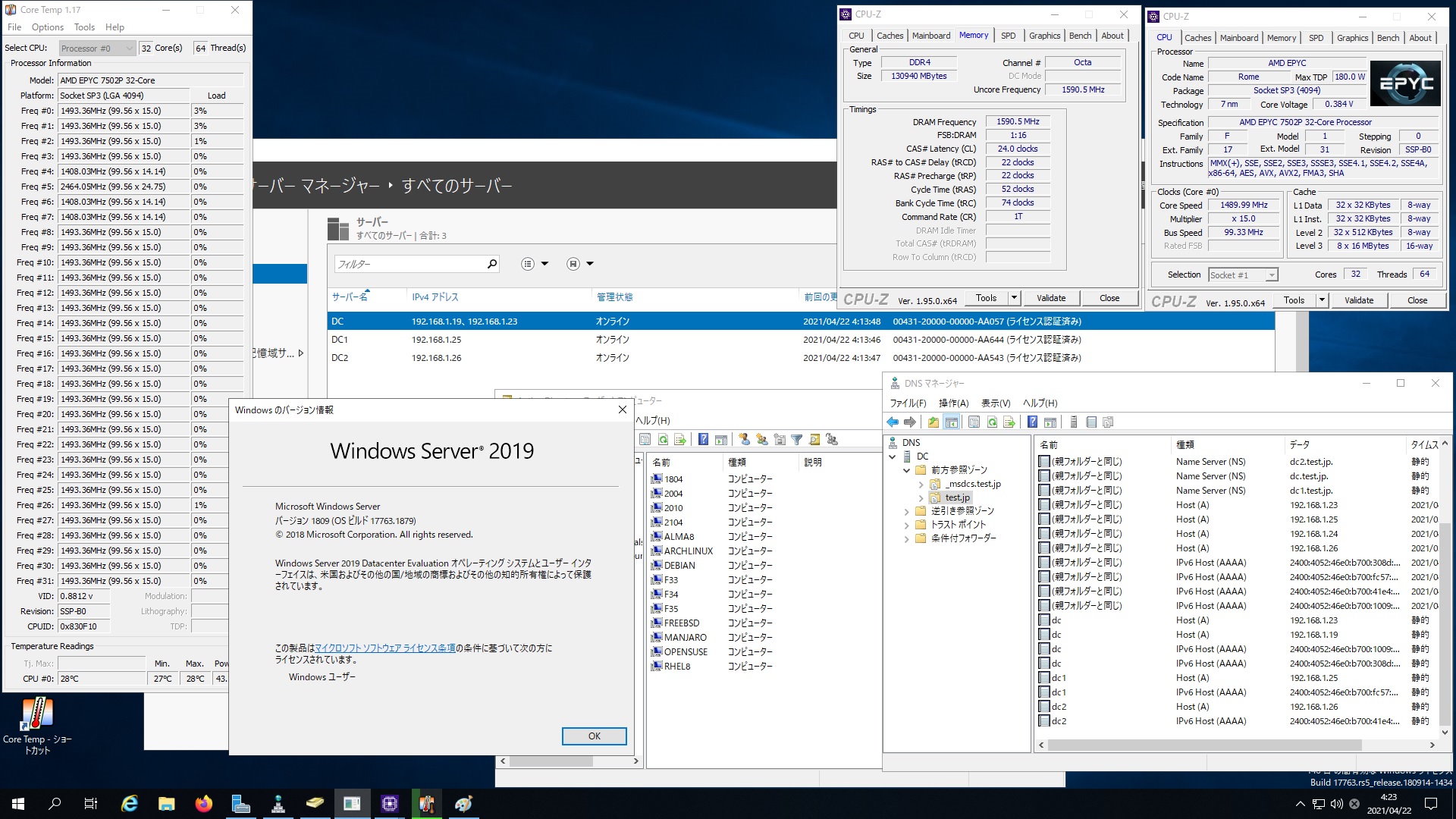
Arch Linux Samba4.14.3 AMD EPYC 7502P 32-core Processor で構築した Windows Server 2019 Datacenter Active Directory Domain のメンバーに参加してみた

[root@archlinux ~]# kinit administrator
Password for administrator@TEST.JP:
[root@archlinux ~]# net ads join -U administrator
Enter administrator’s password:
Using short domain name — TEST
Joined ‘ARCHLINUX’ to dns domain ‘test.jp’
No DNS domain configured for archlinux. Unable to perform DNS Update.
DNS update failed: NT_STATUS_INVALID_PARAMETER
[root@archlinux ~]# systemctl restart winbind
[root@archlinux ~]# wbinfo -u
TEST\administrator
TEST\guest
TEST\krbtgt
TEST\chibi
[root@archlinux ~]# wbinfo -n chibi
S-1-5-21-484203184-1642524679-1101545312-1103 SID_USER (1)
[root@archlinux ~]# net ads info
LDAP server: 192.168.1.23
LDAP server name: dc.test.jp
Realm: TEST.JP
Bind Path: dc=TEST,dc=JP
LDAP port: 389
Server time: Wed, 21 Apr 2021 19:30:14 UTC
KDC server: 192.168.1.23
Server time offset: -5
Last machine account password change: Wed, 21 Apr 2021 19:29:37 UTC
[root@archlinux ~]# host -4 dc
-bash: host: command not found
[root@archlinux ~]# host -4 dc
-bash: host: command not found
[root@archlinux ~]# host -4 dc
dc.test.jp has address 192.168.1.19
dc.test.jp has address 192.168.1.23
dc.test.jp has IPv6 address 2400:4052:46e0:b700:1009:e903:454a:cf65
dc.test.jp has IPv6 address 2400:4052:46e0:b700:308d:e06c:bc1a:f2ee
[root@archlinux ~]# host -4 dc1
dc1.test.jp has address 192.168.1.25
dc1.test.jp has IPv6 address 2400:4052:46e0:b700:fc57:2ec0:103f:1316
[root@archlinux ~]# host -4 dc2
dc2.test.jp has address 192.168.1.26
dc2.test.jp has IPv6 address 2400:4052:46e0:b700:41e4:9a22:b80c:e558
[root@archlinux ~]# host -t SRV _ldap._tcp.test.jp
_ldap._tcp.test.jp has SRV record 0 100 389 dc2.test.jp.
_ldap._tcp.test.jp has SRV record 0 100 389 dc1.test.jp.
_ldap._tcp.test.jp has SRV record 0 100 389 dc.test.jp.
[root@archlinux ~]# host -t SRV _kerberos._udp.test.jp
_kerberos._udp.test.jp has SRV record 0 100 88 dc1.test.jp.
_kerberos._udp.test.jp has SRV record 0 100 88 dc2.test.jp.
_kerberos._udp.test.jp has SRV record 0 100 88 dc.test.jp.
[root@archlinux ~]# host -t A test.jp
test.jp has address 192.168.1.26
test.jp has address 192.168.1.25
test.jp has address 192.168.1.23
[root@archlinux ~]# cat /etc/os-release
NAME=”Arch Linux”
PRETTY_NAME=”Arch Linux”
ID=arch
BUILD_ID=rolling
ANSI_COLOR=”38;2;23;147;209″
HOME_URL=”https://www.archlinux.org/”
DOCUMENTATION_URL=”https://wiki.archlinux.org/”
SUPPORT_URL=”https://bbs.archlinux.org/”
BUG_REPORT_URL=”https://bugs.archlinux.org/”
LOGO=archlinux
[root@archlinux ~]# samba -V
Version 4.14.3
[root@archlinux ~]# smbclient //192.168.1.23/netlogon -Uadministrator
Arch Linux Samba4.14.3 AMD EPYC 7502P 32-core Processor で構築した Windows Server 2019 Datacenter Active Directory Domain のメンバーに参加してみた

コメントする

Manjaro Linux Samba4.14.2 AMD EPYC 7502P 32-core Processor で構築した Windows Server 2019 Datacenter Active Directory Domain のメンバーに参加してみた

[manjaro ~]# kinit administrator
Password for administrator@TEST.JP:
[manjaro ~]# timedatectl set-ntp true
[manjaro ~]# net ads join -U administrator
Enter administrator’s password:
Using short domain name — TEST
Joined ‘MANJARO’ to dns domain ‘test.jp’
No DNS domain configured for manjaro. Unable to perform DNS Update.
DNS update failed: NT_STATUS_INVALID_PARAMETER
[manjaro ~]# systemctl enable winbind
Created symlink /etc/systemd/system/multi-user.target.wants/winbind.service → /usr/lib/systemd/system/winbind.service.
[manjaro ~]# systemctl restart winbind
[manjaro ~]# wbinfo -n chibi
S-1-5-21-484203184-1642524679-1101545312-1103 SID_USER (1)
[manjaro ~]# wbinfo -u
TEST\administrator
TEST\guest
TEST\krbtgt
TEST\chibi
[manjaro ~]# net ads info
LDAP server: 192.168.1.23
LDAP server name: dc.test.jp
Realm: TEST.JP
Bind Path: dc=TEST,dc=JP
LDAP port: 389
Server time: 木, 22 4月 2021 04:49:20 JST
KDC server: 192.168.1.23
Server time offset: -5
Last machine account password change: 木, 22 4月 2021 04:46:01 JST
[manjaro ~]# host -4 dc
dc.test.jp has address 192.168.1.19
dc.test.jp has address 192.168.1.23
dc.test.jp has IPv6 address 2400:4052:46e0:b700:308d:e06c:bc1a:f2ee
dc.test.jp has IPv6 address 2400:4052:46e0:b700:1009:e903:454a:cf65
[manjaro ~]# host -4 dc1
dc1.test.jp has address 192.168.1.25
dc1.test.jp has IPv6 address 2400:4052:46e0:b700:fc57:2ec0:103f:1316
[manjaro ~]# host -4 dc2
dc2.test.jp has address 192.168.1.26
dc2.test.jp has IPv6 address 2400:4052:46e0:b700:41e4:9a22:b80c:e558
[manjaro ~]# host -t SRV _ldap._tcp.test.jp
_ldap._tcp.test.jp has SRV record 0 100 389 dc1.test.jp.
_ldap._tcp.test.jp has SRV record 0 100 389 dc.test.jp.
_ldap._tcp.test.jp has SRV record 0 100 389 dc2.test.jp.
[manjaro ~]# host -t SRV _kerberos._udp.test.jp
_kerberos._udp.test.jp has SRV record 0 100 88 dc1.test.jp.
_kerberos._udp.test.jp has SRV record 0 100 88 dc2.test.jp.
_kerberos._udp.test.jp has SRV record 0 100 88 dc.test.jp.
[manjaro ~]# host -t A test.jp
test.jp has address 13.113.45.174
[manjaro ~]# host -t A dc.test.jp
dc.test.jp has address 192.168.1.19
dc.test.jp has address 192.168.1.23
[manjaro ~]# host -t A dc1.test.jp
dc1.test.jp has address 192.168.1.25
[manjaro ~]# host -t A dc2.test.jp
dc2.test.jp has address 192.168.1.26
[manjaro ~]# cat /etc/os-release
NAME=”Manjaro Linux”
ID=manjaro
ID_LIKE=arch
BUILD_ID=rolling
PRETTY_NAME=”Manjaro Linux”
ANSI_COLOR=”32;1;24;144;200″
HOME_URL=”https://manjaro.org/”
DOCUMENTATION_URL=”https://wiki.manjaro.org/”
SUPPORT_URL=”https://manjaro.org/”
BUG_REPORT_URL=”https://bugs.manjaro.org/”
LOGO=manjarolinux
[manjaro ~]# samba -V
Version 4.14.2
[manjaro ~]# smbclient //192.168.1.23/netlogon -Uadministrator
Manjaro Linux Samba4.14.2 AMD EPYC 7502P 32-core Processor で構築した Windows Server 2019 Datacenter Active Directory Domain のメンバーに参加してみた

コメントする