Fedora release 33 Kernel5.14.7-100.fc33.x86_64 PHP 8.0.11 Update

Fedora release 33 Kernel5.14.7-100.fc33.x86_64 とPHP8.0.11がUpdateされました。

[root@f33 ~]# uname -r
5.14.7-100.fc33.x86_64
[root@f33 ~]# php -v
PHP 8.0.11 (cli) (built: Sep 21 2021 17:07:44) ( NTS gcc x86_64 )
Copyright (c) The PHP Group
Zend Engine v4.0.11, Copyright (c) Zend Technologies
with Zend OPcache v8.0.11, Copyright (c), by Zend Technologies
[root@f33 ~]# curl -V
curl 7.71.1 (x86_64-redhat-linux-gnu) libcurl/7.71.1 OpenSSL/1.1.1l-fips zlib/1.2.11 brotli/1.0.9 libidn2/2.3.2 libpsl/0.21.1 (+libidn2/2.3.0) libssh/0.9.5/openssl/zlib nghttp2/1.43.0
Release-Date: 2020-07-01
Protocols: dict file ftp ftps gopher http https imap imaps ldap ldaps pop3 pop3s rtsp scp sftp smb smbs smtp smtps telnet tftp
Features: AsynchDNS brotli GSS-API HTTP2 HTTPS-proxy IDN IPv6 Kerberos Largefile libz NTLM NTLM_WB PSL SPNEGO SSL TLS-SRP UnixSockets
[root@f33 ~]# samba -V
Version 4.13.11
[root@f33 ~]# cat /etc/redhat-release
Fedora release 33 (Thirty Three)
[root@f33 ~]#
カテゴリー: fedora | コメントする

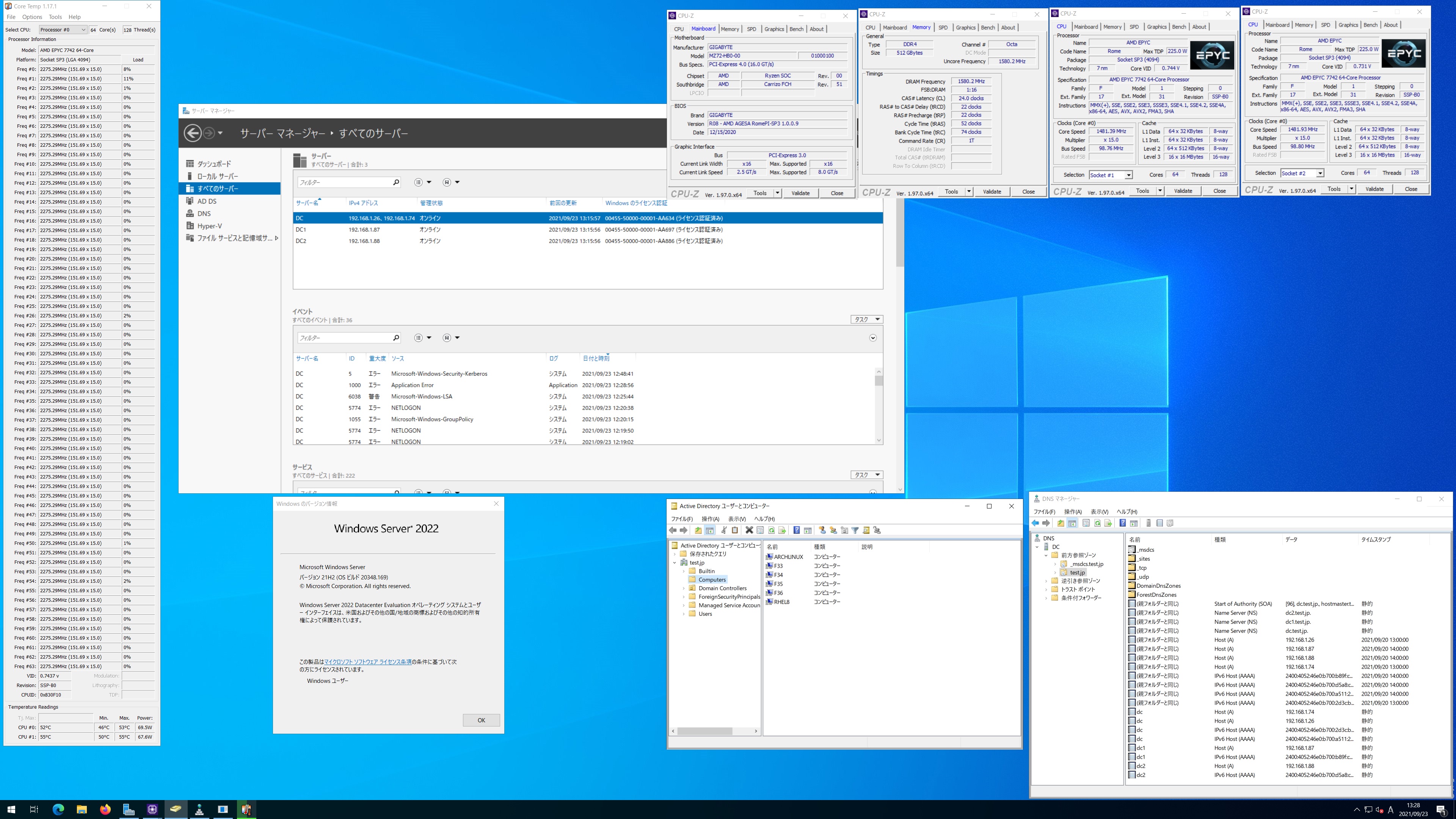
Red Hat Enterprise Linux release 8.4 Samba4.13.3 第2世代 AMD EPYC 7742 64-core Processor x2 soketsに構築した Windows Server 2022 Datacenter Active Directory Domain のメンバーに参加してみた

[root@rhel8 ~]# kinit administrator
Password for administrator@TEST.JP:
[root@rhel8 ~]# net ads join -U administrator
Enter administrator’s password:
Using short domain name — TEST
Joined ‘RHEL8’ to dns domain ‘test.jp’
No DNS domain configured for rhel8. Unable to perform DNS Update.
DNS update failed: NT_STATUS_INVALID_PARAMETER
[root@rhel8 ~]# systemctl restart winbind
[root@rhel8 ~]# wbinfo -u
TEST\guest
TEST\administrator
TEST\krbtgt
TEST\chibi
[root@rhel8 ~]# wbinfo -n chibi
S-1-5-21-969927908-3089190171-3526208924-1105 SID_USER (1)
[root@rhel8 ~]# net ads info
LDAP server: 192.168.1.87
LDAP server name: dc1.test.jp
Realm: TEST.JP
Bind Path: dc=TEST,dc=JP
LDAP port: 389
Server time: 木, 23 9月 2021 13:21:21 JST
KDC server: 192.168.1.87
Server time offset: 3
Last machine account password change: 木, 23 9月 2021 13:20:48 JST
[root@rhel8 ~]# host -4 dc
dc.test.jp has address 192.168.1.26
dc.test.jp has IPv6 address 2400:4052:46e0:b700:2d3c:b342:6a89:2a13
[root@rhel8 ~]# host -4 dc1
dc1.test.jp has address 192.168.1.87
dc1.test.jp has IPv6 address 2400:4052:46e0:b700:b89f:c68e:80a8:b54b
[root@rhel8 ~]# host -4 dc2
dc2.test.jp has address 192.168.1.88
dc2.test.jp has IPv6 address 2400:4052:46e0:b700:d5a8:c961:66d:194e
[root@rhel8 ~]# host -t SRV _ldap._tcp.test.jp
_ldap._tcp.test.jp has SRV record 0 100 389 dc1.test.jp.
_ldap._tcp.test.jp has SRV record 0 100 389 dc2.test.jp.
_ldap._tcp.test.jp has SRV record 0 100 389 dc.test.jp.
[root@rhel8 ~]# host -t SRV _kerberos._udp.test.jp
_kerberos._udp.test.jp has SRV record 0 100 88 dc.test.jp.
_kerberos._udp.test.jp has SRV record 0 100 88 dc2.test.jp.
_kerberos._udp.test.jp has SRV record 0 100 88 dc1.test.jp.
[root@rhel8 ~]# host -t A test.jp
test.jp has address 192.168.1.88
test.jp has address 192.168.1.87
test.jp has address 192.168.1.26
test.jp has address 192.168.1.74
[root@rhel8 ~]# host -4 dc
dc.test.jp has address 192.168.1.26
dc.test.jp has address 192.168.1.74
dc.test.jp has IPv6 address 2400:4052:46e0:b700:2d3c:b342:6a89:2a13
dc.test.jp has IPv6 address 2400:4052:46e0:b700:a511:2ad5:59e1:dafc
[root@rhel8 ~]# cat /etc/redhat-release
Red Hat Enterprise Linux release 8.4 (Ootpa)
[root@rhel8 ~]# smbd -V
Version 4.13.3
[root@rhel8 ~]# smbclient //192.168.1.26/netlogon -Uadministrator
Red Hat Enterprise Linux release 8.4 Samba4.13.3 AMD EPYC 7742 64-core Processor x2 soketsに構築した Windows Server 2022 Datacenter Active Directory Domain のメンバーに参加してみた

カテゴリー: 2 Sockets, rhel8 | コメントする

Fedora release 35 Samba4.15.0 第2世代 AMD EPYC 7742 64-core Processor x2 soketsに構築した Windows Server 2022 Datacenter Active Directory Domain のメンバーに参加してみた

[root@f35 ~]# kinit administrator
Password for administrator@TEST.JP:
[root@f35 ~]# net ads join -U administrator
Password for [TEST\administrator]:
Using short domain name — TEST
Joined ‘F35’ to dns domain ‘test.jp’
No DNS domain configured for f35. Unable to perform DNS Update.
DNS update failed: NT_STATUS_INVALID_PARAMETER
[root@f35 ~]# systemctl restart winbind
[root@f35 ~]# wbinfo -u
TEST\guest
TEST\administrator
TEST\krbtgt
TEST\chibi
[root@f35 ~]# wbinfo -n chibi
S-1-5-21-969927908-3089190171-3526208924-1105 SID_USER (1)
[root@f35 ~]# net ads info
LDAP server: 0.0.0.0
LDAP server name: (null)
Realm: (null)
Bind Path: (null)
LDAP port: 0
Server time: 木, 23 9月 2021 12:32:36 JST
KDC server: 192.168.1.88
Server time offset: 4
Last machine account password change: 木, 01 1月 1970 09:00:00 JST
[root@f35 ~]# host -4 dc
dc.test.jp has address 192.168.1.26
dc.test.jp has address 192.168.1.74
dc.test.jp has IPv6 address 2400:4052:46e0:b700:2d3c:b342:6a89:2a13
dc.test.jp has IPv6 address 2400:4052:46e0:b700:a511:2ad5:59e1:dafc
[root@f35 ~]# host -4 dc1
dc1.test.jp has address 192.168.1.87
dc1.test.jp has IPv6 address 2400:4052:46e0:b700:b89f:c68e:80a8:b54b
[root@f35 ~]# host -4 dc2
dc2.test.jp has address 192.168.1.88
dc2.test.jp has IPv6 address 2400:4052:46e0:b700:d5a8:c961:66d:194e
[root@f35 ~]# host -t SRV _ldap._tcp.test.jp
_ldap._tcp.test.jp has SRV record 0 100 389 dc2.test.jp.
_ldap._tcp.test.jp has SRV record 0 100 389 dc.test.jp.
_ldap._tcp.test.jp has SRV record 0 100 389 dc1.test.jp.
[root@f35 ~]# host -t SRV _kerberos._udp.test.jp
_kerberos._udp.test.jp has SRV record 0 100 88 dc2.test.jp.
_kerberos._udp.test.jp has SRV record 0 100 88 dc1.test.jp.
_kerberos._udp.test.jp has SRV record 0 100 88 dc.test.jp.
[root@f35 ~]# host -t A test.jp
test.jp has address 192.168.1.26
test.jp has address 192.168.1.87
test.jp has address 192.168.1.88
test.jp has address 192.168.1.74
[root@f35 ~]# cat /etc/redhat-release
Fedora release 35 (Thirty Five)
[root@f35 ~]# samba -V
Version 4.15.0
[root@f35 ~]# smbclient //192.168.1.26/netlogon -Uadministrator
Fedora release 35 Samba4.15.0 AMD EPYC 7742 64-core Processor x2 soketsに構築した Windows Server 2022 Datacenter Active Directory Domain のメンバーに参加してみた

カテゴリー: 2 Sockets, fedora, samba4, windows | コメントする

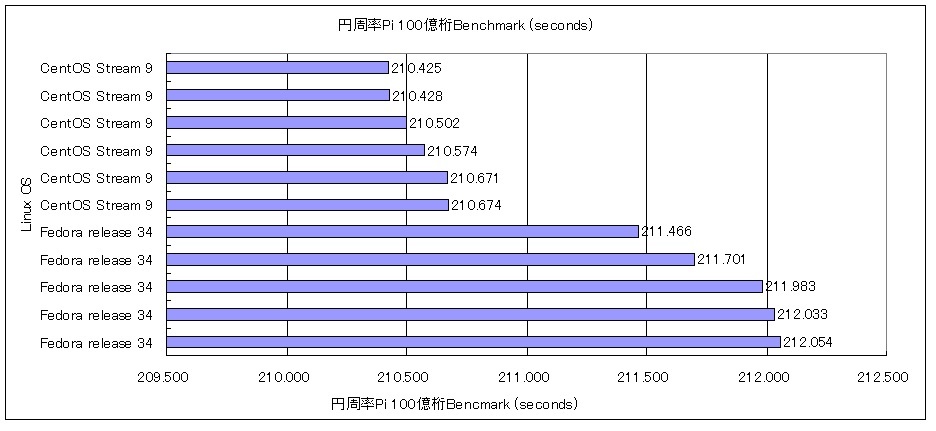
AMD EPYC 7502P 32-Core Processor TITAN RTX y-cruncher v0.7.8.9506-static 円周率Piの100億桁でのBenchmarkをLinuxOSを変えて動作させてみたCentOS Stream release 9 210.425 seconds

←小さいほど高性能
円周率Piの 100億桁でのBenchmark

CentOS Stream release 9 210.425 seconds データ詳細
AMD EPYC 7502P 32-Core Processor 128GB CentOS Stream release 9 TITAN RTX y-cruncher v0.7.8.9507-static CUDA 11.4 Pi 210.425 seconds ( 3.507 minutes ) 10,000,000,000

カテゴリー: CentOS Stream release 9 | コメントする

Fedora release 35 Samba4.15.0 Update

Fedora release 35 Sambaが4.15.0にUpdateされました。

[root@f35 ~]# uname -r
5.14.6-300.fc35.x86_64
[root@f35 ~]# php -v
PHP 8.0.10 (cli) (built: Aug 24 2021 15:40:40) ( NTS gcc x86_64 )
Copyright (c) The PHP Group
Zend Engine v4.0.10, Copyright (c) Zend Technologies
with Zend OPcache v8.0.10, Copyright (c), by Zend Technologies
[root@f35 ~]# curl -V
curl 7.78.0 (x86_64-redhat-linux-gnu) libcurl/7.78.0 OpenSSL/1.1.1l-fips zlib/1.2.11 brotli/1.0.9 libidn2/2.3.2 libpsl/0.21.1 (+libidn2/2.3.2) libssh/0.9.5/openssl/zlib nghttp2/1.44.0 OpenLDAP/2.4.59
Release-Date: 2021-07-21
Protocols: dict file ftp ftps gopher gophers http https imap imaps ldap ldaps mqtt pop3 pop3s rtsp scp sftp smb smbs smtp smtps telnet tftp
Features: alt-svc AsynchDNS brotli GSS-API HSTS HTTP2 HTTPS-proxy IDN IPv6 Kerberos Largefile libz NTLM NTLM_WB PSL SPNEGO SSL TLS-SRP UnixSockets
[root@f35 ~]# samba -V
Version 4.15.0
[root@f35 ~]# cat /etc/redhat-release
Fedora release 35 (Thirty Five)
[root@f35 ~]#

カテゴリー: fedora | コメントする