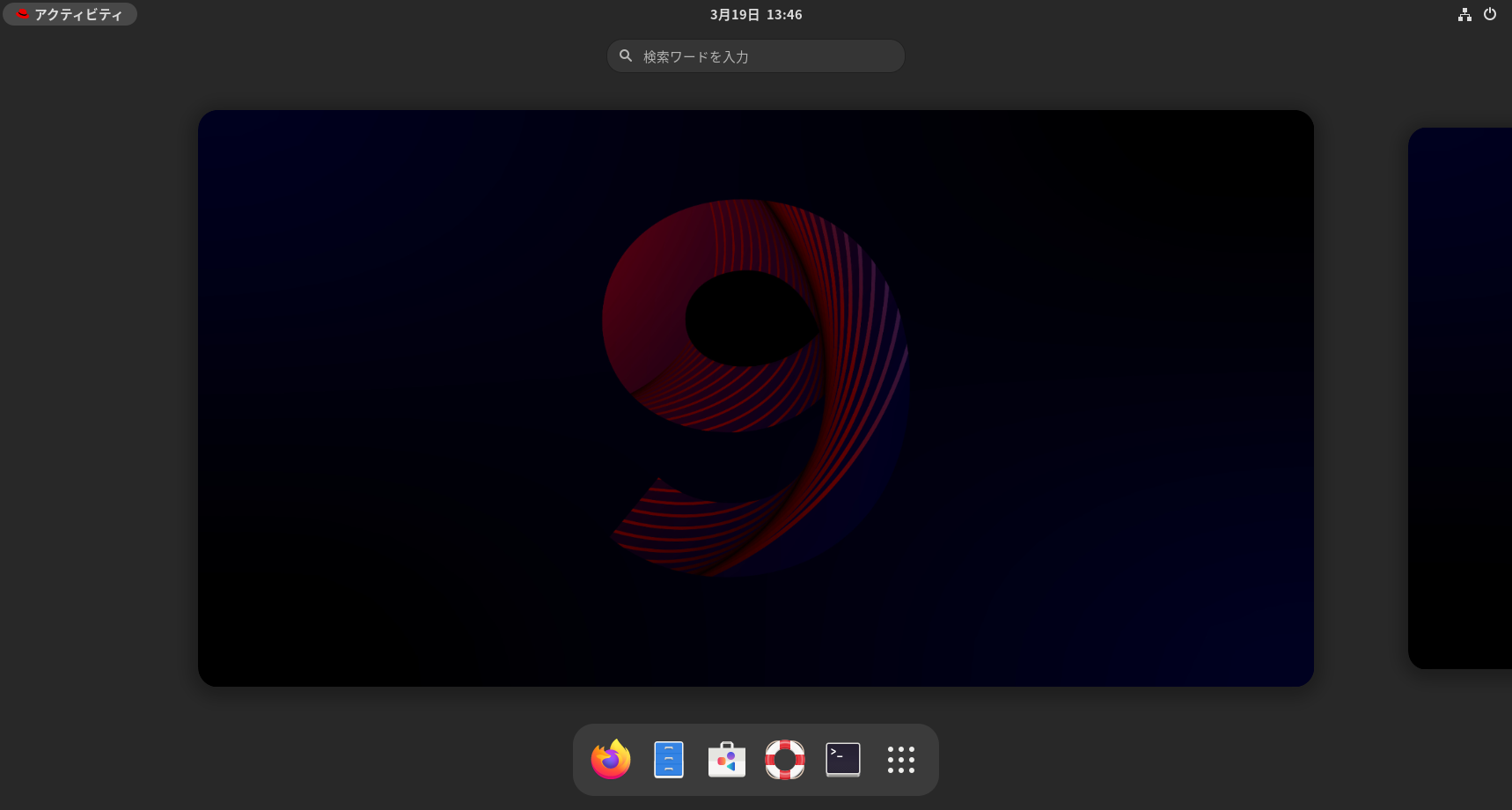
米Red Hatが「Red Hat Enterprise Linux 9」を発表


米Red Hatが「Red Hat Enterprise Linux 9」を発表しました。ReleaseNoteはこちらです。ソースはこちらです。

[root@rhel9 ~]# uname -r
5.14.0-70.13.1.el9_0.x86_64
[root@rhel9 ~]# php -v
PHP 8.1.6 (cli) (built: May 11 2022 01:14:18) (NTS gcc x86_64)
Copyright (c) The PHP Group
Zend Engine v4.1.6, Copyright (c) Zend Technologies
with Zend OPcache v8.1.6, Copyright (c), by Zend Technologies
[root@rhel9 ~]# curl -V
curl 7.76.1 (x86_64-redhat-linux-gnu) libcurl/7.76.1 OpenSSL/3.0.1 zlib/1.2.11 brotli/1.0.9 libidn2/2.3.0 libpsl/0.21.1 (+libidn2/2.3.0) libssh/0.9.6/openssl/zlib nghttp2/1.43.0
Release-Date: 2021-04-14
Protocols: dict file ftp ftps gopher gophers http https imap imaps ldap ldaps mqtt pop3 pop3s rtsp scp sftp smb smbs smtp smtps telnet tftp
Features: alt-svc AsynchDNS brotli GSS-API HTTP2 HTTPS-proxy IDN IPv6 Kerberos Largefile libz NTLM NTLM_WB PSL SPNEGO SSL TLS-SRP UnixSockets
[root@rhel9 ~]# smbd -V
Version 4.15.5
[root@rhel9 ~]# cat /etc/redhat-release
Red Hat Enterprise Linux release 9.0 (Plow)
[root@rhel9 ~]#
カテゴリー: rhel9 | コメントする

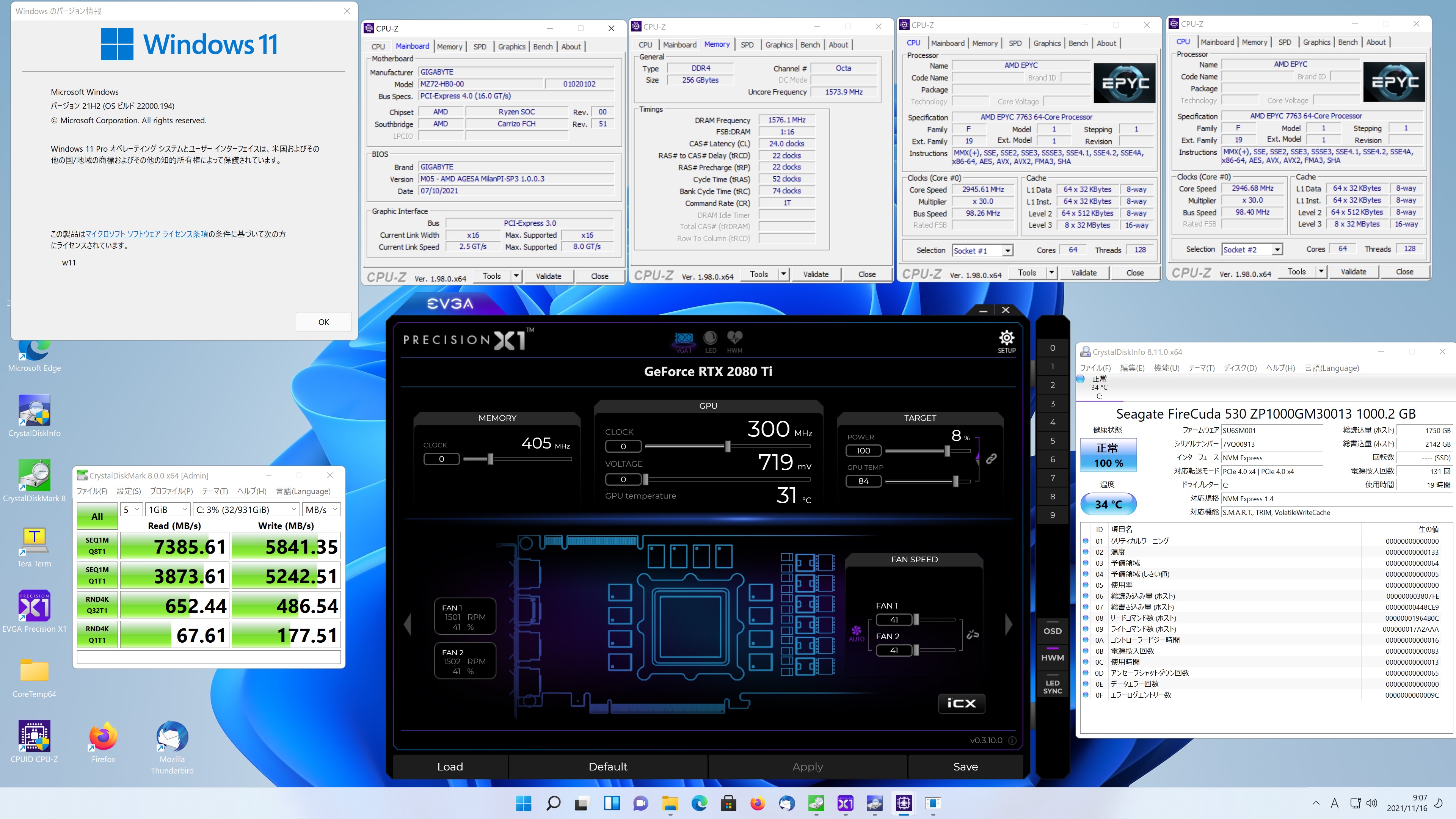
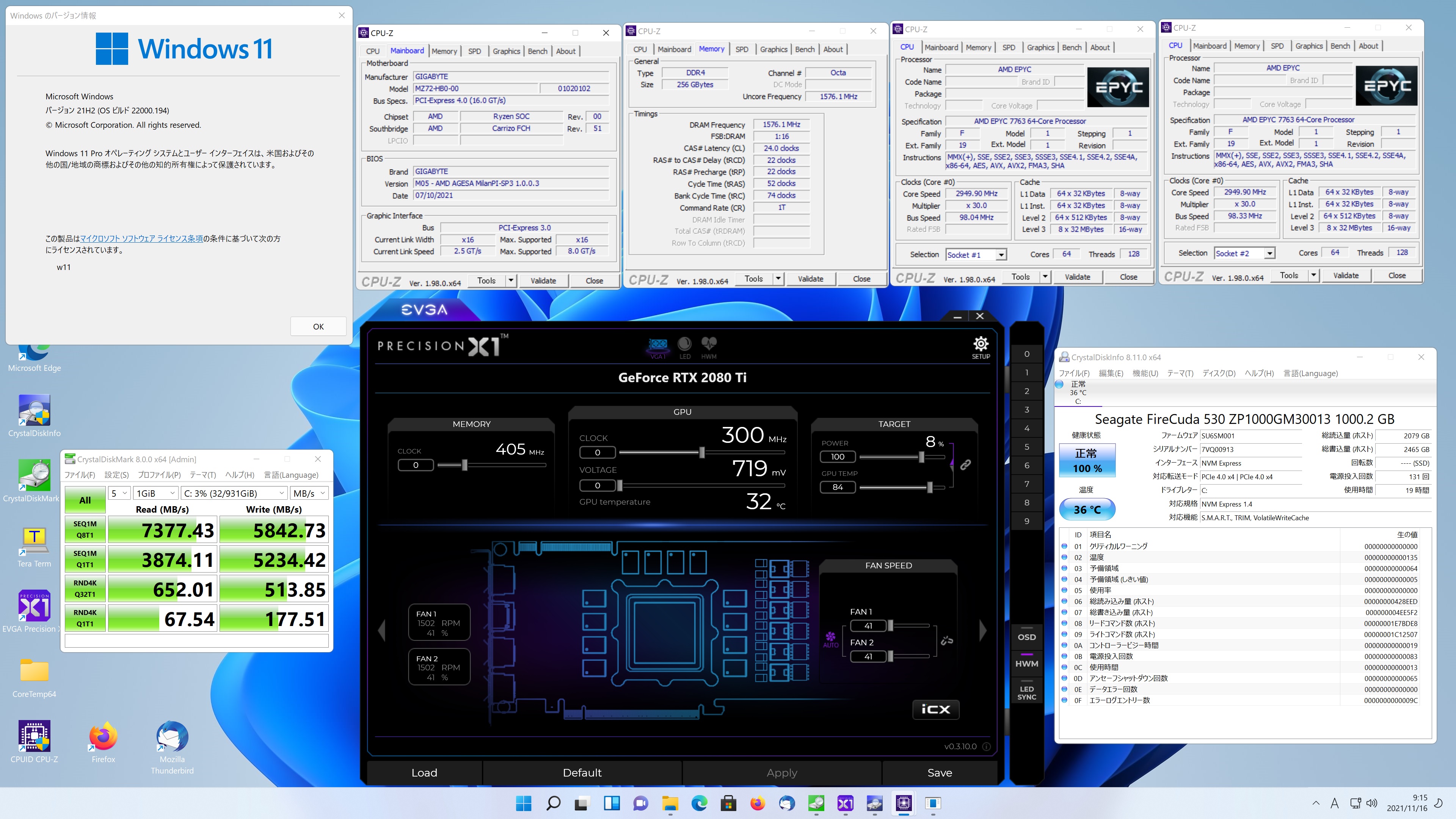
第3世代 AMD EPYC 7763 64-Core Processor 2-sockets 128-core 256threadss Memory 256GB Windows 11 Pro Seagate FireCuda 530 1TB でDiskBenchを動作させてみた Read 7385.61MB/s

Seagate FireCuda 530 1TB DiskBench スコア Read 7385.61 MB/s

Seagate FireCuda 530 1TB DiskBench スコア Read 7377.43 MB/s

関連サイト

カテゴリー: 2 Sockets, windows | コメントする

Fedora release 35 Kernel5.15.2-200.fc35.x86_64 Upgrade

Fedora release 35 Kernelが5.15.2-200.fc35.x86_64にUpgradeされました。

[root@f35 ~]# uname -r
5.15.2-200.fc35.x86_64
[root@f35 ~]# php -v
PHP 8.0.12 (cli) (built: Oct 19 2021 10:34:32) ( NTS gcc x86_64 )
Copyright (c) The PHP Group
Zend Engine v4.0.12, Copyright (c) Zend Technologies
with Zend OPcache v8.0.12, Copyright (c), by Zend Technologies
[root@f35 ~]# curl -V
curl 7.79.1 (x86_64-redhat-linux-gnu) libcurl/7.79.1 OpenSSL/1.1.1l-fips zlib/1.2.11 brotli/1.0.9 libidn2/2.3.2 libpsl/0.21.1 (+libidn2/2.3.2) libssh/0.9.6/openssl/zlib nghttp2/1.45.1 OpenLDAP/2.4.59
Release-Date: 2021-09-22
Protocols: dict file ftp ftps gopher gophers http https imap imaps ldap ldaps mqtt pop3 pop3s rtsp scp sftp smb smbs smtp smtps telnet tftp
Features: alt-svc AsynchDNS brotli GSS-API HSTS HTTP2 HTTPS-proxy IDN IPv6 Kerberos Largefile libz NTLM NTLM_WB PSL SPNEGO SSL TLS-SRP UnixSockets
[root@f35 ~]# samba -V
Version 4.15.1
[root@f35 ~]# cat /etc/redhat-release
Fedora release 35 (Thirty Five)
[root@f35 ~]#

カテゴリー: fedora | コメントする

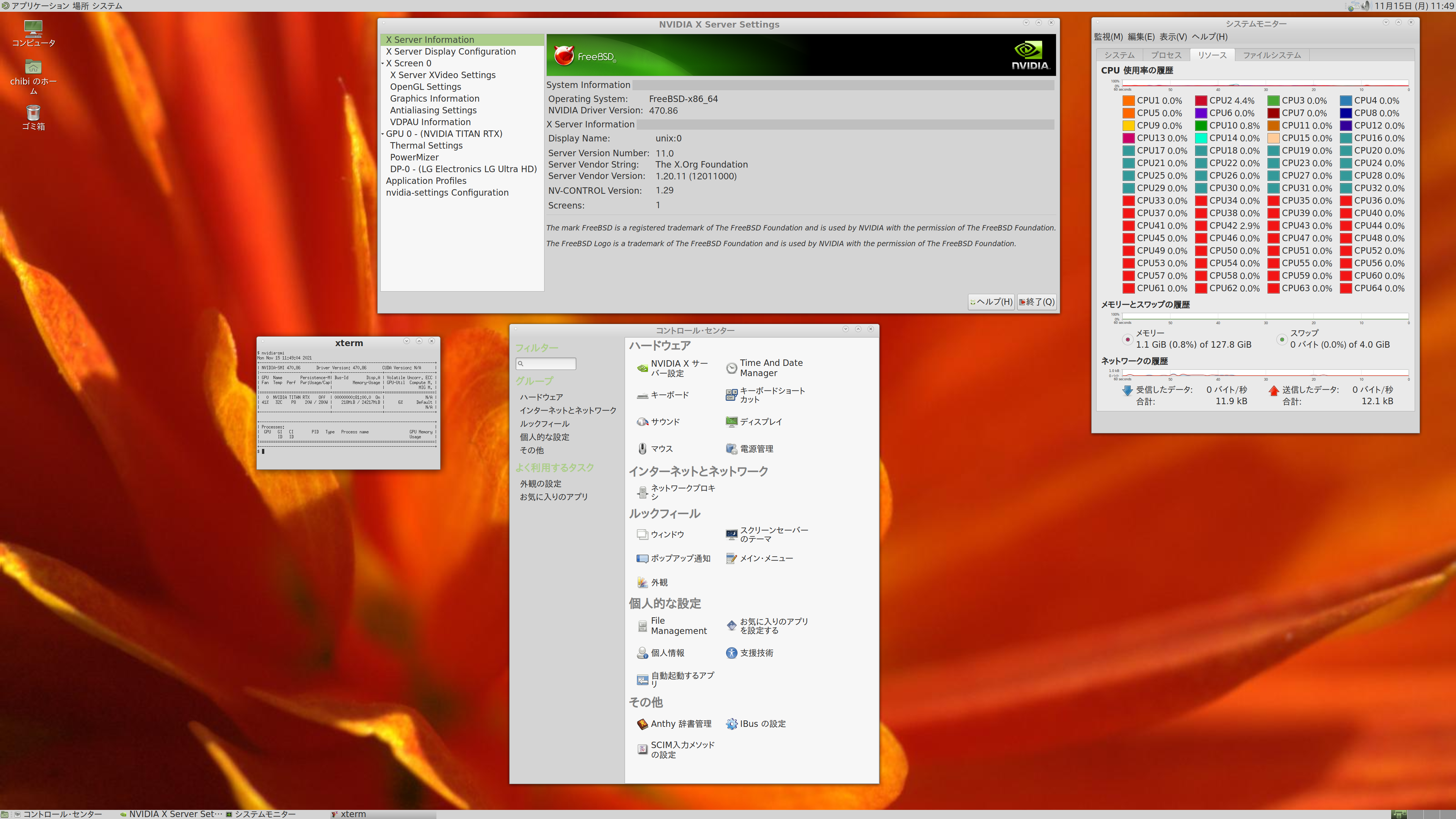
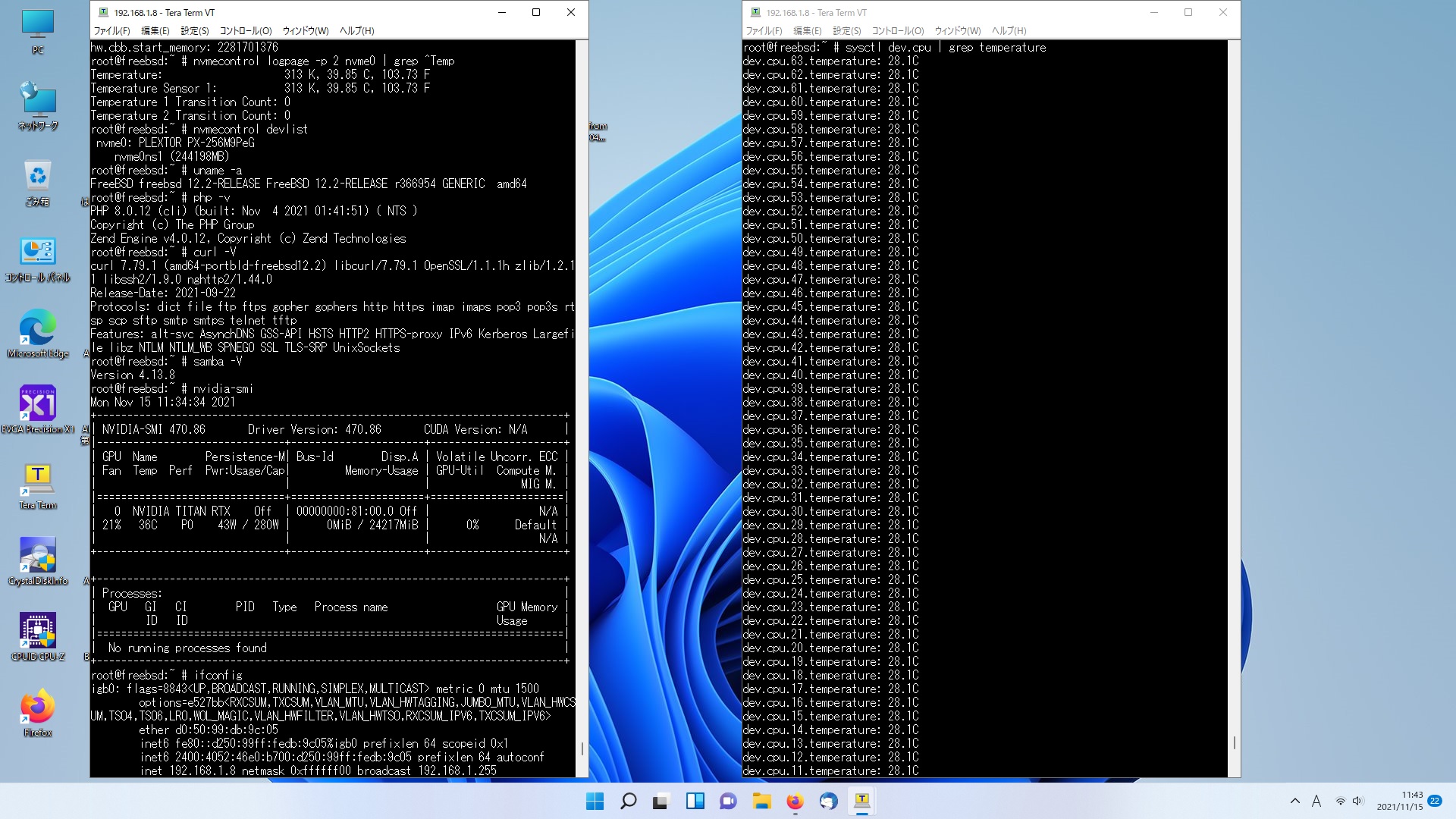
AMD EPYC 7502P 32-Core Processor でFreeBSD 12.2-RELEASE MATEを起動 PHP 8.0.12 Samba4.13.8 470.86.nvidia-smi ifconfig amdtemp等を設定してみた


root@freebsd:~ # sysctl hw.model
hw.model: AMD EPYC 7502P 32-Core Processor
root@freebsd:~ # uname -a
FreeBSD freebsd 12.2-RELEASE FreeBSD 12.2-RELEASE r366954 GENERIC amd64
root@freebsd:~ # php -v
PHP 8.0.12 (cli) (built: Nov 4 2021 01:41:51) ( NTS )
Copyright (c) The PHP Group
Zend Engine v4.0.12, Copyright (c) Zend Technologies
root@freebsd:~ # curl -V
curl 7.79.1 (amd64-portbld-freebsd12.2) libcurl/7.79.1 OpenSSL/1.1.1h zlib/1.2.11 libssh2/1.9.0 nghttp2/1.44.0
Release-Date: 2021-09-22
Protocols: dict file ftp ftps gopher gophers http https imap imaps pop3 pop3s rtsp scp sftp smtp smtps telnet tftp
Features: alt-svc AsynchDNS GSS-API HSTS HTTP2 HTTPS-proxy IPv6 Kerberos Largefile libz NTLM NTLM_WB SPNEGO SSL TLS-SRP UnixSockets
root@freebsd:~ # samba -V
Version 4.13.8
root@freebsd:~ # kldload amdtemp
kldload: can’t load amdtemp: module already loaded or in kernel
root@freebsd:~ # sysctl dev.cpu|grep temperature
dev.cpu.63.temperature: 28.6C
dev.cpu.62.temperature: 28.6C
dev.cpu.61.temperature: 28.6C
dev.cpu.60.temperature: 28.6C
dev.cpu.59.temperature: 28.6C
dev.cpu.58.temperature: 28.6C
dev.cpu.57.temperature: 28.6C
dev.cpu.56.temperature: 28.6C
dev.cpu.55.temperature: 28.6C
dev.cpu.54.temperature: 28.6C
dev.cpu.53.temperature: 28.6C
dev.cpu.52.temperature: 28.6C
dev.cpu.51.temperature: 28.6C
dev.cpu.50.temperature: 28.6C
dev.cpu.49.temperature: 28.6C
dev.cpu.48.temperature: 28.6C
dev.cpu.47.temperature: 28.6C
dev.cpu.46.temperature: 28.6C
dev.cpu.45.temperature: 28.6C
dev.cpu.44.temperature: 28.6C
dev.cpu.43.temperature: 28.6C
dev.cpu.42.temperature: 28.6C
dev.cpu.41.temperature: 28.6C
dev.cpu.40.temperature: 28.6C
dev.cpu.39.temperature: 28.6C
dev.cpu.38.temperature: 28.6C
dev.cpu.37.temperature: 28.6C
dev.cpu.36.temperature: 28.6C
dev.cpu.35.temperature: 28.6C
dev.cpu.34.temperature: 28.6C
dev.cpu.33.temperature: 28.6C
dev.cpu.32.temperature: 28.6C
dev.cpu.31.temperature: 28.6C
dev.cpu.30.temperature: 28.6C
dev.cpu.29.temperature: 28.6C
dev.cpu.28.temperature: 28.6C
dev.cpu.27.temperature: 28.6C
dev.cpu.26.temperature: 28.6C
dev.cpu.25.temperature: 28.6C
dev.cpu.24.temperature: 28.6C
dev.cpu.23.temperature: 28.6C
dev.cpu.22.temperature: 28.6C
dev.cpu.21.temperature: 28.6C
dev.cpu.20.temperature: 28.6C
dev.cpu.19.temperature: 28.6C
dev.cpu.18.temperature: 28.6C
dev.cpu.17.temperature: 28.6C
dev.cpu.16.temperature: 28.6C
dev.cpu.15.temperature: 28.6C
dev.cpu.14.temperature: 28.6C
dev.cpu.13.temperature: 28.6C
dev.cpu.12.temperature: 28.6C
dev.cpu.11.temperature: 28.6C
dev.cpu.10.temperature: 28.6C
dev.cpu.9.temperature: 28.6C
dev.cpu.8.temperature: 28.6C
dev.cpu.7.temperature: 28.6C
dev.cpu.6.temperature: 28.6C
dev.cpu.5.temperature: 28.6C
dev.cpu.4.temperature: 28.6C
dev.cpu.3.temperature: 28.6C
dev.cpu.2.temperature: 28.6C
dev.cpu.1.temperature: 28.6C
dev.cpu.0.temperature: 28.6C
root@freebsd:~ # lscpu
Architecture: amd64
Byte Order: Little Endian
Total CPU(s): 64
Thread(s) per core: 1
Core(s) per socket: 64
Socket(s): 1
Vendor: AuthenticAMD
CPU family: 23
Model: 49
Model name: AMD EPYC 7502P 32-Core Processor
Stepping: 0
L1d cache: 32K
L1i cache: 32K
L2 cache: 512K
L3 cache: 128M
Flags: fpu vme de pse tsc msr pae mce cx8 apic sep mtrr pge mca cmov pat pse36 cflsh mmx fxsr sse sse2 htt sse3 pclmulqdq monitor ssse3 fma cx16 sse4_1 sse4_2 popcnt aes xsave osxsave avx f16c rdrnd syscall nx mmxext fxsr_opt pdpe1gb rdtscp lm lahf_lm cmp_legacy svm extapic cr8_legacy lzcnt sse4a misalignsse 3dnowprefetch osvw ibs skinit wdt tce topoext perfctr_core perfctr_nb pcx_l2i
root@freebsd:~ # lstopo
Machine (128GB)
Package L#0
L3 L#0 (16MB)
L2 L#0 (512KB) + L1d L#0 (32KB) + L1i L#0 (32KB) + Core L#0
PU L#0 (P#0)
PU L#1 (P#1)
L2 L#1 (512KB) + L1d L#1 (32KB) + L1i L#1 (32KB) + Core L#1
PU L#2 (P#2)
PU L#3 (P#3)
L2 L#2 (512KB) + L1d L#2 (32KB) + L1i L#2 (32KB) + Core L#2
PU L#4 (P#4)
PU L#5 (P#5)
L2 L#3 (512KB) + L1d L#3 (32KB) + L1i L#3 (32KB) + Core L#3
PU L#6 (P#6)
PU L#7 (P#7)
L3 L#1 (16MB)
L2 L#4 (512KB) + L1d L#4 (32KB) + L1i L#4 (32KB) + Core L#4
PU L#8 (P#8)
PU L#9 (P#9)
L2 L#5 (512KB) + L1d L#5 (32KB) + L1i L#5 (32KB) + Core L#5
PU L#10 (P#10)
PU L#11 (P#11)
L2 L#6 (512KB) + L1d L#6 (32KB) + L1i L#6 (32KB) + Core L#6
PU L#12 (P#12)
PU L#13 (P#13)
L2 L#7 (512KB) + L1d L#7 (32KB) + L1i L#7 (32KB) + Core L#7
PU L#14 (P#14)
PU L#15 (P#15)
L3 L#2 (16MB)
L2 L#8 (512KB) + L1d L#8 (32KB) + L1i L#8 (32KB) + Core L#8
PU L#16 (P#16)
PU L#17 (P#17)
L2 L#9 (512KB) + L1d L#9 (32KB) + L1i L#9 (32KB) + Core L#9
PU L#18 (P#18)
PU L#19 (P#19)
L2 L#10 (512KB) + L1d L#10 (32KB) + L1i L#10 (32KB) + Core L#10
PU L#20 (P#20)
PU L#21 (P#21)
L2 L#11 (512KB) + L1d L#11 (32KB) + L1i L#11 (32KB) + Core L#11
PU L#22 (P#22)
PU L#23 (P#23)
L3 L#3 (16MB)
L2 L#12 (512KB) + L1d L#12 (32KB) + L1i L#12 (32KB) + Core L#12
PU L#24 (P#24)
PU L#25 (P#25)
L2 L#13 (512KB) + L1d L#13 (32KB) + L1i L#13 (32KB) + Core L#13
PU L#26 (P#26)
PU L#27 (P#27)
L2 L#14 (512KB) + L1d L#14 (32KB) + L1i L#14 (32KB) + Core L#14
PU L#28 (P#28)
PU L#29 (P#29)
L2 L#15 (512KB) + L1d L#15 (32KB) + L1i L#15 (32KB) + Core L#15
PU L#30 (P#30)
PU L#31 (P#31)
L3 L#4 (16MB)
L2 L#16 (512KB) + L1d L#16 (32KB) + L1i L#16 (32KB) + Core L#16
PU L#32 (P#32)
PU L#33 (P#33)
L2 L#17 (512KB) + L1d L#17 (32KB) + L1i L#17 (32KB) + Core L#17
PU L#34 (P#34)
PU L#35 (P#35)
L2 L#18 (512KB) + L1d L#18 (32KB) + L1i L#18 (32KB) + Core L#18
PU L#36 (P#36)
PU L#37 (P#37)
L2 L#19 (512KB) + L1d L#19 (32KB) + L1i L#19 (32KB) + Core L#19
PU L#38 (P#38)
PU L#39 (P#39)
L3 L#5 (16MB)
L2 L#20 (512KB) + L1d L#20 (32KB) + L1i L#20 (32KB) + Core L#20
PU L#40 (P#40)
PU L#41 (P#41)
L2 L#21 (512KB) + L1d L#21 (32KB) + L1i L#21 (32KB) + Core L#21
PU L#42 (P#42)
PU L#43 (P#43)
L2 L#22 (512KB) + L1d L#22 (32KB) + L1i L#22 (32KB) + Core L#22
PU L#44 (P#44)
PU L#45 (P#45)
L2 L#23 (512KB) + L1d L#23 (32KB) + L1i L#23 (32KB) + Core L#23
PU L#46 (P#46)
PU L#47 (P#47)
L3 L#6 (16MB)
L2 L#24 (512KB) + L1d L#24 (32KB) + L1i L#24 (32KB) + Core L#24
PU L#48 (P#48)
PU L#49 (P#49)
L2 L#25 (512KB) + L1d L#25 (32KB) + L1i L#25 (32KB) + Core L#25
PU L#50 (P#50)
PU L#51 (P#51)
L2 L#26 (512KB) + L1d L#26 (32KB) + L1i L#26 (32KB) + Core L#26
PU L#52 (P#52)
PU L#53 (P#53)
L2 L#27 (512KB) + L1d L#27 (32KB) + L1i L#27 (32KB) + Core L#27
PU L#54 (P#54)
PU L#55 (P#55)
L3 L#7 (16MB)
L2 L#28 (512KB) + L1d L#28 (32KB) + L1i L#28 (32KB) + Core L#28
PU L#56 (P#56)
PU L#57 (P#57)
L2 L#29 (512KB) + L1d L#29 (32KB) + L1i L#29 (32KB) + Core L#29
PU L#58 (P#58)
PU L#59 (P#59)
L2 L#30 (512KB) + L1d L#30 (32KB) + L1i L#30 (32KB) + Core L#30
PU L#60 (P#60)
PU L#61 (P#61)
L2 L#31 (512KB) + L1d L#31 (32KB) + L1i L#31 (32KB) + Core L#31
PU L#62 (P#62)
PU L#63 (P#63)
HostBridge L#0
PCIBridge
PCI 14a4:23f1
HostBridge L#2
PCIBridge
2 x { PCI 8086:1521 }
PCIBridge
PCI 1022:7901
PCIBridge
PCI 1022:7901
HostBridge L#6
PCIBridge
PCI 10de:1e02
PCIBridge
PCI 1022:7901
PCIBridge
PCI 1022:7901
HostBridge L#10
PCIBridge
PCIBridge
PCI 1a03:2000
root@freebsd:~ # sysctl hw.physmem
hw.physmem: 137261461504
root@freebsd:~ # sysctl hw | grep mem
hw.physmem: 137261461504
hw.usermem: 134496657408
hw.realmem: 137438953472
hw.pci.host_mem_start: 2147483648
hw.cbb.start_memory: 2281701376
root@freebsd:~ # nvmecontrol logpage -p 2 nvme0 | grep ^Temp
Temperature: 313 K, 39.85 C, 103.73 F
Temperature Sensor 1: 313 K, 39.85 C, 103.73 F
Temperature 1 Transition Count: 0
Temperature 2 Transition Count: 0
root@freebsd:~ # nvmecontrol devlist
nvme0: PLEXTOR PX-256M9PeG
nvme0ns1 (244198MB)
root@freebsd:~ #
AMD EPYC 7502P 32-Core Processor でFreeBSD 12.2-RELEASE MATEを起動 PHP 8.0.12 Samba4.13.8 470.86.nvidia-smi ifconfig amdtemp等をInstallしてみた

カテゴリー: freebsd, nvidia | コメントする

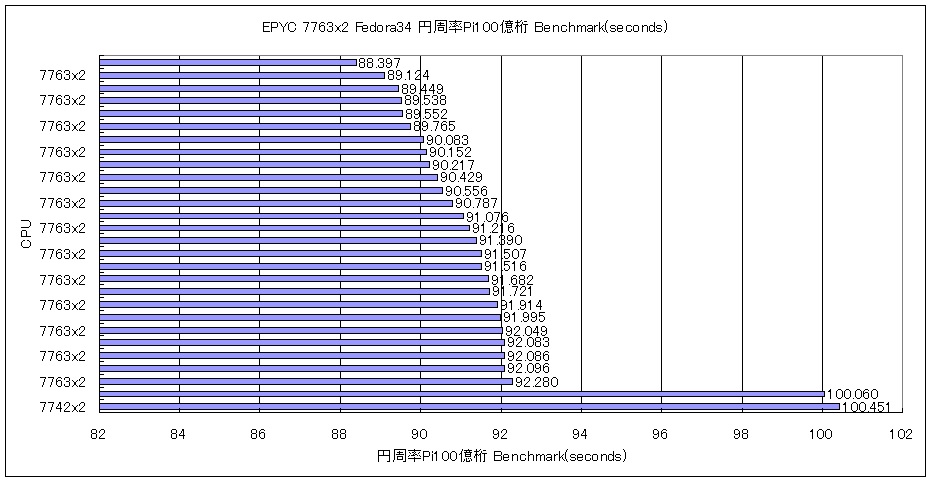
第3世代 AMD EPYC 7763 64-Core Processor x2個128-core 256threads 256GB Fedora release 34 RTX2080Ti y-cruncher v0.7.8.9507-static CUDA 11.5 円周率Pi 100億桁のBenchMarkを動作させてみた 89.124 seconds(Kernel5.14.16)

←小さいほど短時間
円周率Piの100億桁でのBenchmark (seconds)

AMD EPYC 7763 64-Core Processor x2個 Fedora release 34 89.124 seconds (Kernel5.14.16)データ詳細
AMD EPYC 7763 64-Core Processor x2 256G Fedora release 34 RTX2080Ti y-cruncher v0.7.8.9507-static CUDA 11.5 Pi 89.124 seconds ( 1.485 minutes ) 10,000,000,000
参考サイト 2

カテゴリー: 2 Sockets, fedora, nvidia | コメントする