
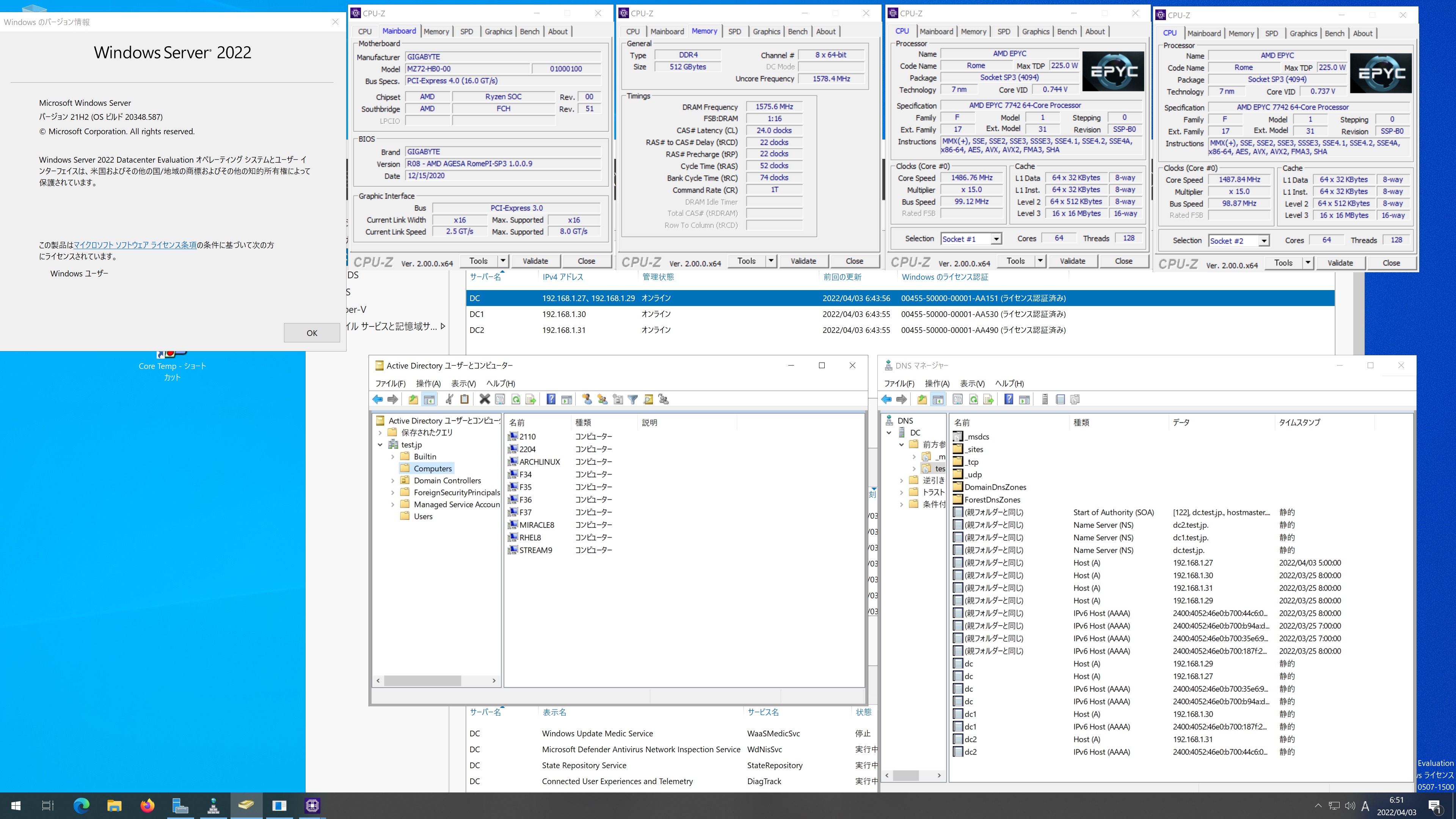
CentOS Stream release 9 Samba4.15.5 第2世代 AMD EPYC 7742 64-core Processor x2 soketsに構築した Windows Server 2022 Datacenter Active Directory Domain のメンバーに参加してみた
[root@archlinux ~]# kinit administrator
Password for administrator@TEST.JP:
[root@archlinux ~]# net ads join -U administrator
Password for [TEST\administrator]:
Using short domain name — TEST
Joined ‘ARCHLINUX’ to dns domain ‘test.jp’
No DNS domain configured for archlinux. Unable to perform DNS Update.
DNS update failed: NT_STATUS_INVALID_PARAMETER
[root@archlinux ~]# systemctl restart winbind
[root@archlinux ~]# wbinfo -u
TEST\guest
TEST\administrator
TEST\krbtgt
TEST\chibi
[root@archlinux ~]# wbinfo -n chibi
S-1-5-21-1558586345-1278082141-3490387582-1103 SID_USER (1)
[root@archlinux ~]# net ads info
LDAP server: 0.0.0.0
LDAP server name: (null)
Realm: (null)
Bind Path: (null)
LDAP port: 0
Server time: 日, 03 4月 2022 06:33:04 JST
KDC server: 192.168.1.31
Server time offset: 0
Last machine account password change: 木, 01 1月 1970 09:00:00 JST
[root@archlinux ~]# host -4 dc
dc.test.jp has address 192.168.1.27
dc.test.jp has address 192.168.1.29
dc.test.jp has IPv6 address 2400:4052:46e0:b700:b94a:d3cf:f733:1de1
dc.test.jp has IPv6 address 2400:4052:46e0:b700:35e6:944a:4878:fa93
[root@archlinux ~]# host -4 dc1
dc1.test.jp has address 192.168.1.30
dc1.test.jp has IPv6 address 2400:4052:46e0:b700:187f:27ee:c7d7:f12e
[root@archlinux ~]# host -4 dc2
dc2.test.jp has address 192.168.1.31
dc2.test.jp has IPv6 address 2400:4052:46e0:b700:44c6:390:1f0c:1df7
[root@archlinux ~]# host -t SRV _ldap._tcp.test.jp
_ldap._tcp.test.jp has SRV record 0 100 389 dc.test.jp.
_ldap._tcp.test.jp has SRV record 0 100 389 dc2.test.jp.
_ldap._tcp.test.jp has SRV record 0 100 389 dc1.test.jp.
[root@archlinux ~]# host -t SRV _kerberos._udp.test.jp
_kerberos._udp.test.jp has SRV record 0 100 88 dc.test.jp.
_kerberos._udp.test.jp has SRV record 0 100 88 dc2.test.jp.
_kerberos._udp.test.jp has SRV record 0 100 88 dc1.test.jp.
[root@archlinux ~]# host -t A test.jp
test.jp has address 192.168.1.31
test.jp has address 192.168.1.29
test.jp has address 192.168.1.27
test.jp has address 192.168.1.30
[root@archlinux ~]# cat /etc/os-release
NAME=”Arch Linux”
PRETTY_NAME=”Arch Linux”
ID=arch
BUILD_ID=rolling
ANSI_COLOR=”38;2;23;147;209″
HOME_URL=”https://archlinux.org/”
DOCUMENTATION_URL=”https://wiki.archlinux.org/”
SUPPORT_URL=”https://bbs.archlinux.org/”
BUG_REPORT_URL=”https://bugs.archlinux.org/”
LOGO=archlinux-logo
[root@archlinux ~]# samba -V
Version 4.15.6
[root@archlinux ~]# smbclient //192.168.1.27/netlogon -Uadministrator
CentOS Stream release 9 Samba4.15.5 AMD EPYC 7742 64-core Processor x2 soketsに構築した Windows Server 2022 Datacenter Active Directory Domain のメンバーに参加してみた
カテゴリー: 2 Sockets, CentOS Stream release 9, samba4, windows | コメントする

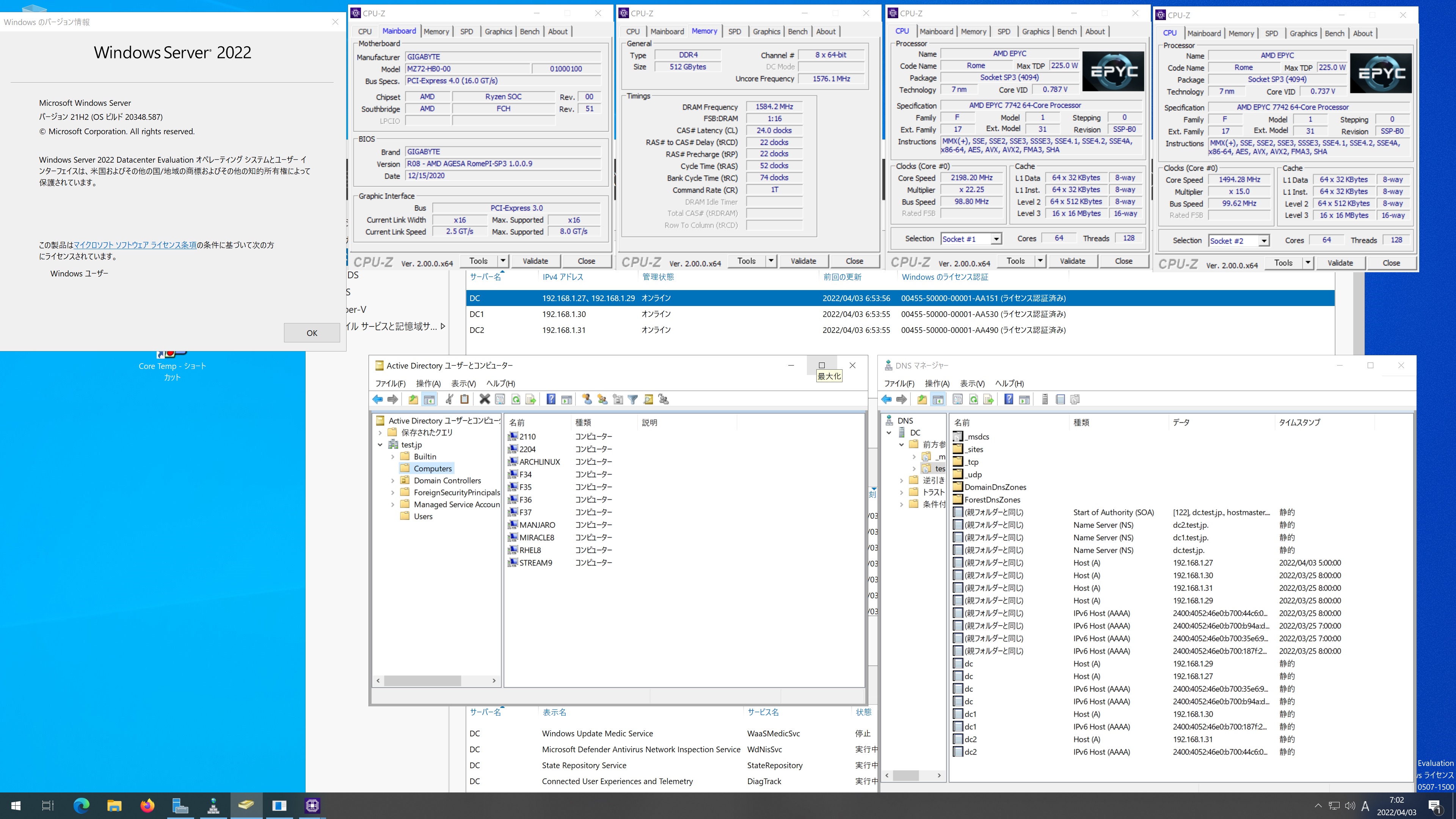
Manjaro Linux Samba4.15.5 第2世代 AMD EPYC 7742 64-core Processor x2 soketsに構築した Windows Server 2022 Datacenter Active Directory Domain のメンバーに参加してみた

[manjaro ~]# kinit administrator
Password for administrator@TEST.JP:
[manjaro ~]# net ads join -U administrator
Password for [TEST\administrator]:
Using short domain name — TEST
Joined ‘MANJARO’ to dns domain ‘test.jp’
No DNS domain configured for manjaro. Unable to perform DNS Update.
DNS update failed: NT_STATUS_INVALID_PARAMETER
[manjaro ~]# systemctl restart winbind
[manjaro ~]# wbinfo -u
TEST\administrator
TEST\guest
TEST\krbtgt
TEST\chibi
[manjaro ~]# wbinfo -n chibi
S-1-5-21-1558586345-1278082141-3490387582-1103 SID_USER (1)
[manjaro ~]# net ads info
LDAP server: 192.168.1.29
LDAP server name: dc.test.jp
Realm: TEST.JP
Bind Path: dc=TEST,dc=JP
LDAP port: 389
Server time: 日, 03 4月 2022 06:56:34 JST
KDC server: 192.168.1.29
Server time offset: 0
Last machine account password change: 日, 03 4月 2022 06:55:58 JST
[manjaro ~]# host -4 dc
dc.test.jp has address 192.168.1.27
dc.test.jp has address 192.168.1.29
dc.test.jp has IPv6 address 2400:4052:46e0:b700:b94a:d3cf:f733:1de1
dc.test.jp has IPv6 address 2400:4052:46e0:b700:35e6:944a:4878:fa93
[manjaro ~]# host -4 dc1
dc1.test.jp has address 192.168.1.30
dc1.test.jp has IPv6 address 2400:4052:46e0:b700:187f:27ee:c7d7:f12e
[manjaro ~]# host -4 dc2
dc2.test.jp has address 192.168.1.31
dc2.test.jp has IPv6 address 2400:4052:46e0:b700:44c6:390:1f0c:1df7
[manjaro ~]# host -t SRV _ldap._tcp.test.jp
_ldap._tcp.test.jp has SRV record 0 100 389 dc1.test.jp.
_ldap._tcp.test.jp has SRV record 0 100 389 dc.test.jp.
_ldap._tcp.test.jp has SRV record 0 100 389 dc2.test.jp.
[manjaro ~]# host -t SRV _kerberos._udp.test.jp
_kerberos._udp.test.jp has SRV record 0 100 88 dc.test.jp.
_kerberos._udp.test.jp has SRV record 0 100 88 dc2.test.jp.
_kerberos._udp.test.jp has SRV record 0 100 88 dc1.test.jp.
[manjaro ~]# host -t A test.jp
test.jp has address 192.168.1.31
test.jp has address 192.168.1.29
test.jp has address 192.168.1.27
test.jp has address 192.168.1.30
[manjaro ~]# cat /etc/os-release
NAME=”Manjaro Linux”
ID=manjaro
ID_LIKE=arch
BUILD_ID=rolling
PRETTY_NAME=”Manjaro Linux”
ANSI_COLOR=”32;1;24;144;200″
HOME_URL=”https://manjaro.org/”
DOCUMENTATION_URL=”https://wiki.manjaro.org/”
SUPPORT_URL=”https://manjaro.org/”
BUG_REPORT_URL=”https://bugs.manjaro.org/”
LOGO=manjarolinux
[manjaro ~]# samba -V
Version 4.15.5
[manjaro ~]# smbclient //192.168.1.27/netlogon -Uadministrator
Manjaro Linux Samba4.15.5 AMD EPYC 7742 64-core Processor x2 soketsに構築した Windows Server 2022 Datacenter Active Directory Domain のメンバーに参加してみた

カテゴリー: 2 Sockets, manjaro, samba4, windows | コメントする

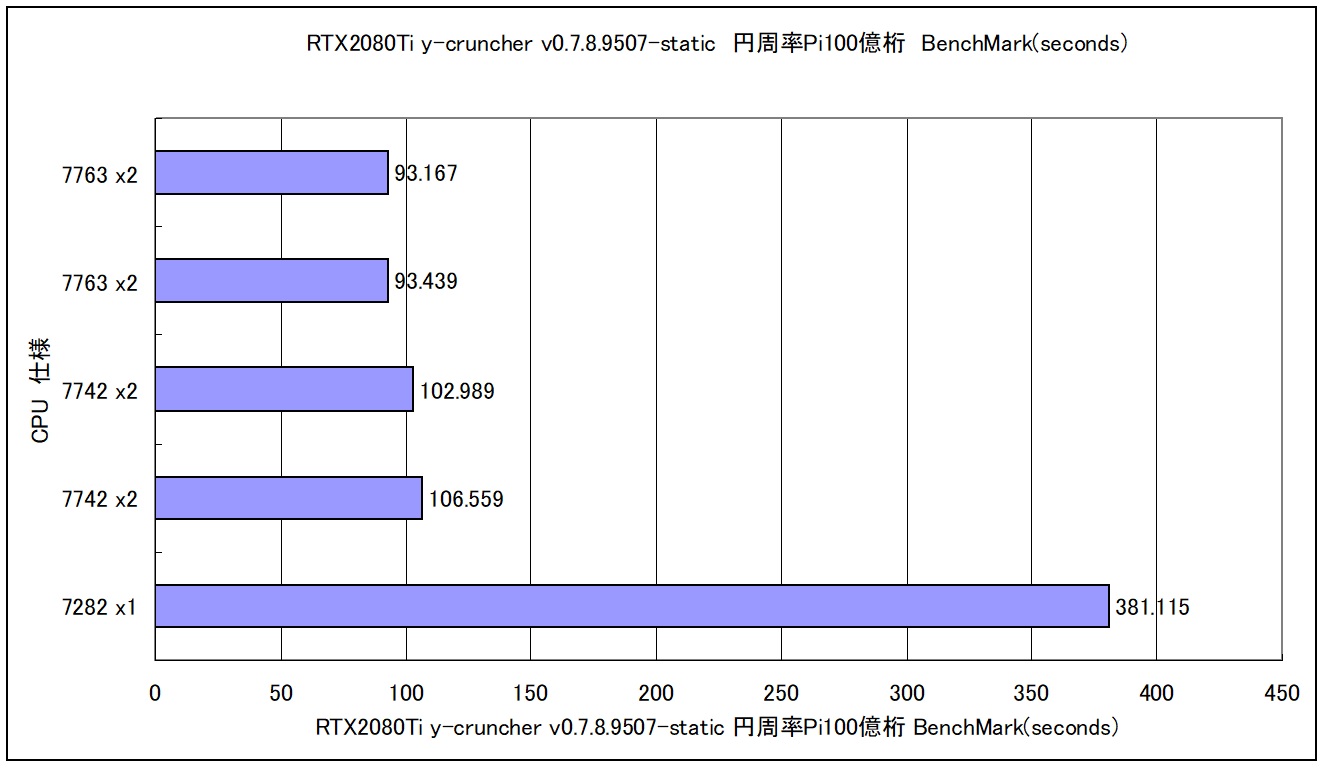
第3世代 AMD EPYC 7763 64-Core Processor x2 Scockets 256GB Red Hat Enterprise Linux release 9.0で円周率 Pi 100億桁のBenchmarkをCPUを替えて動作させてみた 93.167 seconds

← day/ns 数値が小さいほうが高性能 EPYC 7763 2.45MHZ 64-Core EPYC 7742 2.25MHZ 64-Core EPYC 7282 2.8MHZ 16-Core 
円周率Piの100億桁でのBenchmark

AMD EPYC 7763 64-Core Processor x2 Scockets Red Hat Enterprise Linux release 9.0 93.167 seconds データ詳細
AMD EPYC 7763 64-Core Processor x2 256G Red Hat Enterprise Linux release 9.0 RTX2080Ti y-cruncher v0.7.8.9507-static CUDA 11.7 Pi 93.167 seconds ( 1.553 minutes ) 10,000,000,000

カテゴリー: 2 Sockets, nvidia, rhel9 | コメントする

Red Hat Enterprise Linux release 9.0 Kernel5.14.0-70.22.1.el9_0.x86_64 PHP 8.1.9 Update

Red Hat Enterprise Linux release 9.0 Kernel5.14.0-70.22.1.el9_0.x86_64とPHP 8.1.9がUpdateされました。

[root@rhel9 ~]# uname -r
5.14.0-70.22.1.el9_0.x86_64
[root@rhel9 ~]# php -v
PHP 8.1.9 (cli) (built: Aug 2 2022 13:02:24) (NTS gcc x86_64)
Copyright (c) The PHP Group
Zend Engine v4.1.9, Copyright (c) Zend Technologies
with Zend OPcache v8.1.9, Copyright (c), by Zend Technologies
[root@rhel9 ~]# curl -V
curl 7.76.1 (x86_64-redhat-linux-gnu) libcurl/7.76.1 OpenSSL/3.0.1 zlib/1.2.11 brotli/1.0.9 libidn2/2.3.0 libpsl/0.21.1 (+libidn2/2.3.0) libssh/0.9.6/openssl/zlib nghttp2/1.43.0
Release-Date: 2021-04-14
Protocols: dict file ftp ftps gopher gophers http https imap imaps ldap ldaps mqtt pop3 pop3s rtsp scp sftp smb smbs smtp smtps telnet tftp
Features: alt-svc AsynchDNS brotli GSS-API HTTP2 HTTPS-proxy IDN IPv6 Kerberos Largefile libz NTLM NTLM_WB PSL SPNEGO SSL TLS-SRP UnixSockets
[root@rhel9 ~]# smbd -V
Version 4.15.5
[root@rhel9 ~]# cat /etc/redhat-release
Red Hat Enterprise Linux release 9.0 (Plow)
[root@rhel9 ~]#

カテゴリー: rhel9 | コメントする

Fedora release 38 Kernel6.0.0-0.rc4.31.fc38.x86_64 Update

Fedora release 38 Kernelが6.0.0-0.rc4.31.fc38.x86_64にUpdateされました。

[root@f38 ~]# uname -r
6.0.0-0.rc4.31.fc38.x86_64
[root@f38 ~]# php -v
PHP 8.1.10RC1 (cli) (built: Aug 16 2022 15:52:06) (NTS gcc x86_64)
Copyright (c) The PHP Group
Zend Engine v4.1.10RC1, Copyright (c) Zend Technologies
with Zend OPcache v8.1.10RC1, Copyright (c), by Zend Technologies
[root@f38 ~]# curl -V
curl 7.85.0 (x86_64-redhat-linux-gnu) libcurl/7.85.0 OpenSSL/3.0.5 zlib/1.2.12 brotli/1.0.9 libidn2/2.3.3 libpsl/0.21.1 (+libidn2/2.3.3) libssh/0.9.6/openssl/zlib nghttp2/1.49.0
Release-Date: 2022-08-31
Protocols: dict file ftp ftps gopher gophers http https imap imaps ldap ldaps mqtt pop3 pop3s rtsp scp sftp smb smbs smtp smtps telnet tftp
Features: alt-svc AsynchDNS brotli GSS-API HSTS HTTP2 HTTPS-proxy IDN IPv6 Kerberos Largefile libz NTLM NTLM_WB PSL SPNEGO SSL threadsafe TLS-SRP UnixSockets
[root@f38 ~]# samba -V
Version 4.17.0rc3
[root@f38 ~]# cat /etc/redhat-release
Fedora release 38 (Rawhide)
[root@f38 ~]#

カテゴリー: fedora | コメントする