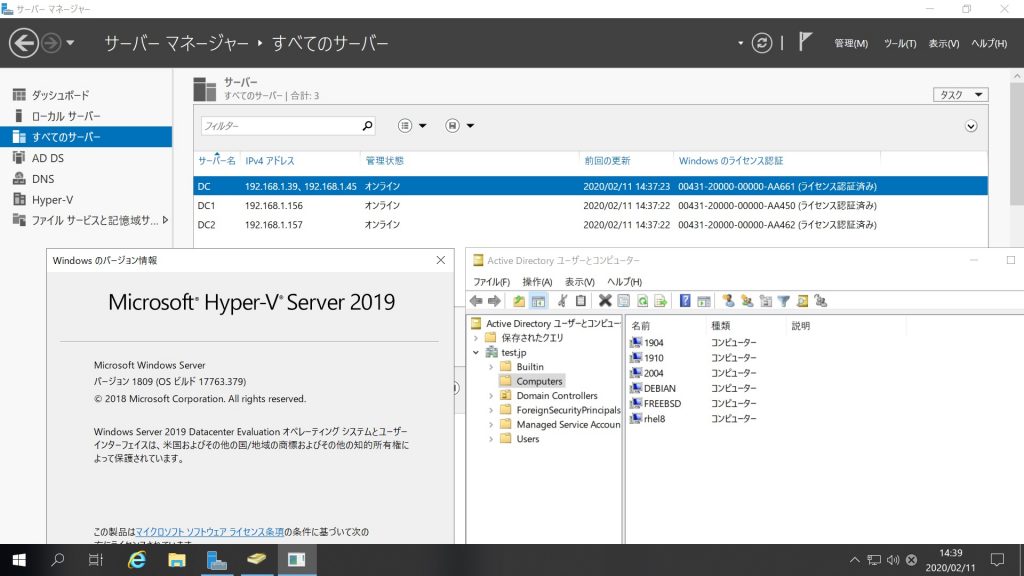
Debian10.3 Samba4.9.5 Windows Server 2019 Datacenter Active Directory Domainのメンバー に参加してみた

root@debian:~# cat /etc/os-release
PRETTY_NAME=”Debian GNU/Linux 10 (buster)”
NAME=”Debian GNU/Linux”
VERSION_ID=”10″
VERSION=”10 (buster)”
VERSION_CODENAME=buster
ID=debian
HOME_URL=”https://www.debian.org/”
SUPPORT_URL=”https://www.debian.org/support”
BUG_REPORT_URL=”https://bugs.debian.org/”
root@debian:~# cat /etc/debian_version
10.3
root@debian:~# kinit administrator
Password for administrator@TEST.JP:
root@debian:~# net ads join -U administrator
Enter administrator’s password:
Using short domain name — TEST
Joined ‘DEBIAN’ to dns domain ‘test.jp’
No DNS domain configured for debian. Unable to perform DNS Update.
DNS update failed: NT_STATUS_INVALID_PARAMETER
root@debian:~# systemctl restart winbind
root@debian:~# wbinfo -u
TEST\guest
TEST\administrator
TEST\krbtgt
TEST\chibi
root@debian:~# wbinfo -n chibi
S-1-5-21-1678940183-1404043644-1380363875-1103 SID_USER (1)
root@debian:~# net ads info
LDAP server: 192.168.1.156
LDAP server name: dc1.test.jp
Realm: TEST.JP
Bind Path: dc=TEST,dc=JP
LDAP port: 389
Server time: 火, 11 2月 2020 14:40:20 JST
KDC server: 192.168.1.156
Server time offset: -3
Last machine account password change: 火, 11 2月 2020 14:38:07 JST
root@debian:~# host -4 dc
dc.test.jp has address 192.168.1.39
dc.test.jp has address 192.168.1.45
dc.test.jp has IPv6 address 2400:4052:46e0:b700:f0b6:ef83:7301:d109
dc.test.jp has IPv6 address 2400:4052:46e0:b700:1911:c150:a1a4:ec24
root@debian:~# host -4 dc1
dc1.test.jp has address 192.168.1.156
dc1.test.jp has IPv6 address 2400:4052:46e0:b700:ad7c:4cdc:822b:97d1
root@debian:~# host -4 dc2
dc2.test.jp has address 192.168.1.157
dc2.test.jp has IPv6 address 2400:4052:46e0:b700:98c3:a37e:341c:8589
root@debian:~# host -t SRV _ldap._tcp.test.jp
_ldap._tcp.test.jp has SRV record 0 100 389 dc2.test.jp.
_ldap._tcp.test.jp has SRV record 0 100 389 dc.test.jp.
_ldap._tcp.test.jp has SRV record 0 100 389 dc1.test.jp.
root@debian:~# host -t SRV _kerberos._udp.test.jp
_kerberos._udp.test.jp has SRV record 0 100 88 dc1.test.jp.
_kerberos._udp.test.jp has SRV record 0 100 88 dc2.test.jp.
_kerberos._udp.test.jp has SRV record 0 100 88 dc.test.jp.
root@debian:~# host -t A test.jp
test.jp has address 192.168.1.39
test.jp has address 192.168.1.156
test.jp has address 192.168.1.157
test.jp has address 192.168.1.45
root@debian:~# cat /etc/os-release
PRETTY_NAME=”Debian GNU/Linux 10 (buster)”
NAME=”Debian GNU/Linux”
VERSION_ID=”10″
VERSION=”10 (buster)”
VERSION_CODENAME=buster
ID=debian
HOME_URL=”https://www.debian.org/”
SUPPORT_URL=”https://www.debian.org/support”
BUG_REPORT_URL=”https://bugs.debian.org/”
root@debian:~# cat /etc/debian_version
10.3
root@debian:~# samba -V
Version 4.9.5-Debian
root@debian:~# smbclient -L localhost -U%

Sharename Type Comment
——— —- ——-
netlogon Disk
sysvol Disk
print$ Disk Printer Drivers
IPC$ IPC IPC Service (Samba 4.9.5-Debian)
Reconnecting with SMB1 for workgroup listing.

Server Comment
——— ——-
DC
DC1
DC2
DEBIAN Samba 4.9.5-Debian

Workgroup Master
——— ——-
TEST DEBIAN
WORKGROUP DESKTOP-0NRQL5D
root@debian:~# smbclient //192.168.1.39/netlogon -Uadministrator

Debian10.3 Samba4.9.5 Windows Server 2019 Datacenter Active Directory Domainのメンバー に参加してみた
カテゴリー: debian, samba4, windows | コメントする

Ubuntu18.04.1 TITAN Vx2 CUDA 10.0 Samples nbody benchmarkをGPUx2台合算で動作させてみた倍精度7049.009 GFLOP/s 単精度17130.392 GFLOP/s

chibi@1804:~$ cat /etc/os-release
NAME=”Ubuntu”
VERSION=”18.04.1 LTS (Bionic Beaver)”
ID=ubuntu
ID_LIKE=debian
PRETTY_NAME=”Ubuntu 18.04.1 LTS”
VERSION_ID=”18.04″
HOME_URL=”https://www.ubuntu.com/”
SUPPORT_URL=”https://help.ubuntu.com/”
BUG_REPORT_URL=”https://bugs.launchpad.net/ubuntu/”
PRIVACY_POLICY_URL=”https://www.ubuntu.com/legal/terms-and-policies/privacy-policy”
VERSION_CODENAME=bionic
UBUNTU_CODENAME=bionic
chibi@1804:~$ nvcc -V
nvcc: NVIDIA (R) Cuda compiler driver
Copyright (c) 2005-2018 NVIDIA Corporation
Built on Sat_Aug_25_21:08:01_CDT_2018
Cuda compilation tools, release 10.0, V10.0.130
chibi@1804:~$ sudo hddtemp /dev/sda
[sudo] chibi のパスワード:
/dev/sda: TS128GSSD370S: 19°C
chibi@1804:~/NVIDIA_CUDA-10.0_Samples/5_Simulations/nbody$ ./nbody -benchmark -fp64 -numbodies=2
56000 -numdevices=2
Run “nbody -benchmark [-numbodies=<numBodies>]” to measure performance.
-fullscreen (run n-body simulation in fullscreen mode)
-fp64 (use double precision floating point values for simulation)
-hostmem (stores simulation data in host memory)
-benchmark (run benchmark to measure performance)
-numbodies=<N> (number of bodies (>= 1) to run in simulation)
-device=<d> (where d=0,1,2…. for the CUDA device to use)
-numdevices=<i> (where i=(number of CUDA devices > 0) to use for simulation)
-compare (compares simulation results running once on the default GPU and once on the CPU)
-cpu (run n-body simulation on the CPU)
-tipsy=<file.bin> (load a tipsy model file for simulation)

NOTE: The CUDA Samples are not meant for performance measurements. Results may vary when GPU Boost is enabled.

number of CUDA devices = 2
> Windowed mode
> Simulation data stored in system memory
> Double precision floating point simulation
> 2 Devices used for simulation
GPU Device 0: “TITAN V” with compute capability 7.0

> Compute 7.0 CUDA device: [TITAN V]
number of bodies = 256000
256000 bodies, total time for 10 iterations: 2789.158 ms
= 234.967 billion interactions per second
= 7049.009 double-precision GFLOP/s at 30 flops per interaction
chibi@1804:~/NVIDIA_CUDA-10.0_Samples/5_Simulations/nbody$ ./nbody -benchmark -numbodies=256000 -numdevices=2
Run “nbody -benchmark [-numbodies=<numBodies>]” to measure performance.
-fullscreen (run n-body simulation in fullscreen mode)
-fp64 (use double precision floating point values for simulation)
-hostmem (stores simulation data in host memory)
-benchmark (run benchmark to measure performance)
-numbodies=<N> (number of bodies (>= 1) to run in simulation)
-device=<d> (where d=0,1,2…. for the CUDA device to use)
-numdevices=<i> (where i=(number of CUDA devices > 0) to use for simulation)
-compare (compares simulation results running once on the default GPU and once on the CPU)
-cpu (run n-body simulation on the CPU)
-tipsy=<file.bin> (load a tipsy model file for simulation)

NOTE: The CUDA Samples are not meant for performance measurements. Results may vary when GPU Boost is enabled.

number of CUDA devices = 2
> Windowed mode
> Simulation data stored in system memory
> Single precision floating point simulation
> 2 Devices used for simulation
GPU Device 0: “TITAN V” with compute capability 7.0

> Compute 7.0 CUDA device: [TITAN V]
number of bodies = 256000
256000 bodies, total time for 10 iterations: 765.143 ms
= 856.520 billion interactions per second
= 17130.392 single-precision GFLOP/s at 20 flops per interaction

データ詳細 Ubuntu18.04.1 TITAN Vx2 CUDA 10.0 Samples nbody benchmark 倍精度7049.009 GFLOP s 単精度17130.392 GFLOP s

GPU温度推移 Ubuntu18.04.1 TITAN Vx2 CUDA 10.0 Samples nbody benchmark 倍精度7049.009 GFLOP s 単精度17130.392 GFLOP s nvidia-smi sensors

カテゴリー: nvidia, ubuntu | コメントする

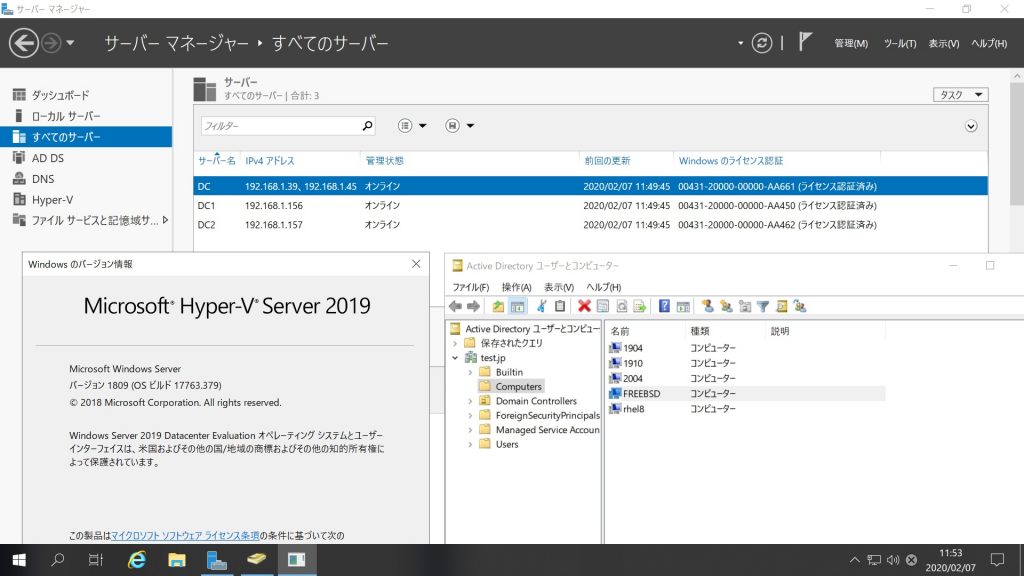
FreeBSD 13.0-CURRENT #0 r357606 Samba4.10.3 Windows Server 2019 Datacenter Active Directory Domainのメンバーに参加してみた

root@freebsd:~ # uname -a
FreeBSD freebsd 13.0-CURRENT FreeBSD 13.0-CURRENT #0 r357606: Thu Feb 6 04:40:35 UTC 2020 root@releng1.nyi.freebsd.org:/usr/obj/usr/src/amd64.amd64/sys/GENERIC amd64
root@freebsd:~ # samba -V
Version 4.10.13
root@freebsd:~ # kinit administrator
administrator@TEST.JP’s Password:
root@freebsd:~ # net ads join -U administrator
Enter administrator’s password:
Using short domain name — TEST
Joined ‘FREEBSD’ to dns domain ‘test.jp’
No DNS domain configured for freebsd. Unable to perform DNS Update.
DNS update failed: NT_STATUS_INVALID_PARAMETER
root@freebsd:~ # service samba_server start
Performing sanity check on Samba configuration: OK
Starting nmbd.
Starting smbd.
Starting winbindd.
root@freebsd:~ # wbinfo -u
TEST\guest
TEST\administrator
TEST\krbtgt
TEST\chibi
root@freebsd:~ # wbinfo -n chibi
S-1-5-21-1678940183-1404043644-1380363875-1103 SID_USER (1)
root@freebsd:~ # net ads info
LDAP server: 192.168.1.157
LDAP server name: dc2.test.jp
Realm: TEST.JP
Bind Path: dc=TEST,dc=JP
LDAP port: 389
Server time: Fri, 07 Feb 2020 11:47:02 JST
KDC server: 192.168.1.157
Server time offset: -4
Last machine account password change: Fri, 07 Feb 2020 11:45:41 JST
root@freebsd:~ # smbclient -L localhost -U%

Sharename Type Comment
——— —- ——-
netlogon Disk
sysvol Disk
IPC$ IPC IPC Service (Samba 4.10.13)
Reconnecting with SMB1 for workgroup listing.

Server Comment
——— ——-
DC
DC1
DC2
FREEBSD Samba 4.10.13

Workgroup Master
——— ——-
TEST FREEBSD
WORKGROUP DESKTOP-0NRQL5D
root@freebsd:~ # smbclient //192.168.1.39/netlogon -U administrator

FreeBSD 13.0-CURRENT #0 r357606 Samba4.10.3 Windows Server 2019 Datacenter Active Directory Domainのメンバーに参加してみた


カテゴリー: freebsd, samba4, windows | コメントする

OpenSUSE Kernel5.5.1-1-default Update

OpenSUSE Kernelが5.5.1-1-defaultにUpdateされました。

opensuse:~ # uname -r
5.5.1-1-default
opensuse:~ # php -v
PHP 7.4.2 (cli) ( NTS )
Copyright (c) The PHP Group
Zend Engine v3.4.0, Copyright (c) Zend Technologies
opensuse:~ # curl -V
curl 7.68.0 (x86_64-suse-linux-gnu) libcurl/7.68.0 OpenSSL/1.1.1d-fips zlib/1.2.11 libidn2/2.3.0 libpsl/0.21.0 (+libidn2/2.3.0) libssh/0.9.3/openssl/zlib nghttp2/1.40.0
Release-Date: 2020-01-08
Protocols: dict file ftp ftps gopher http https imap imaps ldap ldaps pop3 pop3s rtsp scp sftp smb smbs smtp smtps telnet tftp
Features: AsynchDNS GSS-API HTTP2 HTTPS-proxy IDN IPv6 Kerberos Largefile libz Metalink NTLM NTLM_WB PSL SPNEGO SSL TLS-SRP UnixSockets
opensuse:~ # samba -V
Version 4.11.5-git.114.5685848b8fcSUSE-oS15.5-x86_64
opensuse:~ # cat /etc/os-release
NAME=”openSUSE Tumbleweed”
#VERSION=”20200207″
ID=”opensuse-tumbleweed”
ID_LIKE=”opensuse suse”
VERSION_ID=”20200207″
PRETTY_NAME=”openSUSE Tumbleweed”
ANSI_COLOR=”0;32″
CPE_NAME=”cpe:/o:opensuse:tumbleweed:20200207″
BUG_REPORT_URL=“https://bugs.opensuse.org”
HOME_URL=“https://www.opensuse.org/”
LOGO=”distributor-logo”
opensuse:~ #

カテゴリー: opensuse | コメントする

Debian10.3 Kernel4.19.98-1 Update

Debian10.3 Kernelが4.19.98-1にUpdateされました。

root@debian:~# uname -r
4.19.0-8-amd64
root@debian:~# uname -a
Linux debian 4.19.0-8-amd64 #1 SMP Debian 4.19.98-1 (2020-01-26) x86_64 GNU/Linux
root@debian:~# php -v
PHP 7.4.2 (cli) (built: Feb  2 2020 07:53:49) ( NTS )
Copyright (c) The PHP Group
Zend Engine v3.4.0, Copyright (c) Zend Technologies
with Zend OPcache v7.4.2, Copyright (c), by Zend Technologies
root@debian:~# curl -V
curl 7.64.0 (x86_64-pc-linux-gnu) libcurl/7.64.0 OpenSSL/1.1.1d zlib/1.2.11 libidn2/2.2.0 libpsl/0.20.2 (+libidn2/2.0.5) libssh2/1.8.0 nghttp2/1.36.0 librtmp/2.3
Release-Date: 2019-02-06
Protocols: dict file ftp ftps gopher http https imap imaps ldap ldaps pop3 pop3s rtmp rtsp scp sftp smb smbs smtp smtps telnet tftp
Features: AsynchDNS IDN IPv6 Largefile GSS-API Kerberos SPNEGO NTLM NTLM_WB SSL libz TLS-SRP HTTP2 UnixSockets HTTPS-proxy PSL
root@debian:~# samba -V
Version 4.9.5-Debian
root@debian:~# cat /etc/os-release
PRETTY_NAME=”Debian GNU/Linux 10 (buster)”
NAME=”Debian GNU/Linux”
VERSION_ID=”10″
VERSION=”10 (buster)”
VERSION_CODENAME=buster
ID=debian
HOME_URL=“https://www.debian.org/”
SUPPORT_URL=“https://www.debian.org/support”
BUG_REPORT_URL=“https://bugs.debian.org/”
root@debian:~# cat /etc/debian_version
10.3
root@debian:~#

カテゴリー: debian | コメントする