
AMD 2990wx FreeBSD 12.0-RELEASE r34166 をinstallして11ac 5GHZ 無線LANを設定してみた

root@freebsd:~ # uname -a
FreeBSD freebsd 12.0-RELEASE FreeBSD 12.0-RELEASE r341666 GENERIC amd64
root@freebsd:~ # php -v
PHP 7.2.10 (cli) (built: Dec 8 2018 01:30:43) ( NTS )
Copyright (c) 1997-2018 The PHP Group
Zend Engine v3.2.0, Copyright (c) 1998-2018 Zend Technologies
root@freebsd:~ # samba -V
Version 4.7.10
root@freebsd:~ # curl -V
curl 7.62.0 (amd64-portbld-freebsd12.0) libcurl/7.62.0 OpenSSL/1.1.1a zlib/1.2.11 nghttp2/1.33.0
Release-Date: 2018-10-31
Protocols: dict file ftp ftps gopher http https imap imaps pop3 pop3s rtsp smtp smtps telnet tftp
Features: AsynchDNS IPv6 Largefile GSS-API Kerberos SPNEGO NTLM NTLM_WB SSL libz TLS-SRP HTTP2 UnixSockets HTTPS-proxy
root@freebsd:~ # ifconfig wlan0
wlan0: flags=8843<UP,BROADCAST,RUNNING,SIMPLEX,MULTICAST> metric 0 mtu 1500
ether c0:b6:f9:ef:8a:c6
inet 192.168.1.103 netmask 0xffffff00 broadcast 192.168.1.255
groups: wlan
ssid Planex_5-E5DE07 channel 44 (5220 MHz 11a) bssid 00:22:cf:e5:de:0a
regdomain JAPAN country J5 authmode WPA2/802.11i privacy ON
deftxkey UNDEF AES-CCM 2:128-bit txpower 23 bmiss 10 mcastrate 6
mgmtrate 6 scanvalid 60 wme roaming MANUAL
media: IEEE 802.11 Wireless Ethernet OFDM/54Mbps mode 11a
status: associated
nd6 options=29<PERFORMNUD,IFDISABLED,AUTO_LINKLOCAL>
root@freebsd:~ # kldload amdtemp

AMD 2990wx FreeBSD 12.0-RELEASE r34166 をinstallして11ac 5GHZ 無線LANを設定してみた
カテゴリー: 11ac無線LAN, freebsd | コメントする

AMD 2990wx Ubuntu18.04.2 RTX 2080Ti x2 NVLink2slot CUDA 10.1 でsimpleP2P p2pBandwidthLatencyTest deviceQuery bandwidthTestを動作させてみた

chibi@1804:~$ cat /etc/os-release
NAME=”Ubuntu”
VERSION=”18.04.2 LTS (Bionic Beaver)”
ID=ubuntu
ID_LIKE=debian
PRETTY_NAME=”Ubuntu 18.04.2 LTS”
VERSION_ID=”18.04″
HOME_URL=”https://www.ubuntu.com/”
SUPPORT_URL=”https://help.ubuntu.com/”
BUG_REPORT_URL=”https://bugs.launchpad.net/ubuntu/”
PRIVACY_POLICY_URL=”https://www.ubuntu.com/legal/terms-and-policies/privacy-policy”
VERSION_CODENAME=bionic
UBUNTU_CODENAME=bionic
chibi@1804:~$ nvcc -V
nvcc: NVIDIA (R) Cuda compiler driver
Copyright (c) 2005-2019 NVIDIA Corporation
Built on Fri_Feb__8_19:08:17_PST_2019
Cuda compilation tools, release 10.1, V10.1.105
chibi@1804:~/NVIDIA_CUDA-10.1_Samples/1_Utilities/p2pBandwidthLatencyTest$ ./p2pBandwidthLatencyTest
[P2P (Peer-to-Peer) GPU Bandwidth Latency Test]
Device: 0, GeForce RTX 2080 Ti, pciBusID: 42, pciDeviceID: 0, pciDomainID:0
Device: 1, GeForce RTX 2080 Ti, pciBusID: 43, pciDeviceID: 0, pciDomainID:0
Device=0 CAN Access Peer Device=1
Device=1 CAN Access Peer Device=0

***NOTE: In case a device doesn’t have P2P access to other one, it falls back to normal memcopy procedure.
So you can see lesser Bandwidth (GB/s) and unstable Latency (us) in those cases.

P2P Connectivity Matrix
D\D 0 1
0 1 1
1 1 1
Unidirectional P2P=Disabled Bandwidth Matrix (GB/s)
D\D 0 1
0 528.52 4.18
1 4.17 527.72
Unidirectional P2P=Enabled Bandwidth (P2P Writes) Matrix (GB/s)
D\D 0 1
0 530.67 47.00
1 46.94 507.31
Bidirectional P2P=Disabled Bandwidth Matrix (GB/s)
D\D 0 1
0 534.45 7.72
1 7.78 532.24
Bidirectional P2P=Enabled Bandwidth Matrix (GB/s)
D\D 0 1
0 524.11 93.71
1 93.79 528.95
P2P=Disabled Latency Matrix (us)
GPU 0 1
0 1.31 16.16
1 21.55 1.66

CPU 0 1
0 3.77 9.87
1 9.87 3.73
P2P=Enabled Latency (P2P Writes) Matrix (us)
GPU 0 1
0 1.32 1.59
1 1.87 1.66

CPU 0 1
0 3.72 2.89
1 2.89 3.70

NOTE: The CUDA Samples are not meant for performance measurements. Results may vary when GPU Boost is enabled.
chibi@1804:~/NVIDIA_CUDA-10.1_Samples/1_Utilities/p2pBandwidthLatencyTest$

2990wx Ubuntu18.04.2 RTX 2080Ti x2 NVLink2slot CUDA 10.1 simpleP2P p2pBandwidthLatencyTest deviceQuery bandwidthTest

カテゴリー: nvidia, ubuntu | コメントする

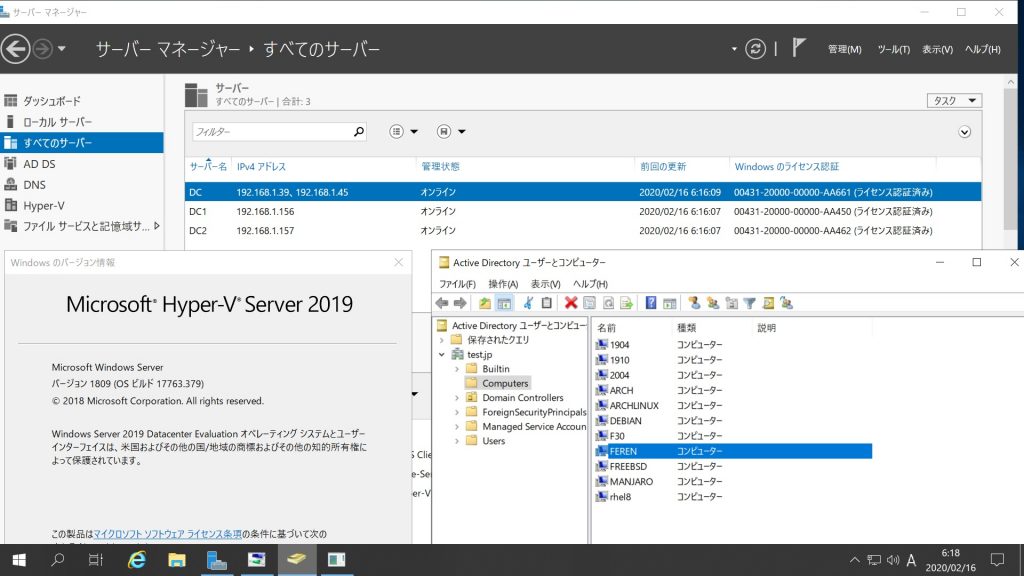
Feren OS Classic Samba4.7.6 Windows Server 2019 Datacenter Active Directory Domain のメンバーに参加してみた

root@feren:~# cat /etc/os-release
NAME=”Feren OS Classic”
VERSION=”2020.01″
ID=ubuntu
ID_LIKE=debian
PRETTY_NAME=”Feren OS Classic”
VERSION_ID=”18.04″
HOME_URL=”https://ferenos.weebly.com/”
SUPPORT_URL=”https://ferenos.weebly.com/feren-os-on-social-media.html”
BUG_REPORT_URL=”https://github.com/feren-OS/Bug-Reporting-Center/issues/new”
PRIVACY_POLICY_URL=”https://ferenos.weebly.com/privacy-policy.html”
VERSION_CODENAME=bionic
FEREN_CODENAME=zinc
root@feren:~# samba -V
Version 4.7.6-Ubuntu
root@feren:~# kinit administrator
Password for administrator@TEST.JP:
root@feren:~# net ads join -U administrator
Enter administrator’s password:
Using short domain name — TEST
Joined ‘FEREN’ to dns domain ‘test.jp’
kerberos_kinit_password FEREN$@TEST.JP failed: Client not found in Kerberos database
DNS update failed: kinit failed: Client not found in Kerberos database
root@feren:~# systemctl restart winbind
root@feren:~# wbinfo -u
TEST\guest
TEST\administrator
TEST\krbtgt
TEST\chibi
root@feren:~# wbinfo -n chibi
S-1-5-21-1678940183-1404043644-1380363875-1103 SID_USER (1)
root@feren:~# net ads info
LDAP server: 192.168.1.157
LDAP server name: dc2.test.jp
Realm: TEST.JP
Bind Path: dc=TEST,dc=JP
LDAP port: 389
Server time: 日, 16 2月 2020 06:17:38 JST
KDC server: 192.168.1.157
Server time offset: -6
Last machine account password change: 日, 16 2月 2020 06:16:59 JST
root@feren:~# host -4 dc
dc.test.jp has address 192.168.1.39
dc.test.jp has address 192.168.1.45
dc.test.jp has IPv6 address 2400:4052:46e0:b700:1911:c150:a1a4:ec24
dc.test.jp has IPv6 address 2400:4052:46e0:b700:f0b6:ef83:7301:d109
root@feren:~# host -4 dc1
dc1.test.jp has address 192.168.1.156
dc1.test.jp has IPv6 address 2400:4052:46e0:b700:ad7c:4cdc:822b:97d1
root@feren:~# host -4 dc2
dc2.test.jp has address 192.168.1.157
dc2.test.jp has IPv6 address 2400:4052:46e0:b700:98c3:a37e:341c:8589
root@feren:~# host -t SRV _ldap._tcp.test.jp
_ldap._tcp.test.jp has SRV record 0 100 389 dc2.test.jp.
_ldap._tcp.test.jp has SRV record 0 100 389 dc.test.jp.
_ldap._tcp.test.jp has SRV record 0 100 389 dc1.test.jp.
root@feren:~# host -t SRV _kerberos._udp.test.jp
_kerberos._udp.test.jp has SRV record 0 100 88 dc.test.jp.
_kerberos._udp.test.jp has SRV record 0 100 88 dc1.test.jp.
_kerberos._udp.test.jp has SRV record 0 100 88 dc2.test.jp.
root@feren:~# host -t A test.jp
test.jp has address 192.168.1.39
test.jp has address 192.168.1.45
test.jp has address 192.168.1.156
test.jp has address 192.168.1.157
root@feren:~# root@feren:~# smbclient -L localhost -U%

Sharename Type Comment
——— —- ——-
netlogon Disk
sysvol Disk
print$ Disk Printer Drivers
IPC$ IPC IPC Service (Samba 4.7.6-Ubuntu)
Reconnecting with SMB1 for workgroup listing.

Server Comment
——— ——-

Workgroup Master
——— ——-
TEST FEREN
root@feren:~# smbclient //192.168.1.39/netlogon -Uadministrator

Feren OS Classic Samba4.7.6 Windows Server 2019 Datacenter Active Directory Domain のメンバーに参加してみた

カテゴリー: FerenOS, samba4, windows | コメントする

Fedora release 31 Kernel5.4.18-200.fc31.x86_64 Update

Fedora release 31 Kernelが5.4.18-200.fc31.x86_64にUpdateされました。

[root@f31 ~]# uname -r
5.4.18-200.fc31.x86_64
[root@f31 ~]# php -v
PHP 7.4.2 (cli) (built: Jan 21 2020 11:35:20) ( NTS )
Copyright (c) The PHP Group
Zend Engine v3.4.0, Copyright (c) Zend Technologies
[root@f31 ~]# curl -V
curl 7.66.0 (x86_64-redhat-linux-gnu) libcurl/7.66.0 OpenSSL/1.1.1d-fips zlib/1.2.11 brotli/1.0.7 libidn2/2.3.0 libpsl/0.21.0 (+libidn2/2.2.0) libssh/0.9.3/openssl/zlib nghttp2/1.40.0
Release-Date: 2019-09-11
Protocols: dict file ftp ftps gopher http https imap imaps ldap ldaps pop3 pop3s rtsp scp sftp smb smbs smtp smtps telnet tftp
Features: AsynchDNS brotli GSS-API HTTP2 HTTPS-proxy IDN IPv6 Kerberos Largefile libz Metalink NTLM NTLM_WB PSL SPNEGO SSL TLS-SRP UnixSockets
[root@f31 ~]# samba -V
Version 4.11.6
[root@f31 ~]# cat /etc/redhat-release
Fedora release 31 (Thirty One)
[root@f31 ~]#

カテゴリー: fedora | コメントする

Fedora release 30 Kernel5.4.18-100.fc30.x86_64 Update

Fedora release 30 Kernelが5.4.18-100.fc30.x86_64にUpdateされました。

[root@f30 ~]# uname -r
5.4.18-100.fc30.x86_64
[root@f30 ~]# php -v
PHP 7.4.2 (cli) (built: Jan 21 2020 11:35:20) ( NTS )
Copyright (c) The PHP Group
Zend Engine v3.4.0, Copyright (c) Zend Technologies
[root@f30 ~]# curl -V
curl 7.65.3 (x86_64-redhat-linux-gnu) libcurl/7.65.3 OpenSSL/1.1.1d-fips zlib/1.2.11 brotli/1.0.7 libidn2/2.3.0 libpsl/0.20.2 (+libidn2/2.0.5) libssh/0.9.3/openssl/zlib nghttp2/1.39.2
Release-Date: 2019-07-19
Protocols: dict file ftp ftps gopher http https imap imaps ldap ldaps pop3 pop3s rtsp scp sftp smb smbs smtp smtps telnet tftp
Features: AsynchDNS brotli GSS-API HTTP2 HTTPS-proxy IDN IPv6 Kerberos Largefile libz Metalink NTLM NTLM_WB PSL SPNEGO SSL TLS-SRP UnixSockets
[root@f30 ~]# samba -V
Version 4.10.13
[root@f30 ~]# cat /etc/redhat-release
Fedora release 30 (Thirty)
[root@f30 ~]#

カテゴリー: fedora | コメントする