
Ubuntu16.04.5 TITAN Vx2 GTX1080Tix2 GT1030 CUDA9.2 Sample nbody benchmark を動作させてみた23956.714 GFLOP/s

chibi@1604:~/NVIDIA_CUDA-9.2_Samples/5_Simulations/nbody$ ./nbody –benchmark –numbodies=256000 -numdevices=5
Run “nbody -benchmark [-numbodies=<numBodies>]” to measure performance.
-fullscreen (run n-body simulation in fullscreen mode)
-fp64 (use double precision floating point values for simulation)
-hostmem (stores simulation data in host memory)
-benchmark (run benchmark to measure performance)
-numbodies=<N> (number of bodies (>= 1) to run in simulation)
-device=<d> (where d=0,1,2…. for the CUDA device to use)
-numdevices=<i> (where i=(number of CUDA devices > 0) to use for simulation)
-compare (compares simulation results running once on the default GPU and once on the CPU)
-cpu (run n-body simulation on the CPU)
-tipsy=<file.bin> (load a tipsy model file for simulation)

NOTE: The CUDA Samples are not meant for performance measurements. Results may vary when GPU Boost is enabled.

number of CUDA devices = 5
> Windowed mode
> Simulation data stored in system memory
> Single precision floating point simulation
> 5 Devices used for simulation
GPU Device 0: “TITAN V” with compute capability 7.0

> Compute 7.0 CUDA device: [TITAN V]
> Compute 6.1 CUDA device: [GeForce GTX 1080 Ti]
> Compute 6.1 CUDA device: [GeForce GT 1030]
number of bodies = 256000
256000 bodies, total time for 10 iterations: 547.120 ms
= 1197.836 billion interactions per second
= 23956.714 single-precision GFLOP/s at 20 flops per interaction
chibi@1604:~/NVIDIA_CUDA-9.2_Samples/5_Simulations/nbody$ cat /etc/os-release
NAME=”Ubuntu”
VERSION=”16.04.5 LTS (Xenial Xerus)”
ID=ubuntu
ID_LIKE=debian
PRETTY_NAME=”Ubuntu 16.04.5 LTS”
VERSION_ID=”16.04″
HOME_URL=”http://www.ubuntu.com/”
SUPPORT_URL=”http://help.ubuntu.com/”
BUG_REPORT_URL=”http://bugs.launchpad.net/ubuntu/”
VERSION_CODENAME=xenial
UBUNTU_CODENAME=xenial
chibi@1604:~/NVIDIA_CUDA-9.2_Samples/5_Simulations/nbody$ nvcc -V
nvcc: NVIDIA (R) Cuda compiler driver
Copyright (c) 2005-2018 NVIDIA Corporation
Built on Tue_Jun_12_23:07:04_CDT_2018
Cuda compilation tools, release 9.2, V9.2.148
chibi@1604:~/NVIDIA_CUDA-9.2_Samples/5_Simulations/nbody$ sudo hddtemp /dev/sda
/dev/sda: SATA SSD: 30°C
chibi@1604:~/NVIDIA_CUDA-9.2_Samples/5_Simulations/nbody$Ubuntu16.04.5 TITAN Vx2 GTX1080Tix2 GT1030 CUDA9.2 Sample nbody benchmark 23956.714 GFLOPs nvidia-smi sensors
カテゴリー: centos7, nvidia | コメントする

Kernel 5.7-rc4が公開

Kernel 5.7-rc4が公開されました。ReleaseNoteはこちらです。関連記事はこちらです。

カテゴリー: Linux | コメントする

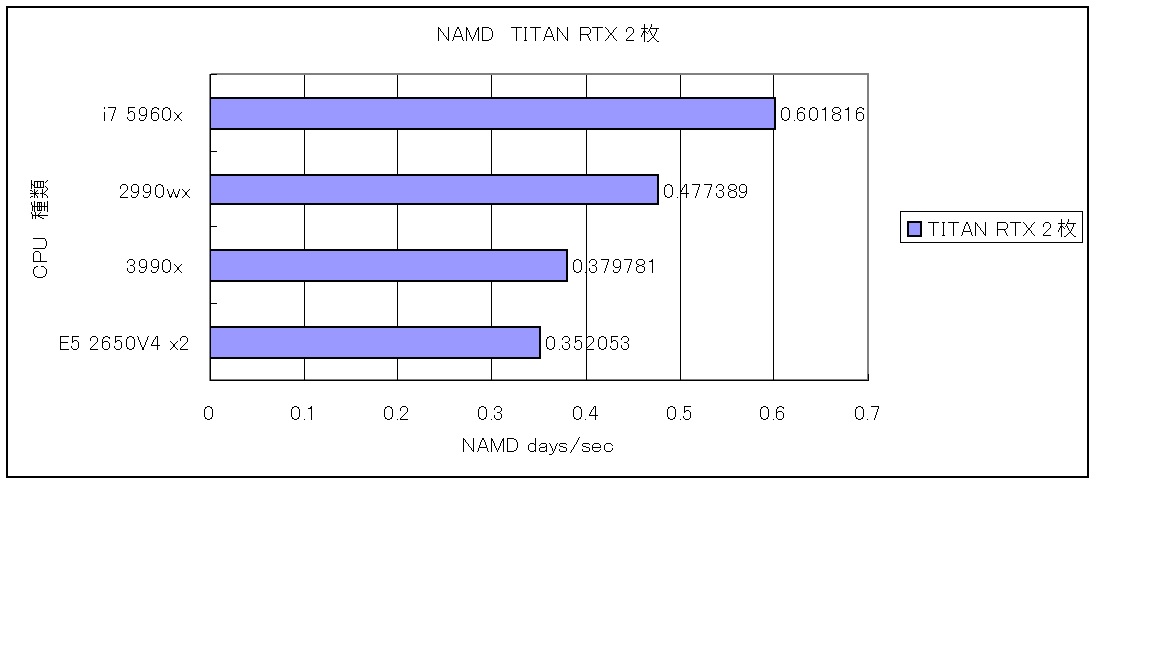
CPU毎のNAMD 2.12 stmv 1,066,628 atomsをベンチマークしてみた

参考サイト

[chibi@rhel8 ~]$ cat /etc/redhat-release
Red Hat Enterprise Linux release 8.2 Beta (Ootpa)
[chibi@rhel8 ~]$ nvcc -V
nvcc: NVIDIA (R) Cuda compiler driver
Copyright (c) 2005-2019 NVIDIA Corporation
Built on Wed_Oct_23_19:24:38_PDT_2019
Cuda compilation tools, release 10.2, V10.2.89
[chibi@rhel8 ~]$ sudo nvidia-docker run -it –rm nvcr.io/hpc/namd:2.12-171025 /opt/namd/namd-multicore-memopt +p40 +setcpuaffinity +idlepoll /workspace/examples/stmv/stmv_pmecuda.namd
[sudo] chibi のパスワード:
Charm++: standalone mode (not using charmrun)
Charm++> Running in Multicore mode: 40 threads
Charm++> Using recursive bisection (scheme 3) for topology aware partitions
Converse/Charm++ Commit ID: v6.8.2
Warning> Randomization of virtual memory (ASLR) is turned on in the kernel, thread migration may not work! Run ‘echo 0 > /proc/sys/kernel/randomize_va_space’ as root to disable it, or try running with ‘+isomalloc_sync’.
CharmLB> Load balancer assumes all CPUs are same.
Charm++> cpu affinity enabled.
Charm++> Running on 1 unique compute nodes (48-way SMP).
Charm++> cpu topology info is gathered in 0.002 seconds.
Info: Built with CUDA version 9000
Did not find +devices i,j,k,… argument, using all
Pe 23 physical rank 23 will use CUDA device of pe 32
Pe 22 physical rank 22 will use CUDA device of pe 32
Pe 15 physical rank 15 will use CUDA device of pe 16
Pe 39 physical rank 39 will use CUDA device of pe 32
Pe 13 physical rank 13 will use CUDA device of pe 16
Pe 14 physical rank 14 will use CUDA device of pe 16
Pe 38 physical rank 38 will use CUDA device of pe 32
Pe 36 physical rank 36 will use CUDA device of pe 32
Pe 12 physical rank 12 will use CUDA device of pe 16
Pe 37 physical rank 37 will use CUDA device of pe 32
Pe 10 physical rank 10 will use CUDA device of pe 16
Pe 4 physical rank 4 will use CUDA device of pe 16
Pe 28 physical rank 28 will use CUDA device of pe 32
Pe 34 physical rank 34 will use CUDA device of pe 32
Pe 5 physical rank 5 will use CUDA device of pe 16
Pe 29 physical rank 29 will use CUDA device of pe 32
Pe 3 physical rank 3 will use CUDA device of pe 16
Pe 27 physical rank 27 will use CUDA device of pe 32
Pe 24 physical rank 24 will use CUDA device of pe 32
Pe 0 physical rank 0 will use CUDA device of pe 16
Pe 17 physical rank 17 will use CUDA device of pe 16
Pe 21 physical rank 21 will use CUDA device of pe 32
Pe 19 physical rank 19 will use CUDA device of pe 16
Pe 35 physical rank 35 will use CUDA device of pe 32
Pe 11 physical rank 11 will use CUDA device of pe 16
Pe 8 physical rank 8 will use CUDA device of pe 16
Pe 7 physical rank 7 will use CUDA device of pe 16
Pe 31 physical rank 31 will use CUDA device of pe 32
Pe 33 physical rank 33 will use CUDA device of pe 32
Pe 9 physical rank 9 will use CUDA device of pe 16
Pe 2 physical rank 2 will use CUDA device of pe 16
Pe 26 physical rank 26 will use CUDA device of pe 32
Pe 20 physical rank 20 will use CUDA device of pe 32
Pe 18 physical rank 18 will use CUDA device of pe 16
Pe 25 physical rank 25 will use CUDA device of pe 32
Pe 1 physical rank 1 will use CUDA device of pe 16
Pe 30 physical rank 30 will use CUDA device of pe 32
Pe 6 physical rank 6 will use CUDA device of pe 16
Pe 16 physical rank 16 binding to CUDA device 0 on 10a85f94b259: ‘TITAN RTX’ Mem: 24219MB Rev: 7.5
Pe 32 physical rank 32 binding to CUDA device 1 on 10a85f94b259: ‘TITAN RTX’ Mem: 24220MB Rev: 7.5

←days/ns, Less Is Better

カテゴリー: nvidia, rhel8 | コメントする

Fedora release 32 Kernel5.6.2-300.fc32.x86_64 Update

Fedora release 32 Kernelが5.6.2-300.fc32.x86_64にUpdateされました。

[root@f32 ~]# uname -r
5.6.2-300.fc32.x86_64
[root@f32 ~]# php -v
PHP 7.4.4 (cli) (built: Mar 17 2020 10:40:21) ( NTS )
Copyright (c) The PHP Group
Zend Engine v3.4.0, Copyright (c) Zend Technologies
with Zend OPcache v7.4.4, Copyright (c), by Zend Technologies
[root@f32 ~]# curl -V
curl 7.69.1 (x86_64-redhat-linux-gnu) libcurl/7.69.1 OpenSSL/1.1.1d-fips zlib/1.2.11 brotli/1.0.7 libidn2/2.3.0 libpsl/0.21.0 (+libidn2/2.3.0) libssh/0.9.3/openssl/zlib nghttp2/1.40.0
Release-Date: 2020-03-11
Protocols: dict file ftp ftps gopher http https imap imaps ldap ldaps pop3 pop3s rtsp scp sftp smb smbs smtp smtps telnet tftp
Features: AsynchDNS brotli GSS-API HTTP2 HTTPS-proxy IDN IPv6 Kerberos Largefile libz Metalink NTLM NTLM_WB PSL SPNEGO SSL TLS-SRP UnixSockets
[root@f32 ~]# samba -V
Version 4.12.0
[root@f32 ~]# cat /etc/redhat-release
Fedora release 32 (Thirty Two)
[root@f32 ~]#

カテゴリー: fedora | コメントする

Arch Linux Kernel5.6.2-arch1-2 Update

Arch Linux Kernelが5.6.2-arch1-2にUpdateされました。

[root@archlinux ~]# uname -r
5.6.2-arch1-2
[root@archlinux ~]# php -v
PHP 7.4.4 (cli) (built: Mar 18 2020 04:33:54) ( NTS )
Copyright (c) The PHP Group
Zend Engine v3.4.0, Copyright (c) Zend Technologies
[root@archlinux ~]# curl -V
curl 7.69.1 (x86_64-pc-linux-gnu) libcurl/7.69.1 OpenSSL/1.1.1f zlib/1.2.11 libidn2/2.3.0 libpsl/0.21.0 (+libidn2/2.2.0) libssh2/1.9.0 nghttp2/1.40.0
Release-Date: 2020-03-11
Protocols: dict file ftp ftps gopher http https imap imaps pop3 pop3s rtsp scp sftp smb smbs smtp smtps telnet tftp
Features: AsynchDNS GSS-API HTTP2 HTTPS-proxy IDN IPv6 Kerberos Largefile libz NTLM NTLM_WB PSL SPNEGO SSL TLS-SRP UnixSockets
[root@archlinux ~]# samba -V
Version 4.11.3
[root@archlinux ~]# cat /etc/os-release
NAME=”Arch Linux”
PRETTY_NAME=”Arch Linux”
ID=arch
BUILD_ID=rolling
ANSI_COLOR=”0;36″
HOME_URL=“https://www.archlinux.org/”
DOCUMENTATION_URL=“https://wiki.archlinux.org/”
SUPPORT_URL=“https://bbs.archlinux.org/”
BUG_REPORT_URL=“https://bugs.archlinux.org/”
LOGO=archlinux
[root@archlinux ~]#

カテゴリー: archlinux | コメントする